







Question: import java.util.Scanner; public class Histogram { private static final int SENTINAL = 999; private static final int MAX_NUMBERS = 20; private static final double
![accepted as adata // number of bins in range [0..100] // size](https://dsd5zvtm8ll6.cloudfront.net/si.experts.images/questions/2024/01/65ba66609215b_72065ba6660658c7.jpg)
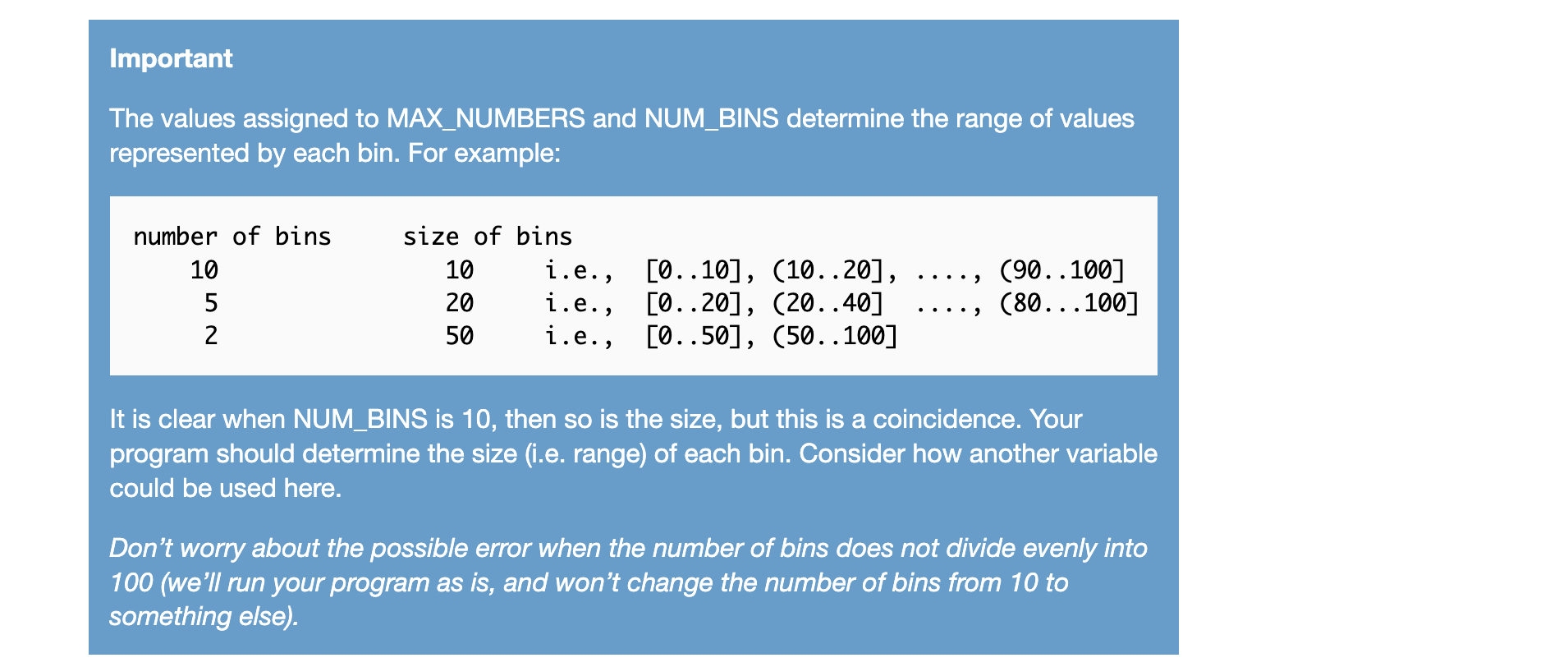
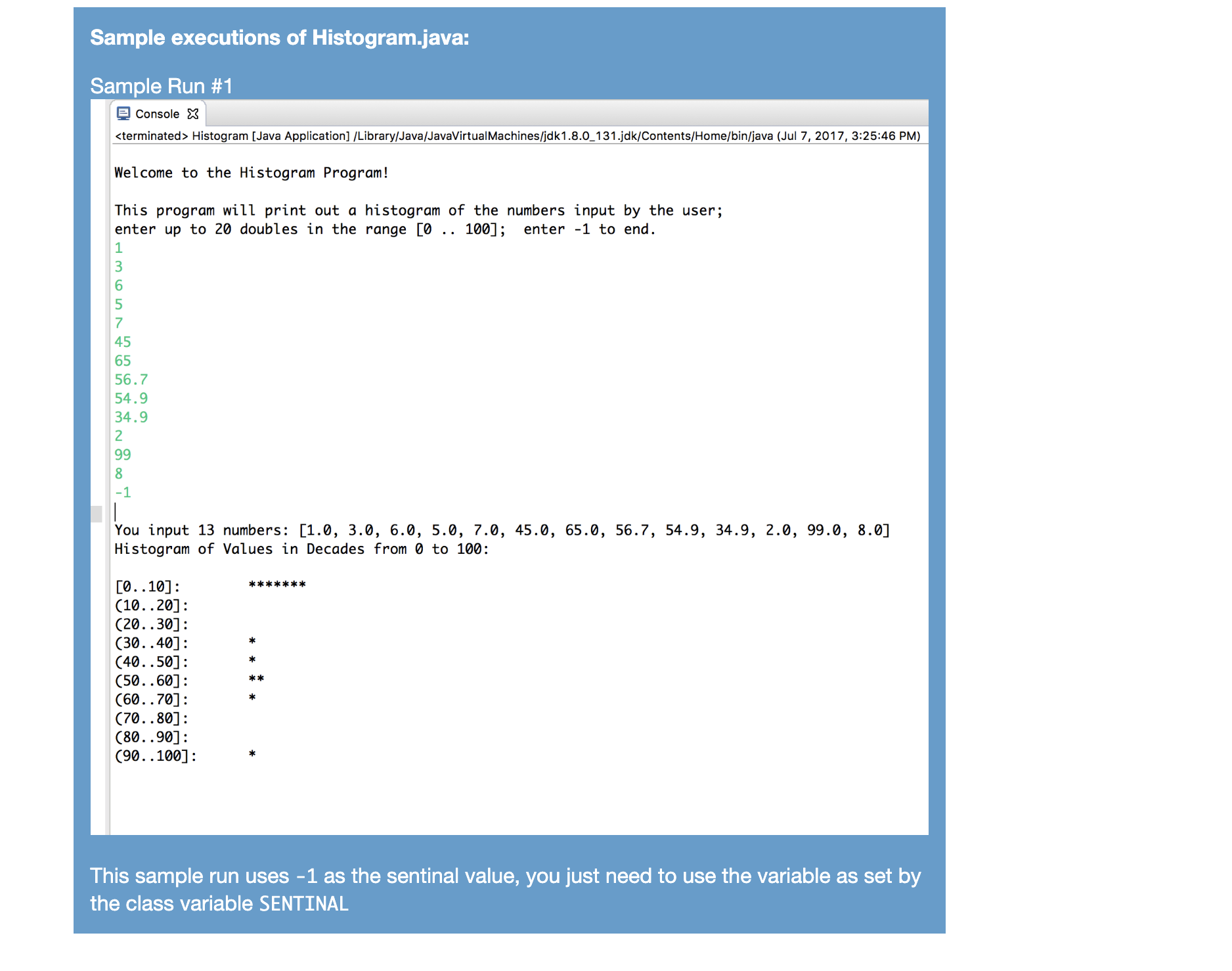
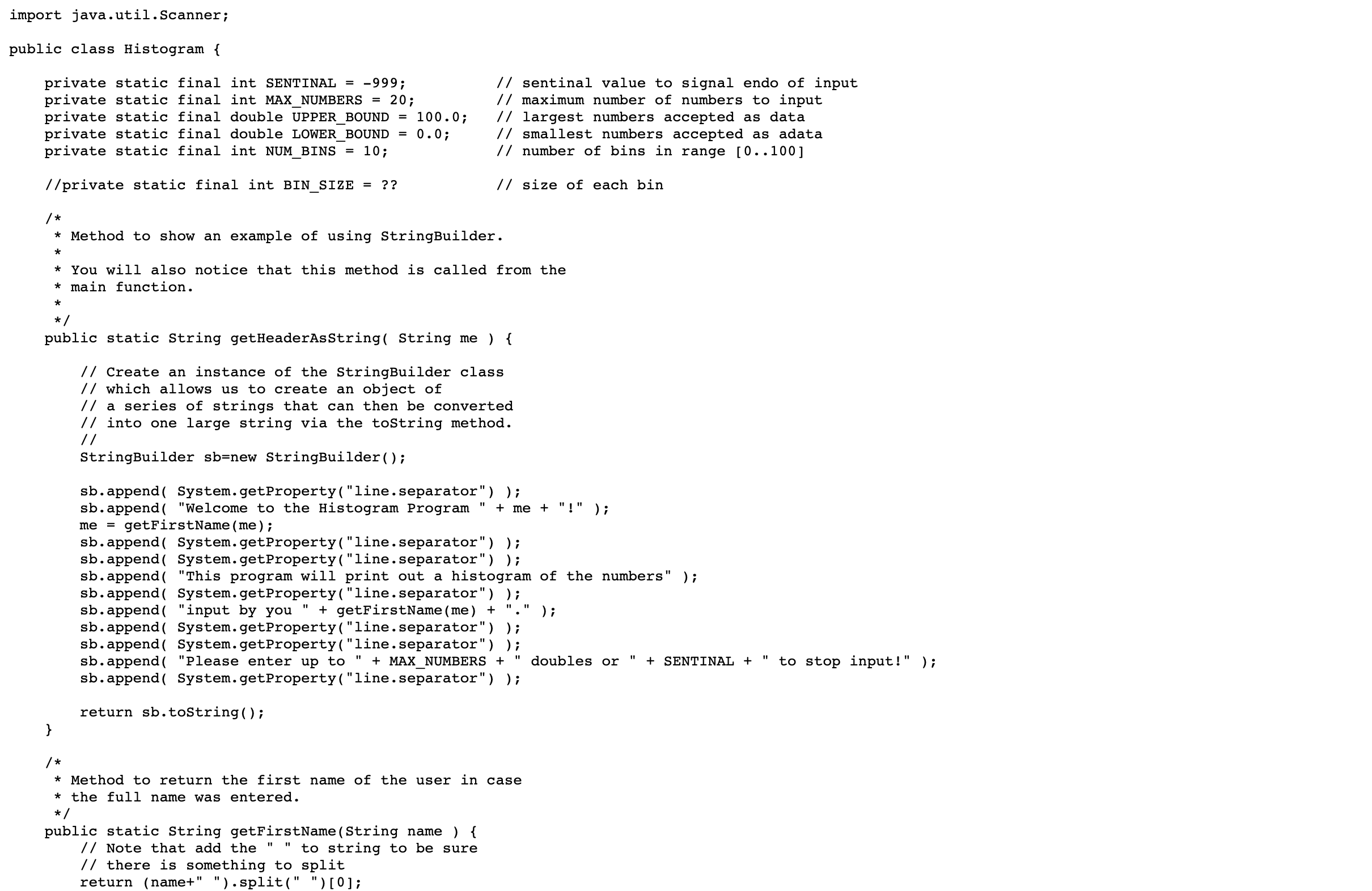
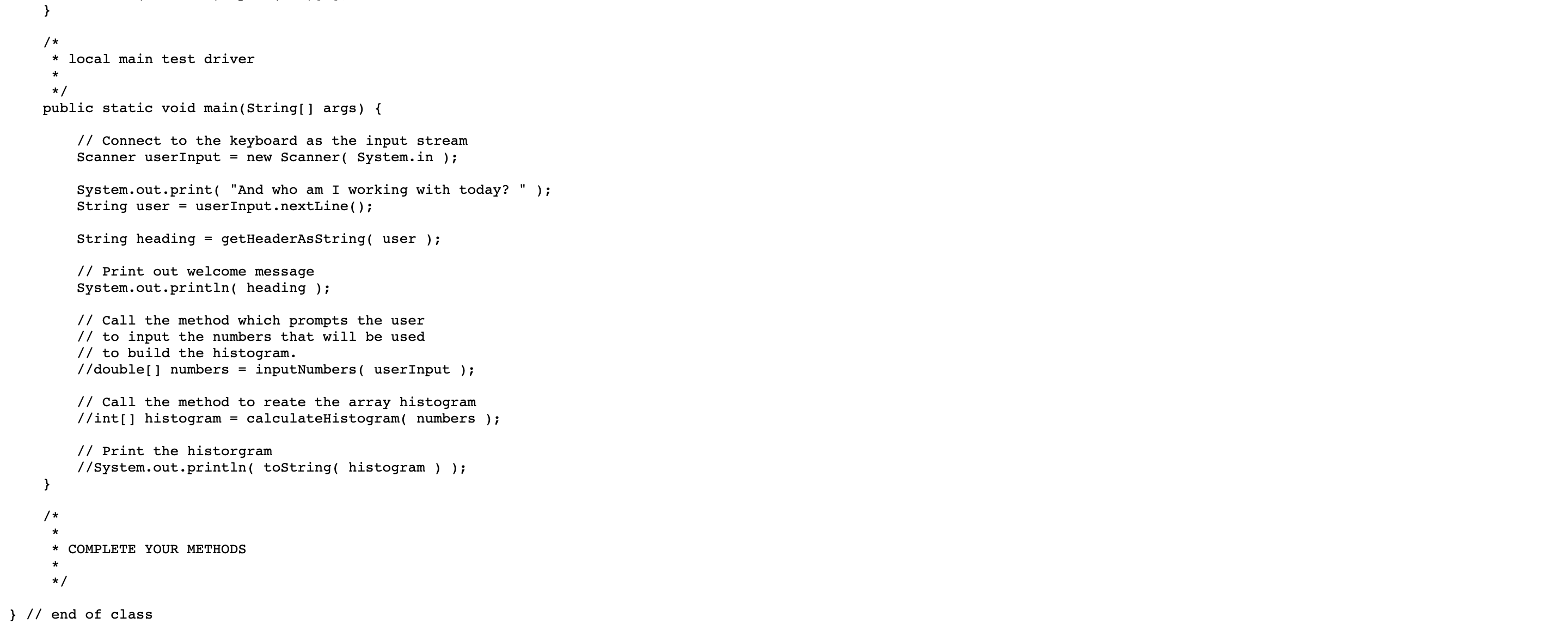
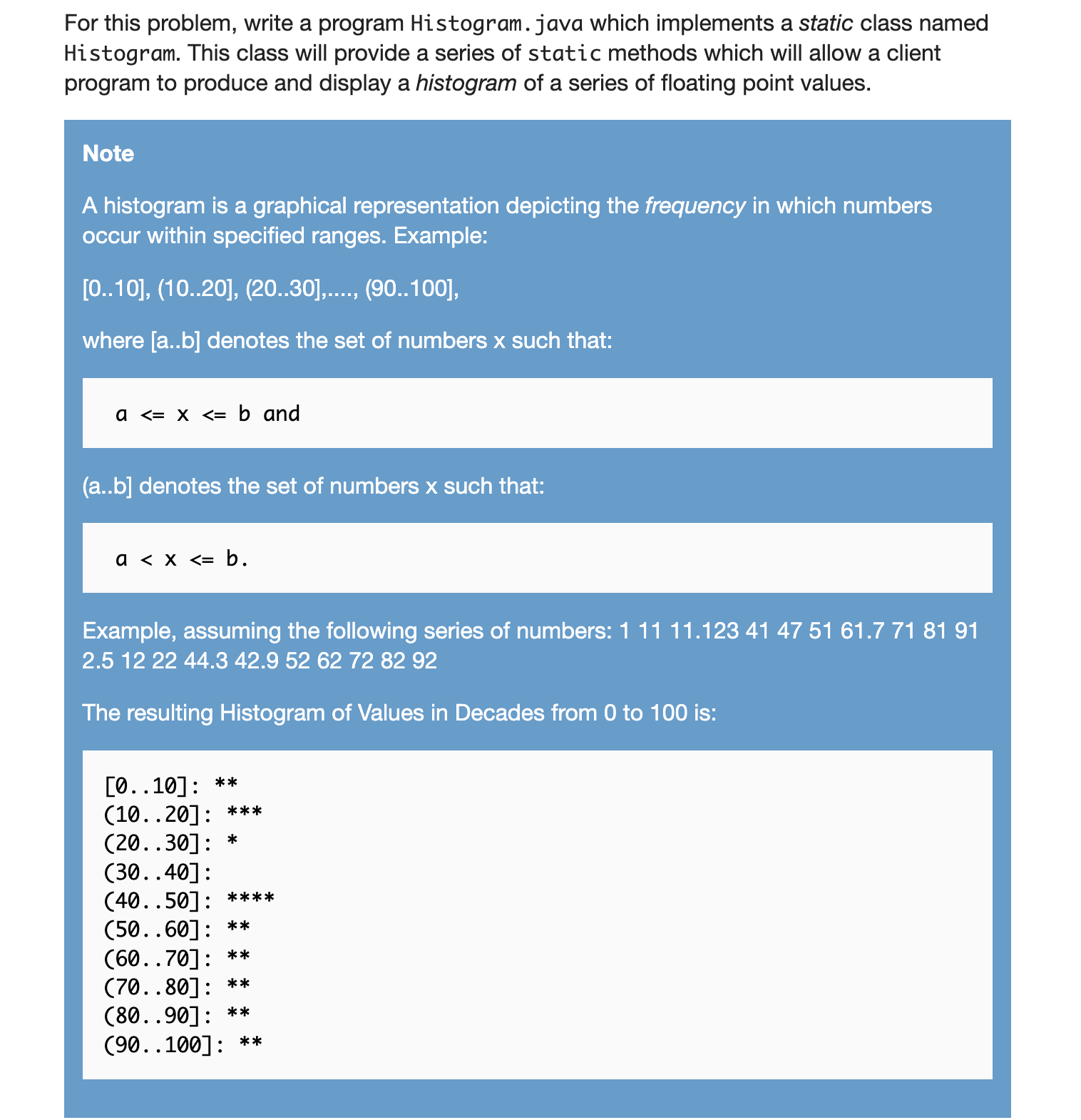
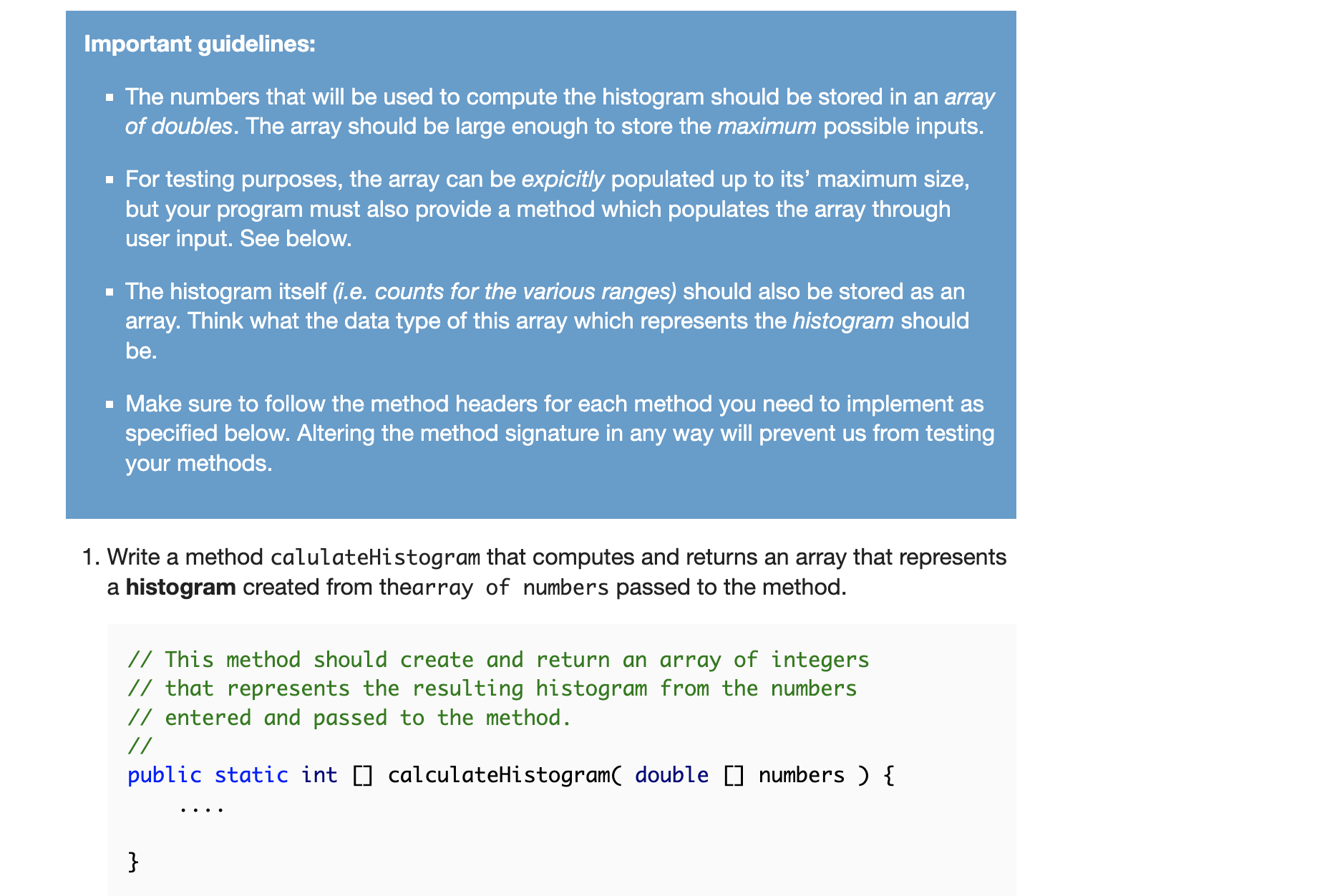
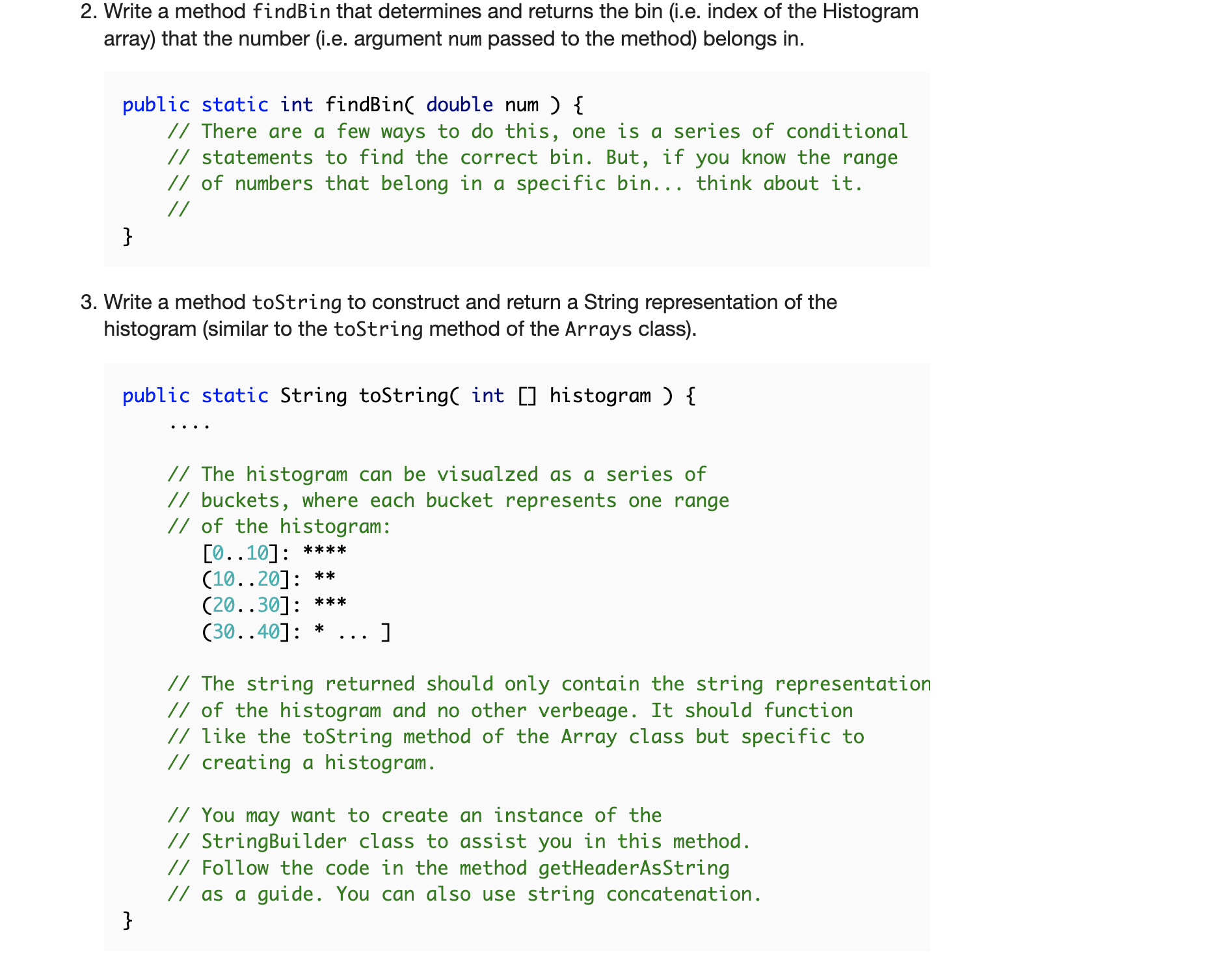
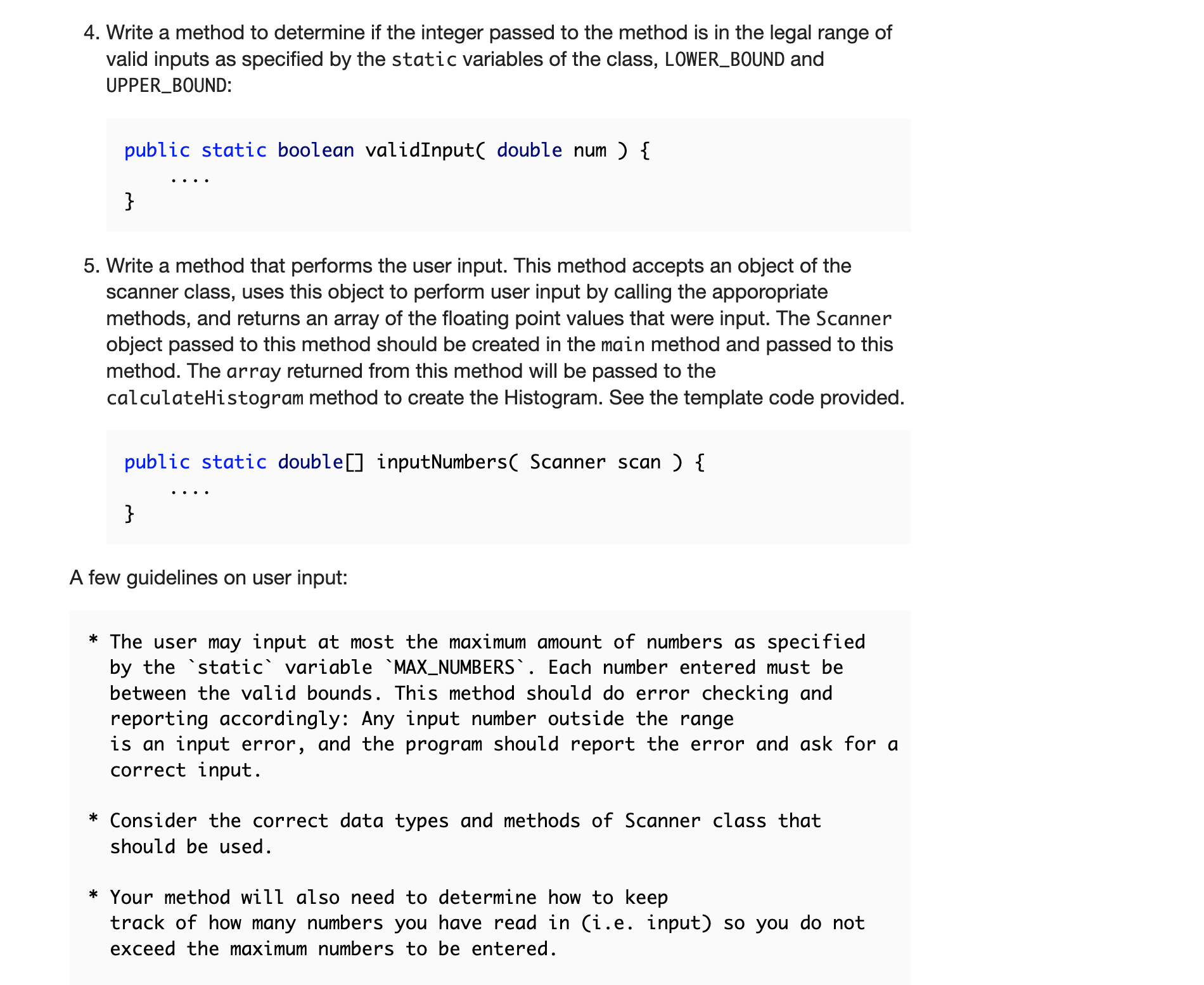
import java.util.Scanner; public class Histogram { private static final int SENTINAL = 999; private static final int MAX_NUMBERS = 20; private static final double UPPER_BOUND = 100.0; private static final double LOWER_BOUND = 0.0; private static final int NUM_BINS = 10%; //private static final int BIN_SIZE = ?? // sentinal value to signal endo of input // maximum number of numbers to input // largest numbers accepted as data // smallest numbers accepted as adata // number of bins in range [0..100] // size of each bin * Method to show an example of using StringBuilder. * * You will also notice that this method is called from the * main function. * */ public static String getHeaderAsString( String me ) { // Create an instance of the StringBuilder class // which allows us to create an object of // a series of strings that can then be converted // into one large string via the toString method. // StringBuilder sb=new StringBuilder(); " + me + "!" ); sb.append( System.getProperty("line.separator") ); sb.append( "Welcome to the Histogram Program me = getFirstName (me); " sb.append( System.getProperty("line.separator") ); sb.append( System.getProperty("line.separator") ); sb.append( "This program will print out a histogram of the numbers" i sb.append( System.getProperty("line.separator") ); sb.append( "input by you + getFirstName (me) + sb.append( System.getProperty("line.separator") ); sb.append( System.getProperty("line.separator") ); sb.append( "Please enter up to + MAX NUMBERS + sb.append( System.getProperty("line.separator") ); ); " doubles or + SENTINAL + to stop input!" ); return sb.toString(); } * Method to return the first name of the user in case *the full name was entered. */ public static String getFirstName (String name ) { // Note that add the " " to string to be sure // there is something to split return (name+" ").split(" ")[0]; } * * local main test driver * */ public static void main(String[] args) { } /* * // Connect to the keyboard as the input stream Scanner userInput = new Scanner(System.in); System.out.print( "And who am I working with today? String user = userInput.nextLine(); String heading = getHeaderAsString( user ); // Print out welcome message System.out.println( heading ); // Call the method which prompts the user // to input the numbers that will be used // to build the histogram. //double[] numbers = inputNumbers( userInput ); // Call the method to reate the array histogram //int[] histogram = calculateHistogram( numbers ); // Print the historgram //System.out.println( toString( histogram ) ); * COMPLETE YOUR METHODS * } // end of class ); For this problem, write a program Histogram. java which implements a static class named Histogram. This class will provide a series of static methods which will allow a client program to produce and display a histogram of a series of floating point values. Note A histogram is a graphical representation depicting the frequency in which numbers occur within specified ranges. Example: [0..10], (10..20], (20..30],...., (90..100], where [a..b] denotes the set of numbers x such that: a Important guidelines: The numbers that will be used to compute the histogram should be stored in an array of doubles. The array should be large enough to store the maximum possible inputs. For testing purposes, the array can be expicitly populated up to its' maximum size, but your program must also provide a method which populates the array through user input. See below. The histogram itself (i.e. counts for the various ranges) should also be stored as an array. Think what the data type of this array which represents the histogram should be. Make sure to follow the method headers for each method you need to implement as specified below. Altering the method signature in any way will prevent us from testing your methods. 1. Write a method calulateHistogram that computes and returns an array that represents a histogram created from thearray of numbers passed to the method. // This method should create and return an array of integers // that represents the resulting histogram from the numbers // entered and passed to the method. // public static int calculateHistogram( double numbers ) { } .... 2. Write a method findBin that determines and returns the bin (i.e. index of the Histogram array) that the number (i.e. argument num passed to the method) belongs in. public static int findBin( double num ) { } // There are a few ways to do this, one is a series of conditional // statements to find the correct bin. But, if you know the range // of numbers that belong in a specific bin... think about it. // 3. Write a method toString to construct and return a String representation of the histogram (similar to the toString method of the Arrays class). public static String toString( int histogram ) { } // The histogram can be visualzed as a series of // buckets, where each bucket represents one range // of the histogram: [0..10]: **** (10..20]: ** (20..30]: *** (30..40]: * ] // The string returned should only contain the string representation // of the histogram and no other verbeage. It should function // like the toString method of the Array class but specific to // creating a histogram. // You may want to create an instance of the // StringBuilder class to assist you in this method. // Follow the code in the method getHeaderAsString // as a guide. You can also use string concatenation. 4. Write a method to determine if the integer passed to the method is in the legal range of valid inputs as specified by the static variables of the class, LOWER_BOUND and UPPER_BOUND: public static boolean valid Input( double num ) { } 5. Write a method that performs the user input. This method accepts an object of the scanner class, uses this object to perform user input by calling the apporopriate methods, and returns an array of the floating point values that were input. The Scanner object passed to this method should be created in the main method and passed to this method. The array returned from this method will be passed to the calculateHistogram method to create the Histogram. See the template code provided. public static double inputNumbers( Scanner scan ) { } A few guidelines on user input: * The user may input at most the maximum amount of numbers as specified by the static variable `MAX_NUMBERS`. Each number entered must be between the valid bounds. This method should do error checking and reporting accordingly: Any input number outside the range is an input error, and the program should report the error and ask for a correct input. * Consider the correct data types and methods of Scanner class that should be used. * Your method will also need to determine how to keep track of how many numbers you have read in (i.e. input) so you do not exceed the maximum numbers to be entered. * To not force the user to enter the maximum inputs allowed, you can make use of a *sentinal* value to signal end of intput. For examp continue to accept input values until the value as specified by the static variable `SENTINAL` is entered (or off course until the maximum number of inputs has been reached). The logic here can get more complicated then you may think. Think through all the possib cases carefully. *The array that this method returns should only be as large as the number of inputs read in. 6. Finally, make sure you use the static variables which have been declared in the template provided. You should NOT have the numbers 20 or 10 occur anywhere in your program except in the declarations of these variables. You MUST do this so that if you decide to change one of these, you don't have the "multiple update" problem. Here is an example of what you should use: public class Histogram { public static final int SENTINAL public static final int MAX_NUMBERS public static final int NUM_BINS = = -999; 20; = 10; // sentinal value used to // maximum number of numb // number of bins in rang // UPPER_BOUND to represent the largest possible number in the rang // LOWER_BOUND to represent the smalles possible number in the rang // BIN_SIZE how many different values fall into each bin public static void main(....) etc. Important The values assigned to MAX_NUMBERS and NUM_BINS determine the range of values represented by each bin. For example: number of bins size of bins 10 5 10 i.e., [0..10], (10..20], 20 i.e., [0..20], (20..40] (90..100] (80...100] 2 50 i.e., [0..50], (50..100] It is clear when NUM_BINS is 10, then so is the size, but this is a coincidence. Your program should determine the size (i.e. range) of each bin. Consider how another variable could be used here. Don't worry about the possible error when the number of bins does not divide evenly into 100 (we'll run your program as is, and won't change the number of bins from 10 to something else). Sample executions of Histogram.java: Sample Run #1 Console X Histogram [Java Application] /Library/Java/JavaVirtual Machines/jdk1.8.0_131.jdk/Contents/Home/bin/java (Jul 7, 2017, 3:25:46 PM) Welcome to the Histogram Program! This program will print out a histogram of the numbers input by the user; enter up to 20 doubles in the range [0.. 100]; enter 1 to end. 13657F655MN 45 56.7 54.9 34.9 2 99 8 -1 You input 13 numbers: [1.0, 3.0, 6.0, 5.0, 7.0, 45.0, 65.0, 56.7, 54.9, 34.9, 2.0, 99.0, 8.0] Histogram of Values in Decades from 0 to 100: [0..10]: (10..20]: ******* (20..30]: (30..40]: (40..50]: (50..60]: **** (60..70]: (70..80]: (80..90]: (90..100]: This sample run uses -1 as the sentinal value, you just need to use the variable as set by the class variable SENTINAL import java.util.Scanner; public class Histogram { private static final int SENTINAL = 999; private static final int MAX_NUMBERS = 20; private static final double UPPER_BOUND = 100.0; private static final double LOWER_BOUND = 0.0; private static final int NUM_BINS = 10%; //private static final int BIN_SIZE = ?? // sentinal value to signal endo of input // maximum number of numbers to input // largest numbers accepted as data // smallest numbers accepted as adata // number of bins in range [0..100] // size of each bin * Method to show an example of using StringBuilder. * * You will also notice that this method is called from the * main function. * */ public static String getHeaderAsString( String me ) { // Create an instance of the StringBuilder class // which allows us to create an object of // a series of strings that can then be converted // into one large string via the toString method. // StringBuilder sb=new StringBuilder(); " + me + "!" ); sb.append( System.getProperty("line.separator") ); sb.append( "Welcome to the Histogram Program me = getFirstName (me); " sb.append( System.getProperty("line.separator") ); sb.append( System.getProperty("line.separator") ); sb.append( "This program will print out a histogram of the numbers" i sb.append( System.getProperty("line.separator") ); sb.append( "input by you + getFirstName (me) + sb.append( System.getProperty("line.separator") ); sb.append( System.getProperty("line.separator") ); sb.append( "Please enter up to + MAX NUMBERS + sb.append( System.getProperty("line.separator") ); ); " doubles or + SENTINAL + to stop input!" ); return sb.toString(); } * Method to return the first name of the user in case *the full name was entered. */ public static String getFirstName (String name ) { // Note that add the " " to string to be sure // there is something to split return (name+" ").split(" ")[0]; } * * local main test driver * */ public static void main(String[] args) { } /* * // Connect to the keyboard as the input stream Scanner userInput = new Scanner(System.in); System.out.print( "And who am I working with today? String user = userInput.nextLine(); String heading = getHeaderAsString( user ); // Print out welcome message System.out.println( heading ); // Call the method which prompts the user // to input the numbers that will be used // to build the histogram. //double[] numbers = inputNumbers( userInput ); // Call the method to reate the array histogram //int[] histogram = calculateHistogram( numbers ); // Print the historgram //System.out.println( toString( histogram ) ); * COMPLETE YOUR METHODS * } // end of class ); For this problem, write a program Histogram. java which implements a static class named Histogram. This class will provide a series of static methods which will allow a client program to produce and display a histogram of a series of floating point values. Note A histogram is a graphical representation depicting the frequency in which numbers occur within specified ranges. Example: [0..10], (10..20], (20..30],...., (90..100], where [a..b] denotes the set of numbers x such that: a Important guidelines: The numbers that will be used to compute the histogram should be stored in an array of doubles. The array should be large enough to store the maximum possible inputs. For testing purposes, the array can be expicitly populated up to its' maximum size, but your program must also provide a method which populates the array through user input. See below. The histogram itself (i.e. counts for the various ranges) should also be stored as an array. Think what the data type of this array which represents the histogram should be. Make sure to follow the method headers for each method you need to implement as specified below. Altering the method signature in any way will prevent us from testing your methods. 1. Write a method calulateHistogram that computes and returns an array that represents a histogram created from thearray of numbers passed to the method. // This method should create and return an array of integers // that represents the resulting histogram from the numbers // entered and passed to the method. // public static int calculateHistogram( double numbers ) { } .... 2. Write a method findBin that determines and returns the bin (i.e. index of the Histogram array) that the number (i.e. argument num passed to the method) belongs in. public static int findBin( double num ) { } // There are a few ways to do this, one is a series of conditional // statements to find the correct bin. But, if you know the range // of numbers that belong in a specific bin... think about it. // 3. Write a method toString to construct and return a String representation of the histogram (similar to the toString method of the Arrays class). public static String toString( int histogram ) { } // The histogram can be visualzed as a series of // buckets, where each bucket represents one range // of the histogram: [0..10]: **** (10..20]: ** (20..30]: *** (30..40]: * ] // The string returned should only contain the string representation // of the histogram and no other verbeage. It should function // like the toString method of the Array class but specific to // creating a histogram. // You may want to create an instance of the // StringBuilder class to assist you in this method. // Follow the code in the method getHeaderAsString // as a guide. You can also use string concatenation. 4. Write a method to determine if the integer passed to the method is in the legal range of valid inputs as specified by the static variables of the class, LOWER_BOUND and UPPER_BOUND: public static boolean valid Input( double num ) { } 5. Write a method that performs the user input. This method accepts an object of the scanner class, uses this object to perform user input by calling the apporopriate methods, and returns an array of the floating point values that were input. The Scanner object passed to this method should be created in the main method and passed to this method. The array returned from this method will be passed to the calculateHistogram method to create the Histogram. See the template code provided. public static double inputNumbers( Scanner scan ) { } A few guidelines on user input: * The user may input at most the maximum amount of numbers as specified by the static variable `MAX_NUMBERS`. Each number entered must be between the valid bounds. This method should do error checking and reporting accordingly: Any input number outside the range is an input error, and the program should report the error and ask for a correct input. * Consider the correct data types and methods of Scanner class that should be used. * Your method will also need to determine how to keep track of how many numbers you have read in (i.e. input) so you do not exceed the maximum numbers to be entered. * To not force the user to enter the maximum inputs allowed, you can make use of a *sentinal* value to signal end of intput. For examp continue to accept input values until the value as specified by the static variable `SENTINAL` is entered (or off course until the maximum number of inputs has been reached). The logic here can get more complicated then you may think. Think through all the possib cases carefully. *The array that this method returns should only be as large as the number of inputs read in. 6. Finally, make sure you use the static variables which have been declared in the template provided. You should NOT have the numbers 20 or 10 occur anywhere in your program except in the declarations of these variables. You MUST do this so that if you decide to change one of these, you don't have the "multiple update" problem. Here is an example of what you should use: public class Histogram { public static final int SENTINAL public static final int MAX_NUMBERS public static final int NUM_BINS = = -999; 20; = 10; // sentinal value used to // maximum number of numb // number of bins in rang // UPPER_BOUND to represent the largest possible number in the rang // LOWER_BOUND to represent the smalles possible number in the rang // BIN_SIZE how many different values fall into each bin public static void main(....) etc. Important The values assigned to MAX_NUMBERS and NUM_BINS determine the range of values represented by each bin. For example: number of bins size of bins 10 5 10 i.e., [0..10], (10..20], 20 i.e., [0..20], (20..40] (90..100] (80...100] 2 50 i.e., [0..50], (50..100] It is clear when NUM_BINS is 10, then so is the size, but this is a coincidence. Your program should determine the size (i.e. range) of each bin. Consider how another variable could be used here. Don't worry about the possible error when the number of bins does not divide evenly into 100 (we'll run your program as is, and won't change the number of bins from 10 to something else). Sample executions of Histogram.java: Sample Run #1 Console X Histogram [Java Application] /Library/Java/JavaVirtual Machines/jdk1.8.0_131.jdk/Contents/Home/bin/java (Jul 7, 2017, 3:25:46 PM) Welcome to the Histogram Program! This program will print out a histogram of the numbers input by the user; enter up to 20 doubles in the range [0.. 100]; enter 1 to end. 13657F655MN 45 56.7 54.9 34.9 2 99 8 -1 You input 13 numbers: [1.0, 3.0, 6.0, 5.0, 7.0, 45.0, 65.0, 56.7, 54.9, 34.9, 2.0, 99.0, 8.0] Histogram of Values in Decades from 0 to 100: [0..10]: (10..20]: ******* (20..30]: (30..40]: (40..50]: (50..60]: **** (60..70]: (70..80]: (80..90]: (90..100]: This sample run uses -1 as the sentinal value, you just need to use the variable as set by the class variable SENTINAL
Step by Step Solution
3.34 Rating (160 Votes )
There are 3 Steps involved in it
The answer provided below has been developed in a clear step by step manner Step 1 inptuElements met... View full answer

Get step-by-step solutions from verified subject matter experts
 Study Help