







Question: import sys import os import math import pyaudio BITRATE=16000 TICKS_PER_SECOND=800. SPEEDFACTOR=3 PITCHFACTOR=2 MAXSIZE=1000000 microperiods = [ 0, 0, 0, 0, 0, 0, 0, 0, 0,
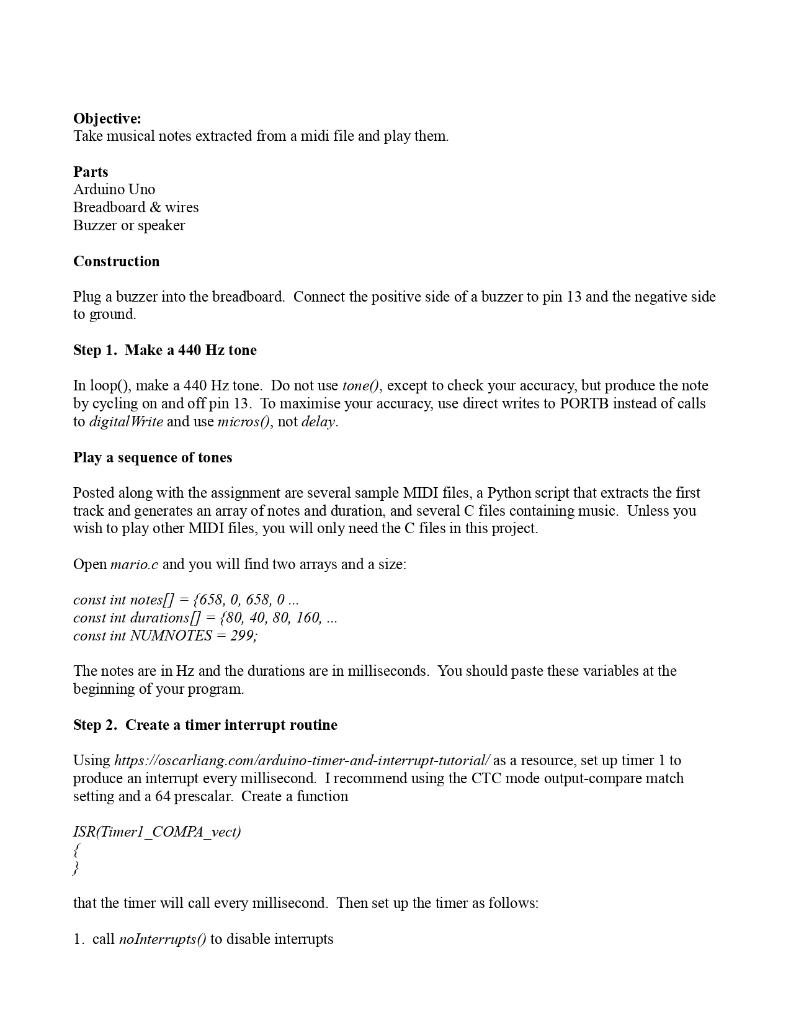
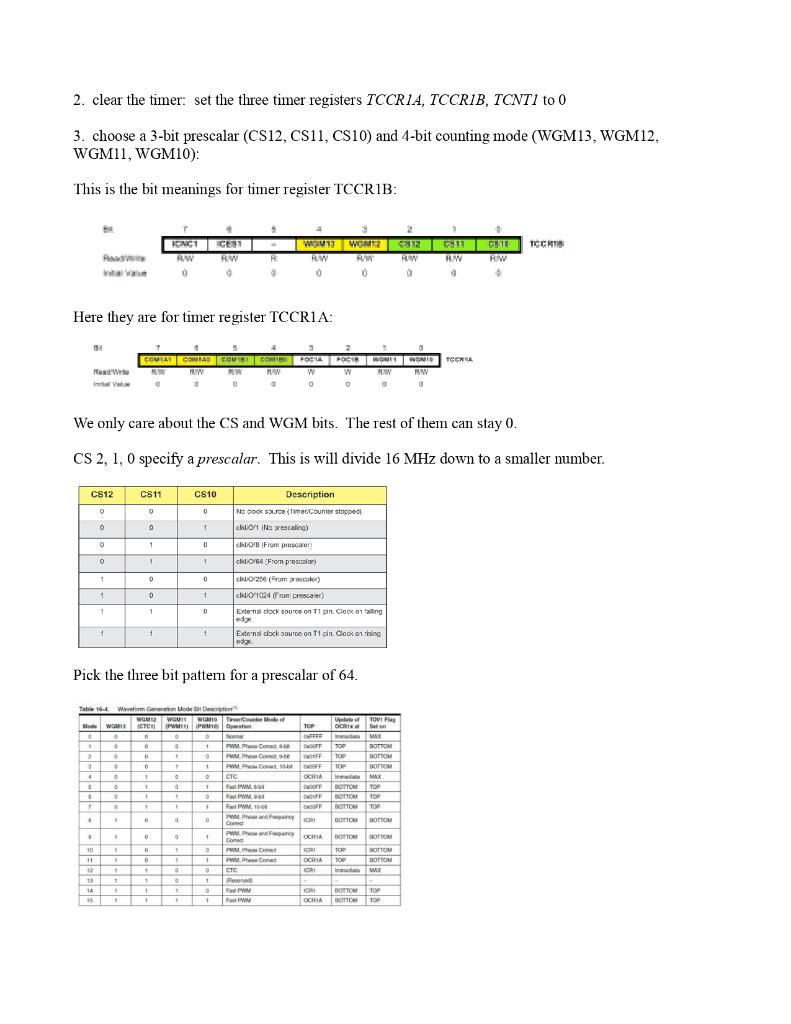
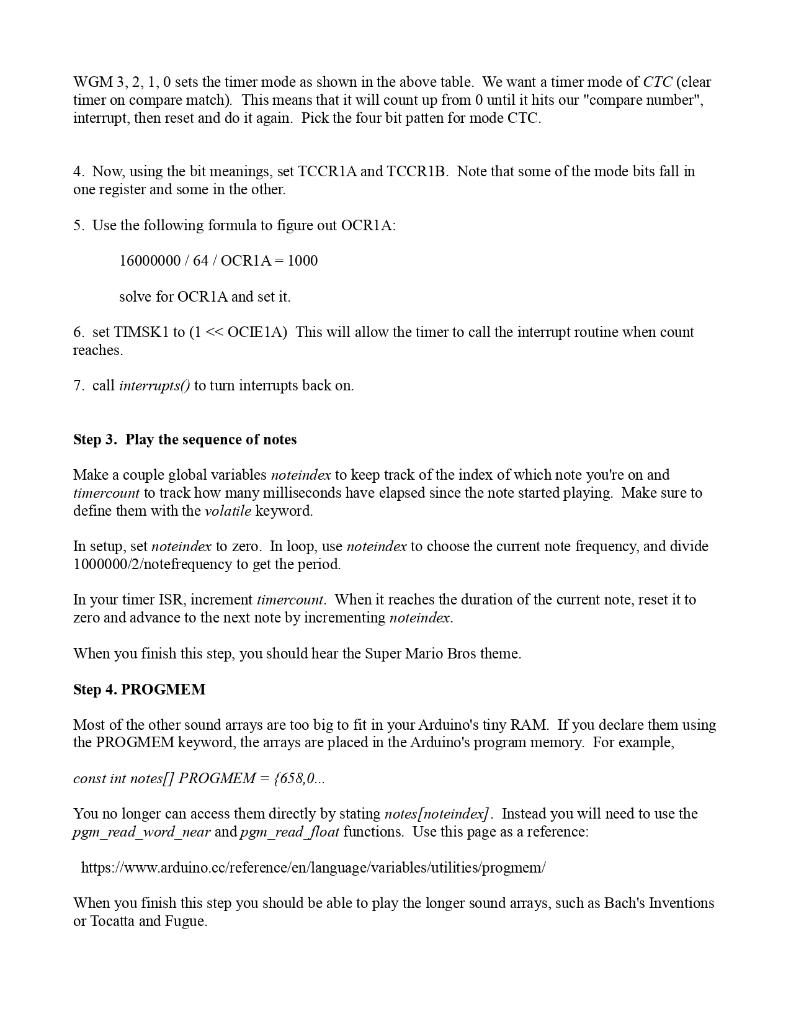
import sys
import os
import math
import pyaudio
BITRATE=16000
TICKS_PER_SECOND=800.
SPEEDFACTOR=3
PITCHFACTOR=2
MAXSIZE=1000000
microperiods = [ 0, 0, 0, 0, 0, 0, 0, 0, 0, 0, 0, 0, 0, 0, 0, 0, 0, 0, 0, 0, 0, 0, 0, 0, 30578, 28861, 27242, 25713, 24270, 22909, 21622, 20409, 19263, 18182, 17161, 16198, 15289, 14436, 13621, 12856, 12135, 11454, 10811, 10205, 9632, 9091, 8581, 8099, 7645, 7218, 6811, 6428, 6068, 5727, 5406, 5103, 4816, 4546, 4291, 4050, 3823, 3609, 3406, 3214, 3034, 2864, 2703, 2552, 2408, 2273, 2146, 2025, 0, 0, 0, 0, 0, 0, 0, 0, 0, 0, 0, 0, 0, 0, 0, 0, 0, 0, 0, 0, 0, 0, 0, 0, 0, 0, 0, 0, 0, 0, 0, 0, 0, 0, 0, 0 ]
def getmidigram(fname):
notes=[]
os.system("midi2abc -midigram -f "+fname+" > midigram")
f=file("midigram").read().split(" ")
lastline=0
for line in f:
lsplit=line.split()
if(len(lsplit)
continue
if(int(lsplit[0]) break notes.append([int(lsplit[0]),int(lsplit[1]),int(lsplit[4])]) lastline=int(line[0]) return notes def gentones(midinotes): # midinotes=midinotes[:10] WAVDATA='' for i in xrange(len(midinotes)): note=midinotes[i] length=note[1]-note[0] length=length/TICKS_PER_SECOND # freq=microperiods[note[2]]*1.0 if(microperiods[note[2]-12])!=0: freq=1000000./microperiods[note[2]-12] else: freq=1 # print note[2],note[2]-12,microperiods[note[2]],freq,microperiods[69],1000000./microperiods[69] # freq=440. freq=freq*2 WAVDATA+=gentone(freq,length) if(i off=midinotes[i+1][0] length=off-note[1] length=length/TICKS_PER_SECOND WAVDATA+=genemptytone(length) return WAVDATA def gentone(frequency,length): if(frequency==0): return genemptytone(length) NOF=int(BITRATE*length) REST=NOF%BITRATE WAVEDATA='' for x in xrange(NOF): WAVEDATA+=chr(int(math.sin(x/((BITRATE/frequency)/(2*math.pi)))*127+128)) # for x in xrange(REST): # WAVEDATA+=chr(128) return WAVEDATA def genemptytone(length): NOF=int(BITRATE*length) W='' for x in xrange(NOF): W+=chr(128) return W def playtone(wav): PyAudio=pyaudio.PyAudio p=PyAudio() s=p.open(format=p.get_format_from_width(1),channels=1,rate=BITRATE,output=True) s.write(wav) s.stop_stream() s.close() p.terminate() def genC(notes): notestr="const int notes[] PROGMEM={" time=notes[0][0] durstr="const float durations[] PROGMEM={" size=0 for n in notes: if n[0]>time: notestr+="0," durstr+=str(n[0]-time)+"," if microperiods[n[2]-12]!=0: freq=1000000/microperiods[n[2]-12] else: freq=0 notestr+=str(freq*PITCHFACTOR)+"," durstr+=str((n[1]-n[0])*SPEEDFACTOR)+"," time=n[1] size+=1 if size==MAXSIZE: break notestr+="}; " durstr+="}; " f=file("out.c","w") f.write(notestr) f.write(durstr) numnotes=len(notes) if numnotes>MAXSIZE: numnotes=MAXSIZE f.write( "const int NUMNOTES="+str(numnotes)+"; ") f.close() return f.write( "const int notes[] PROGMEM={ ") offset=notes[0][0] for n in notes: f.write(str(n[2]-12)+",") f.write( "}; ") f.write("const float durations[] PROGMEM={ ") for n in notes: f.write( "{"+str(n[0]-offset)+","+str(n[1]-offset)+","+str(n[2]-12)+"}, ") f.write( "}; ") f.write( "const int NUMNOTES="+str(len(notes))+"; ") f.close() def main(fname): # os.system('play --null --channels 1 synth .2 sine 840') # print "getting notes" notes=getmidigram(fname) genC(notes) # print "generating waveform" wav=gentones(notes) # print "playing" playtone(wav) # print "done" main(sys.argv[1]) vint notes[] ={658,0,658,0,658,0,522,0,658,0,782,0,522,0,390,0,328,0,438,0,492,0,466,0,438,0,390,0,658,0,782,0,878,0,698,0,782,0,658,0,522,0,586,0,492,0,522,0,390,0,328,0,438,0,492,0,466,0,438,0,390,0,658,0,782,0,878,0,698,0,782,0,658,0,522,0,586,0,492,0,782,0,738,0,698,0,622,0,658,0,414,0,438,0,522,0,438,0,522,0,586,0,782,0,738,0,698,0,622,0,658,0,0,0,0,0,0,0,782,0,738,0,698,0,622,0,658,0,414,0,438,0,522,0,438,0,522,0,586,0,622,0,586,0,522,0,782,0,738,0,698,0,622,0,658,0,414,0,438,0,522,0,438,0,522,0,586,0,782,0,738,0,698,0,622,0,658,0,0,0,0,0,0,0,782,0,738,0,698,0,622,0,658,0,414,0,438,0,522,0,438,0,522,0,586,0,622,0,586,0,522,0,522,0,522,0,522,0,522,0,586,0,658,0,522,0,438,0,390,0,522,0,522,0,522,0,522,0,586,}; float durations[] ={240,40,240,160,240,160,240,40,240,160,240,880,240,280,240,280,240,280,240,160,240,160,240,40,240,160,240,80,240,80,240,80,240,160,240,40,240,160,240,160,240,40,240,40,240,280,240,280,240,280,240,280,240,160,240,160,240,40,240,160,240,80,240,80,240,80,240,160,240,40,240,160,240,160,240,40,240,40,240,520,240,40,240,40,240,40,240,160,240,160,240,40,240,40,240,160,240,40,240,40,240,280,240,40,240,40,240,40,240,160,240,160,240,160,240,40,240,640,240,40,240,40,240,40,240,160,240,160,240,40,240,40,240,160,240,40,240,40,240,280,240,280,240,280,240,1120,240,40,240,40,240,40,240,160,240,160,240,40,240,40,240,160,240,40,240,40,240,280,240,40,240,40,240,40,240,160,240,160,240,160,240,40,240,640,240,40,240,40,240,40,240,160,240,160,240,40,240,40,240,160,240,40,240,40,240,280,240,280,240,280,240,880,240,40,240,160,240,160,240,40,240,160,240,40,240,160,240,40,240,400,240,40,240,160,240,160,240,40,240,}; const int NUMNOTES=120;
Step by Step Solution
There are 3 Steps involved in it

Get step-by-step solutions from verified subject matter experts
 Study Help