







Question: IMPORTANT- PLEASE USE SECRET CODE 01011100 Please take another look at what I've marked as the red zones. Goal: The purpose of this project is
IMPORTANT- PLEASE USE SECRET CODE01011100
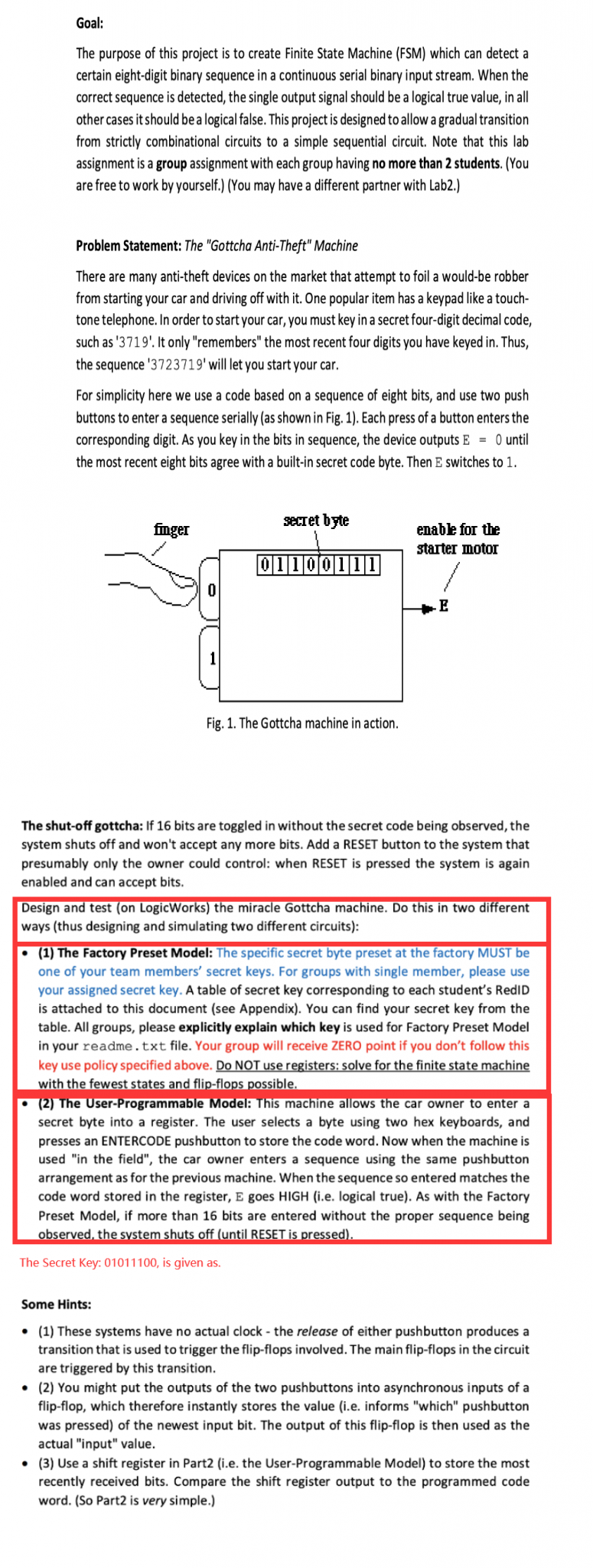
Please take another look at what I've marked as the red zones.
Goal: The purpose of this project is to create Finite State Machine (FSM) which can detect a certain eight-digit binary sequence in a continuous serial binary input stream. When the correct sequence is detected, the single output signal should be a logical true value, in all other cases it should be a logical false. This project is designed to allow a gradual transition from strictly combinational circuits to a simple sequential circuit. Note that this lab assignment is a group assignment with each group having no more than 2 students. (You are free to work by yourself.) (You may have a different partner with Lab2.) Problem Statement: The "Gottcha Anti-Theft" Machine There are many anti-theft devices on the market that attempt to foil a would-be robber from starting your car and driving off with it. One popular item has a keypad like a touch- tone telephone. In order to start your car, you must key in a secret four-digit decimal code, such as '3719'. It only "remembers" the most recent four digits you have keyed in. Thus, the sequence '3723719' will let you start your car. For simplicity here we use a code based on a sequence of eight bits, and use two push buttons to enter a sequence serially (as shown in Fig. 1). Each press of a button enters the corresponding digit. As you key in the bits in sequence, the device outputs E = 0 until the most recent eight bits agree with a built-in secret code byte. Then E switches to 1. secret byte finger 011001 enable for the starter motor 01100111 E Fig. 1. The Gottcha machine in action. The shut-off gottcha: If 16 bits are toggled in without the secret code being observed, the system shuts off and won't accept any more bits. Add a RESET button to the system that presumably only the owner could control: when RESET is pressed the system is again enabled and can accept bits. Design and test (on LogicWorks) the miracle Gottcha machine. Do this in two different ways (thus designing and simulating two different circuits): (1) The Factory Preset Model: The specific secret byte preset at the factory MUST be one of your team members' secret keys. For groups with single member, please use your assigned secret key. A table of secret key corresponding to each student's RedID is attached to this document (see Appendix). You can find your secret key from the table. All groups, please explicitly explain which key is used for Factory Preset Model in your readme.txt file. Your group will receive ZERO point if you don't follow this key use policy specified above. Do NOT use registers: solve for the finite state machine with the fewest states and flip-flops possible. (2) The User-Programmable Model: This machine allows the car owner to enter a secret byte into a register. The user selects a byte using two hex keyboards, and presses an ENTERCODE pushbutton to store the code word. Now when the machine is used in the field", the car owner enters a sequence using the same pushbutton arrangement as for the previous machine. When the sequence so entered matches the code word stored in the register, E goes HIGH (i.e. logical true). As with the Factory Preset Model, if more than 16 bits are entered without the proper sequence being observed, the system shuts off (until RESET is pressed). The Secret Key: 01011100, is given as. Some Hints: (1) These systems have no actual clock - the release of either pushbutton produces a transition that is used to trigger the flip-flops involved. The main flip-flops in the circuit are triggered by this transition. (2) You might put the outputs of the two pushbuttons into asynchronous inputs of a flip-flop, which therefore instantly stores the value (i.e. informs "which" pushbutton was pressed) of the newest input bit. The output of this flip-flop is then used as the actual "input" value. (3) Use a shift register in Part2 (i.e. the User-Programmable Model) to store the most recently received bits. Compare the shift register output to the programmed code word. (So Part2 is very simple.)
Step by Step Solution
There are 3 Steps involved in it

Get step-by-step solutions from verified subject matter experts
 Study Help