







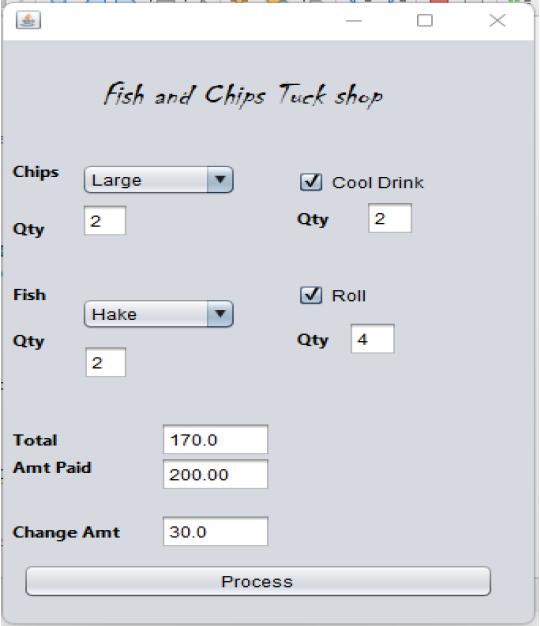
Question: Improve below Java code to have estactics of the screenshot below. The current appearance of my jFrame is not appealing , so how to i
Improve below Java code to have estactics of the screenshot below. The current appearance of my jFrame is not appealing , so how to i change e.g size of my combobox so that it allow space on the right for the colddrink checkbox
import javax.swing.*;
import java.awt.*;
import java.awt.event.ActionEvent;
import java.awt.event.ActionListener;
public class CashRegisterApp {
private JFrame frame;
private JComboBox
private JCheckBox rollCheckBox, coolDrinkCheckBox;
private JTextField quantityTextField, totalTextField, amountPaidTextField, changeAmountTextField;
private JLabel fishLabel, chipLabel, quantityLabel, totalLabel, amountPaidLabel, changeAmountLabel;
// Product price list
private final static double[] prices = {
40.0, // Snoek
45.0, // Hake
15.0, // Small Chips
20.0, // Medium Chips
25.0, // Large Chips
2.5, // Roll
10.0 // Cool Drink
};
public CashRegisterApp() {
frame = new JFrame("Fish and Chips Tuck Shop");
frame.setLayout(new GridLayout(8, 2));
fishLabel = new JLabel("Fish:");
chipLabel = new JLabel("Chips:");
quantityLabel = new JLabel("Quantity:");
totalLabel = new JLabel("Total:");
amountPaidLabel = new JLabel("Amount Paid:");
changeAmountLabel = new JLabel("Change Amount:");
fishComboBox = new JComboBox(new String[]{"Snoek", "Hake"});
chipComboBox = new JComboBox(new String[]{"Small Chips", "Medium Chips", "Large Chips"});
rollCheckBox = new JCheckBox("Roll");
coolDrinkCheckBox = new JCheckBox("Cool Drink");
quantityTextField = new JTextField();
totalTextField = new JTextField();
amountPaidTextField = new JTextField();
changeAmountTextField = new JTextField();
JButton calculateButton = new JButton("Calculate Total");
calculateButton.addActionListener(new ActionListener() {
@Override
public void actionPerformed(ActionEvent e) {
calculateTotal();
}
});
// Add components to the frame
frame.add(fishLabel);
frame.add(fishComboBox);
frame.add(chipLabel);
frame.add(chipComboBox);
frame.add(rollCheckBox);
frame.add(coolDrinkCheckBox);
frame.add(quantityLabel);
frame.add(quantityTextField);
frame.add(calculateButton);
frame.add(new JLabel()); // Empty cell
frame.add(totalLabel);
frame.add(totalTextField);
frame.add(amountPaidLabel);
frame.add(amountPaidTextField);
frame.add(changeAmountLabel);
frame.add(changeAmountTextField);
frame.setDefaultCloseOperation(JFrame.EXIT_ON_CLOSE);
frame.pack();
frame.setVisible(true);
}
private void calculateTotal() {
int selectedFishIndex = fishComboBox.getSelectedIndex();
int selectedChipIndex = chipComboBox.getSelectedIndex();
boolean selectedRoll = rollCheckBox.isSelected();
boolean selectedCoolDrink = coolDrinkCheckBox.isSelected();
int quantity = Integer.parseInt(quantityTextField.getText());
double fishPrice = prices[selectedFishIndex];
double chipPrice = prices[selectedChipIndex];
double rollPrice = selectedRoll ? prices[5] : 0.0;
double coolDrinkPrice = selectedCoolDrink ? prices[6] : 0.0;
double totalPrice = (fishPrice + chipPrice + rollPrice + coolDrinkPrice) * quantity;
totalTextField.setText(String.valueOf(totalPrice));
double amountPaid = Double.parseDouble(amountPaidTextField.getText());
double changeAmount = amountPaid - totalPrice;
changeAmountTextField.setText(String.valueOf(changeAmount));
}
public static void main(String[] args) {
SwingUtilities.invokeLater(new Runnable() {
@Override
public void run() {
new CashRegisterApp();
}
});
}
}
Fish and Chips Tuck shop Chips Large Cool Drink 2 Qty 2 Qty Fish Roll Hake Qty 2 Qty 4 Total 170.0 Amt Paid 200.00 Change Amt 30.0 Process
Step by Step Solution
There are 3 Steps involved in it

Get step-by-step solutions from verified subject matter experts
 Study Help