







Question: Imtrying to get my input data button to prompt my dialog box for user input when it clicks using scene builder and java fx. Any
Imtrying to get my input data button to prompt my dialog box for user input when it clicks using scene builder and java fx. Any help would be great. Here's what it's suppose to look like when prompted:
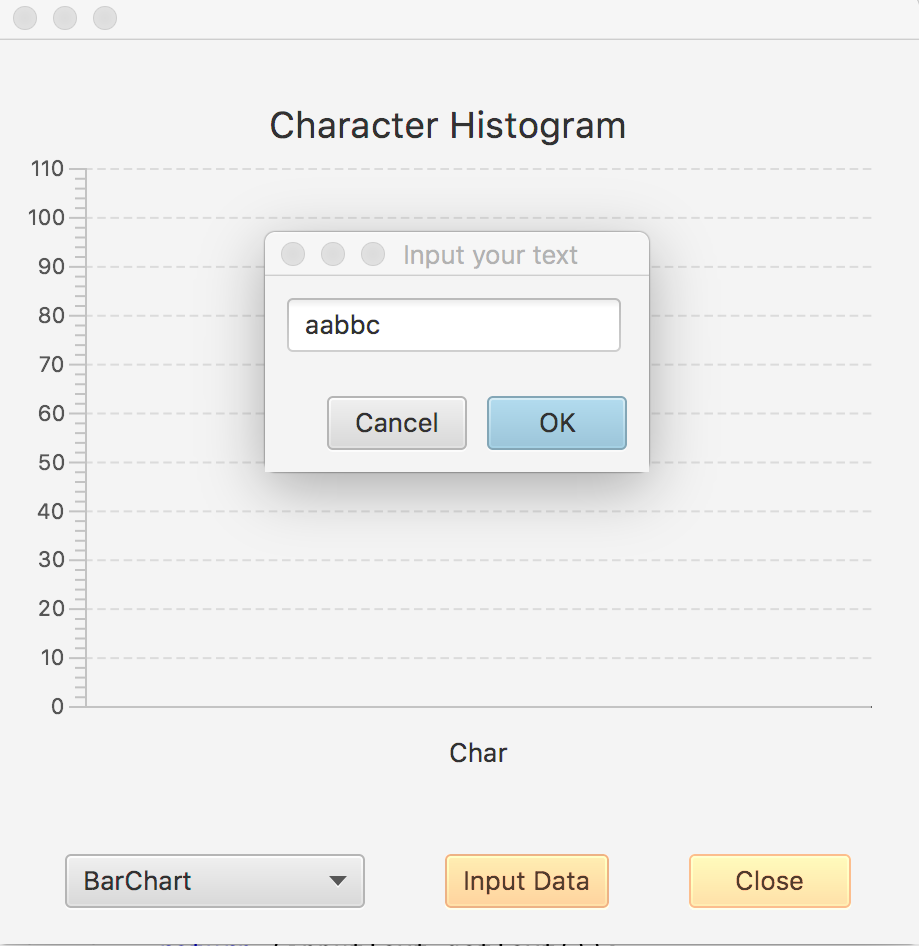
here's my code thus far:
FXMLDocumentController.java
import java.net.URL; import java.util.Arrays; import java.util.Optional; import java.util.ResourceBundle; import javafx.application.Platform; import javafx.beans.value.ChangeListener; import javafx.beans.value.ObservableValue; import javafx.collections.FXCollections; import javafx.collections.ObservableList; import javafx.event.ActionEvent; import javafx.fxml.FXML; import javafx.fxml.Initializable; import javafx.scene.chart.BarChart; import javafx.scene.chart.PieChart; import javafx.scene.chart.XYChart; import javafx.scene.chart.XYChart.Series; import javafx.scene.control.Button; import javafx.scene.control.ButtonBar.ButtonData; import javafx.scene.control.ButtonType; import javafx.scene.control.ComboBox; import javafx.scene.control.Dialog; import javafx.scene.control.TextField; import javafx.scene.layout.GridPane; import javafx.stage.Stage;
enum ChartType{barChart, pieChart};
public class FXMLDocumentController implements Initializable { final int TOTAL_CHARS = 26; ChartType mChartType; int mChars[]; // Call various vreated buttons/combobox @FXML private javafx.scene.control.Button mButtonClose; @FXML private javafx.scene.control.ComboBox mComboBox; @FXML private Button mInputButton; @FXML private void didClickCloseButton(ActionEvent event){ Stage stage = (Stage) mButtonClose.getScene().getWindow(); stage.close(); } private String showInputDialog(){ Dialog
ButtonType okButton = new ButtonType("OK", ButtonData.OK_DONE); dialog.getDialogPane().getButtonTypes().addAll(okButton, ButtonType.CANCEL);
GridPane gridPane = new GridPane(); gridPane.setHgap(10); gridPane.setVgap(10); TextField inputText = new TextField(); inputText.setPromptText("Input Text"); gridPane.add(inputText, 0, 0); dialog.getDialogPane().setContent(gridPane);
Platform.runLater(()->inputText.requestFocus());
dialog.setResultConverter((ButtonType dialogButton) -> { if (dialogButton == okButton) { return (inputText.getText()); } return (null); }); Optional
return (result.get()); } private void paint(){ // Set values to comboBox // Please implement this function // This function according to the mChartType // refreshes either BarChart or PieChart // You need to add each item and its occurance (for instance 'a', 2) // to the selected chart for each character in the alpabet } @FXML private void didClickInputButton(ActionEvent event) { Arrays.fill(mChars, 0); String s = showInputDialog(); if ((s!= null) && (s.trim().length() > 0)){ s = s.toLowerCase(); for (int i=0;i
Step by Step Solution
There are 3 Steps involved in it
To make your input button prompt the dialog box you need to ensure your dialog setup and button action handler are correctly linked Below is the code ... View full answer

Get step-by-step solutions from verified subject matter experts
 Study Help