







Question: In a function file named myMathFunction .m, write a user-defined function named myMathFunction() that evaluates the single-variable mathematical function f(x) = 5 sin(x)cos(2x + pi/3).
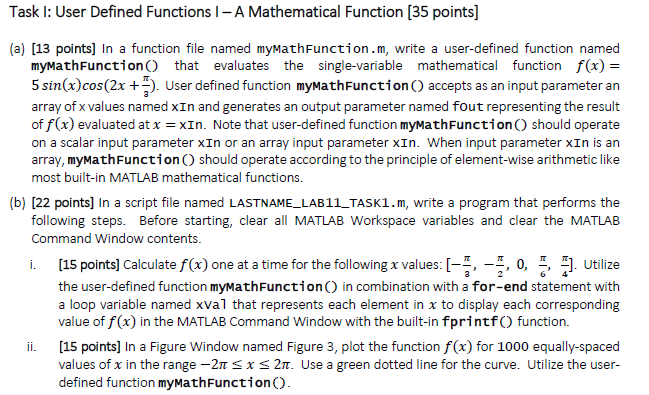
In a function file named myMathFunction .m, write a user-defined function named myMathFunction() that evaluates the single-variable mathematical function f(x) = 5 sin(x)cos(2x + pi/3). User defined function myMathFunction() accepts as an input parameter an array of x values named xIn and generates an output parameter named fout representing the result of f(x) evaluated at x = xIn. Note that user-defined function myMathFunction() should operate on a scalar input parameter xIn or an array input parameter xIn. When input parameter xIn is an array, myMathFunction() should operate according to the principle of element-wise arithmetic like most built-in MATLAB mathematical functions. In a script file named LASTNAME_LAB11_TASK1. m, write a program that performs the following steps. Before starting, clear all MATLAB Workspace variables and clear the MATLAB Command Window contents. i. Calculate f(x) one at a time for the following x values: [-pi/3, -pi/2, 0, pi/6, pi/4]. Utilize the user-defined function myMathFunction() in combination with a for-end statement with a loop variable named xVal that represents each element in x to display each corresponding value of f(x) in the MATLAB Command Window with the built-in fprintf () function. ii. In a Figure Window named Figure 3, plot the function f(x) for 1000 equally-spaced values of x in the range -2pi lessthanorequalto x lessthanorequalto 2pi. Use a green dotted line for the curve. Utilize the user-defined function myMathFunction(). In a function file named myMathFunction .m, write a user-defined function named myMathFunction() that evaluates the single-variable mathematical function f(x) = 5 sin(x)cos(2x + pi/3). User defined function myMathFunction() accepts as an input parameter an array of x values named xIn and generates an output parameter named fout representing the result of f(x) evaluated at x = xIn. Note that user-defined function myMathFunction() should operate on a scalar input parameter xIn or an array input parameter xIn. When input parameter xIn is an array, myMathFunction() should operate according to the principle of element-wise arithmetic like most built-in MATLAB mathematical functions. In a script file named LASTNAME_LAB11_TASK1. m, write a program that performs the following steps. Before starting, clear all MATLAB Workspace variables and clear the MATLAB Command Window contents. i. Calculate f(x) one at a time for the following x values: [-pi/3, -pi/2, 0, pi/6, pi/4]. Utilize the user-defined function myMathFunction() in combination with a for-end statement with a loop variable named xVal that represents each element in x to display each corresponding value of f(x) in the MATLAB Command Window with the built-in fprintf () function. ii. In a Figure Window named Figure 3, plot the function f(x) for 1000 equally-spaced values of x in the range -2pi lessthanorequalto x lessthanorequalto 2pi. Use a green dotted line for the curve. Utilize the user-defined function myMathFunction()
Step by Step Solution
There are 3 Steps involved in it

Get step-by-step solutions from verified subject matter experts
 Study Help