







Question: In C++ #include #include #include // for fixed #include // for setprecision using namespace std; int main() { double price; cout > price; // we're
In C++
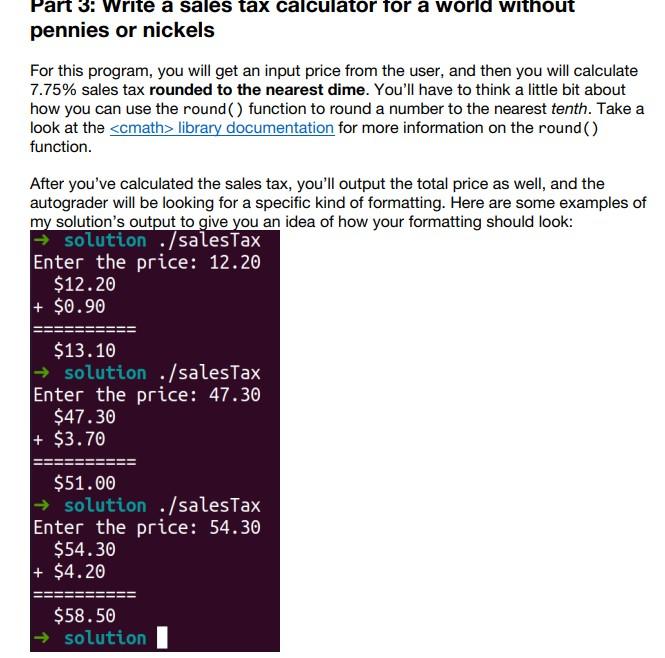
#include #include #include // for fixed #include // for setprecision using namespace std; int main() { double price; cout > price; // we're living in an alternate universe where there are no pennies or nickels, // so everything is rounded to the nearest 10 cents // Your program will calculate 7.75% tax, *rounded to the nearest dime* // Come to office hours and I'll give you a hint! // FIXME: print the following on separate lines // (all #s rounded to the nearest 2 decimal places): // 1. the price // 2. the (rounded) sales tax calculated for the price, with a '+' at the front // 3. a line with 10 '=' characters // 4. the total price // // Some of these lines will begin with a space or a '+' character--see the example // in the write-up. return 0; } Part 3: Write a sales tax calculator for a world without pennies or nickels For this program, you will get an input price from the user, and then you will calculate 7.75% sales tax rounded to the nearest dime. You'll have to think a little bit about how you can use the round() function to round a number to the nearest tenth. Take a look at the
Step by Step Solution
There are 3 Steps involved in it

Get step-by-step solutions from verified subject matter experts
 Study Help