







Question: In C++ Incorporates nested loops, data validation, arithmetic expressions, and simple input/output functions into one program - Do NOT use arrays or functions int main()
In C++
Incorporates nested loops, data validation, arithmetic expressions, and simple input/output functions into one program -
Do NOT use arrays or functions
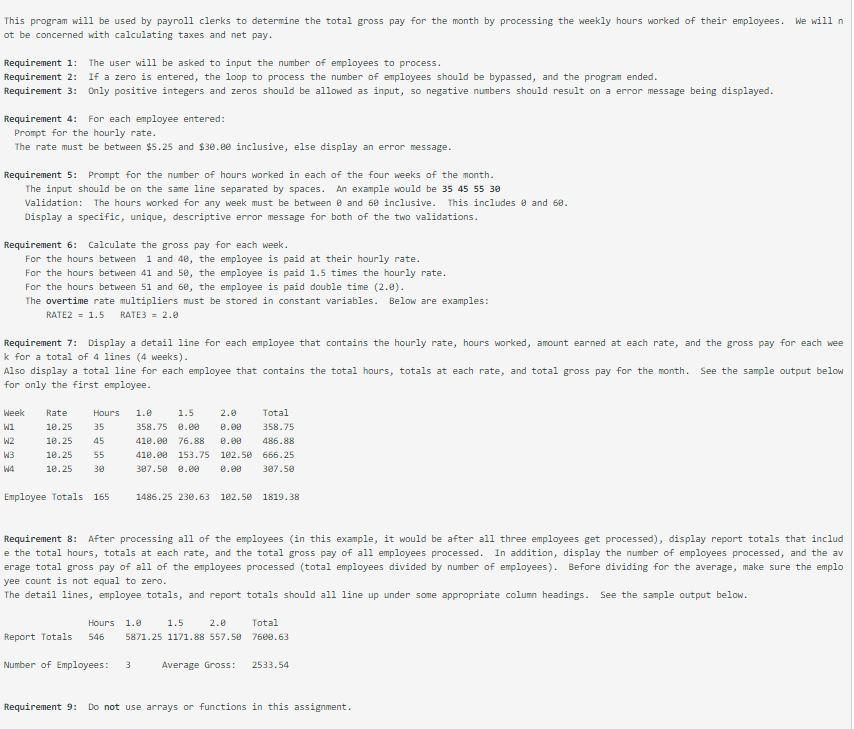
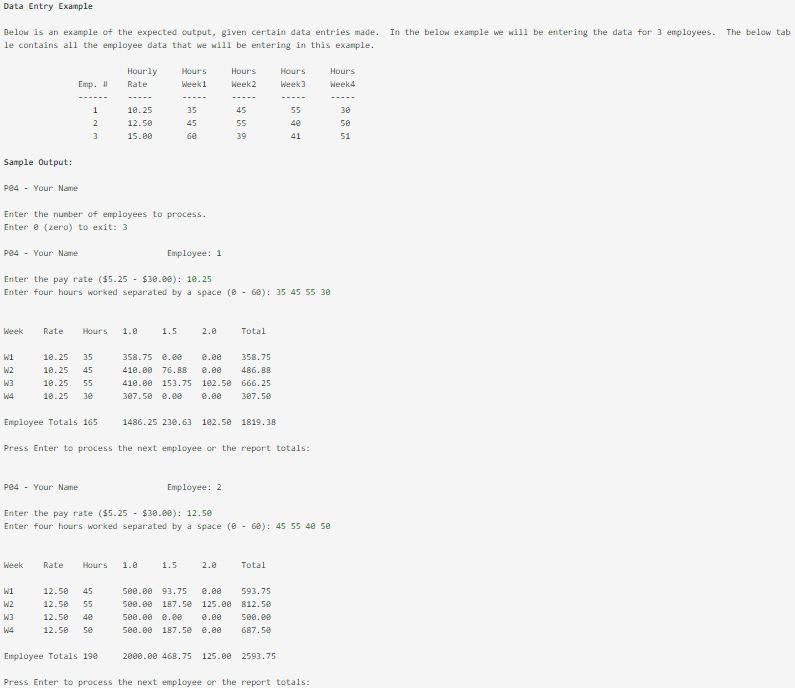
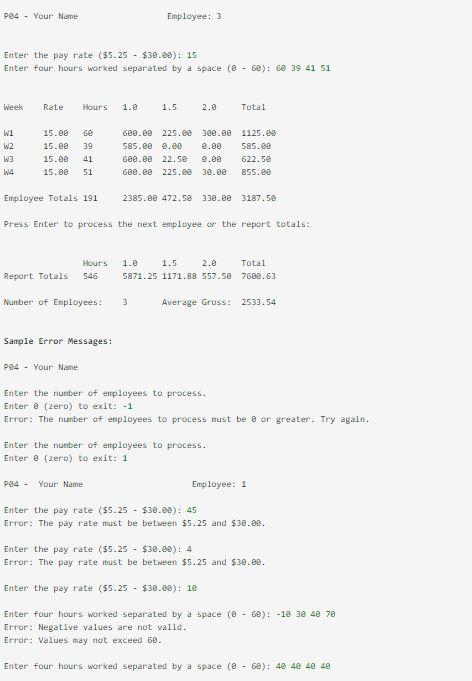
int main() { //declare constants //declare variables (see below) //initialize accumulators to zero cout Report Layout: Not all required variables are represented in layout. Week Rate Hours 1.0 1.5 2.0 Total W1 rate w1Hours w1Pay1 w1Pay2 w1Pay3 w1Total W2 rate w2Hours w2Pay1 w2Pay2 w2Pay3 w2Total W3 rate w3Hours w3Pay1 w3Pay2 w3Pay3 w3Total W4 rate w4Hours w4Pay1 w4Pay2 w4Pay3 w4Total Employee totals: empHours empPay1 empPay2 empPay3 empTotal Report totals: reportHours reportPay1 reportPay2 reportPay3 reportTotal empCount empAverage Calculate pay: //Note, you will have to create four of these pay calculation formulas, one for each week W1, W2, W3, and W4. //Week1 if (w1Hours This program will be used by payroll clerks to determine the total gross pay for the month by processing the weekly hours worked of their employees. We will n ot be concerned with calculating taxes and net pay. Requirement 1: The user will be asked to input the number of employees to process. Requirement 2: If a zero is entered, the loop to process the number of employees should be bypassed, and the program ended. Requirement 3: Only positive integers and zeros should be allowed as input, so negative numbers should result on a error message being displayed. Requirement 4: For each employee entered: Prompt for the hourly rate. The rate must be between $5.25 and $30.00 inclusive, else display an error message. Requirement 5: Prompt for the number of hours worked in each of the four weeks of the month. The input should be on the same line separated by spaces. An example would be 35 45 55 30 Validation: The hours worked for any week must be between 0 and 6e inclusive. This includes 8 and 68. Display a specific, unique, descriptive error message for both of the two validations. Requirement 6: Calculate the gross pay for each week. For the hours between 1 and 4e, the employee is paid at their hourly rate. For the hours between 41 and 5e, the employee is paid 1.5 times the hourly rate. For the hours between 51 and 6e, the employee is paid double time (2.0). The overtime rate multipliers must be stored in constant variables. Below are examples: RATE2 = 1.5 RATE3 = 2.0 Requirement 7: Display a detail line for each employee that contains the hourly rate, hours worked, amount earned at each rate, and the gross pay for each wee k for a total of 4 lines (4 weeks). Also display a total line for each employee that contains the total hours, totals at each rate, and total gross pay for the month. See the sample output below for only the first employee. Week wi W2 W3 WA Rate 18.25 10.25 10.25 10.25 Hours 35 45 55 30 1.2 1.5 2.8 Total 358.75 0.88 8.00 358.75 41e.ee 76.88 0.08 486.88 419.00 153.75 102.50 656.25 387.50 8.00 3.09 307.50 Employee Totals 165 1486.25 230.63 102.50 1819.38 Requirement 8: After processing all of the employees (in this example, it would be after all three employees get processed), display report totals that includ e the total hours, totals at each rate, and the total gross pay of all employees processed. In addition, display the number of employees processed, and the av erage total gross pay of all of the employees processed (total employees divided by number of employees). Before dividing for the average, make sure the emplo yee count is not equal to zero. The detail lines, employee totals, and report totals should all line up under some appropriate column headings. See the sample output below. Hours 546 1.9 1.5 2.8 Total 5871.25 1171.88 557.58 7668.63 Report Totals Number of Employees: 3 Average Gross: 2533.54 Requirement 9: Do not use arrays or functions in this assignment. Data Entry Example Below is an example of the expected output, given certain data entries made. In the below example we will be entering the data for 3 employees. The below tab le contains all the enployee data that we will be entering in this example. Hourly Rate Hours Week 1 Hours Week 2 Hours Week 3 Hours Week 4 Emp. 1 2 3 10.25 12.50 15.00 35 45 be 45 55 39 55 40 41 30 58 51 Sample Output: P94 - Your Name Enter the number of employees to process. Enter 2 (zero) to exit: 3 P04 - Your Name Employee: 1 Enter the pay rate ($5.25 - $38.80): 10.25 Enter four hours worked separated by a space (-60): 35 45 55 30 Week Rate Hours 1.8 1.5 2.0 Total W1 W2 W3 10.25 10.25 10.25 18.25 35 45 55 3e 358.75 0.20 418.00 76.88 418.00 153,75 307.50 8.00 8.80 358.75 8.00 486.88 102.50 666.25 e.se 387.58 W4 Employee Totals 165 1486.25 232.63 102.58 1819.36 Press Enter to process the next employee or the report totals: pe4 - Your Name Employee: 2 Enter the pay rate ($5.25 - $38.00): 12.50 Enter four hours worked separated by a space (0 - 60): 45 55 48 58 Week Rate Hours 1.8 1.5 Total W1 W2 W3 12.50 12.50 12.50 12.50 45 55 48 58 508.30 93.75 e.ee 593.75 588.00 187.50 125.ee 812.50 508.08 8.80 2.ee 500.00 588.68 187.50 0.00 687.50 W4 Employee Totals 190 2000.00 468.75 125.00 2593.75 Press Enter to process the next employee or the report totals: pe4 - Your Name Employee: 3 Enter the pay rate ($5.25 - $38.88): 15 Enter four hours worked separated by a space (-60): 69 39 41 51 Week Rate Hours 1.8 1.5 2.0 Total W1 W2 W3 15.00 15.89 15.00 15.00 39 41 51 688.00 225.ee 3e8.68 1125.00 585.00 8.00 8.00 585.89 680.00 22.50 e.ee 622.50 688.88 225.00 38.00 855.ee W4 Employee Totals 191 2385.00 472.50 338.80 3187.50 Press Enter to process the next employee or the report totals: 1.5 Hours 546 1.0 2.6 Total 5871.25 1171.88 557.50 7668.63 Report Totals Number of Employees: 3 Average Gross: 2533.54 Sample Error Messages: P94 - Your Name Enter the number of employees to process. Enter @ (zero) to exit: -1 Error: The number of employees to process must be 8 or greater. Try again. Enter the number of employees to process. Enter & (zero) to exit: 1 pe4 - Your Name Employee: 1 Enter the pay rate ($5.25 - $30.00): 45 Error: The pay rate must be between $5.25 and $38.88. Enter the pay rate ($5.25 - $38.00): 4 Error: The pay rate must be between $5.25 and $38.88. Enter the pay rate ($5.25 - $30.00): 10 Enter four hours worked separated by a space (0 - 60): -19 38 48 70 Error: Negative values are not valid. Error: Values may not exceed 60. Enter four hours worked separated by a space (-60): 49 48 48 48 Step by Step Solution
There are 3 Steps involved in it
1 Expert Approved Answer
Step: 1 Unlock

Question Has Been Solved by an Expert!
Get step-by-step solutions from verified subject matter experts
Step: 2 Unlock
Step: 3 Unlock
 Study Help