Question: IN C++ PLEASE! Lab Week 4 User Defined Functions and include files Skills Required Create Functions Include Headers and other files Loops (while, for), Conditional
IN C++ PLEASE!
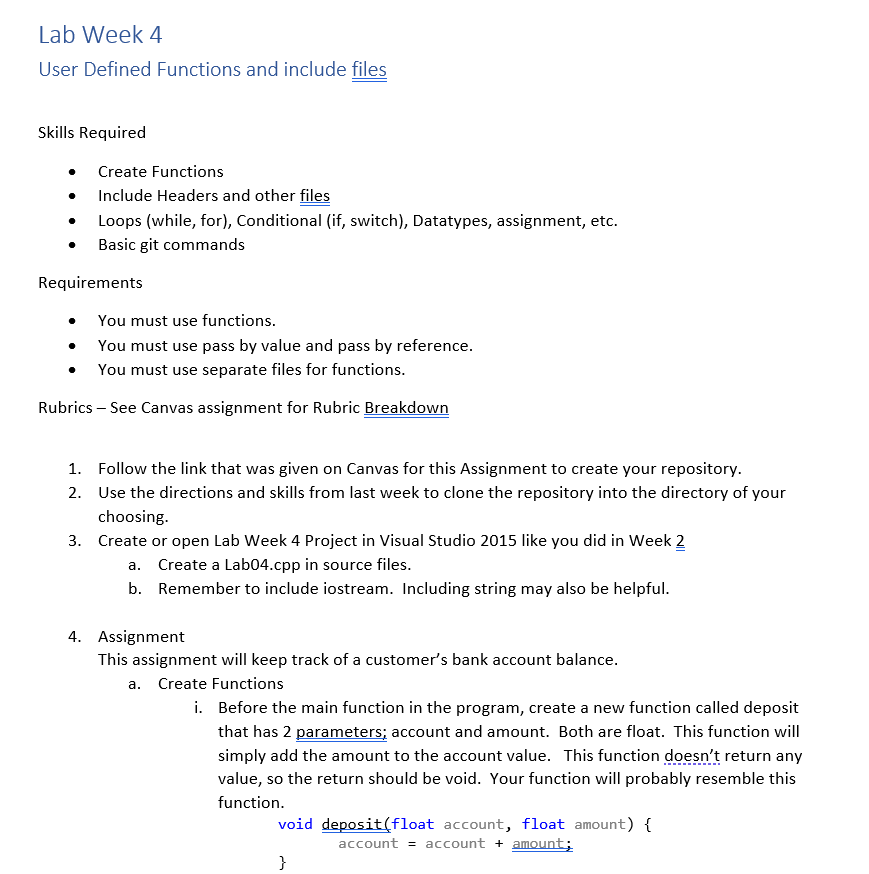
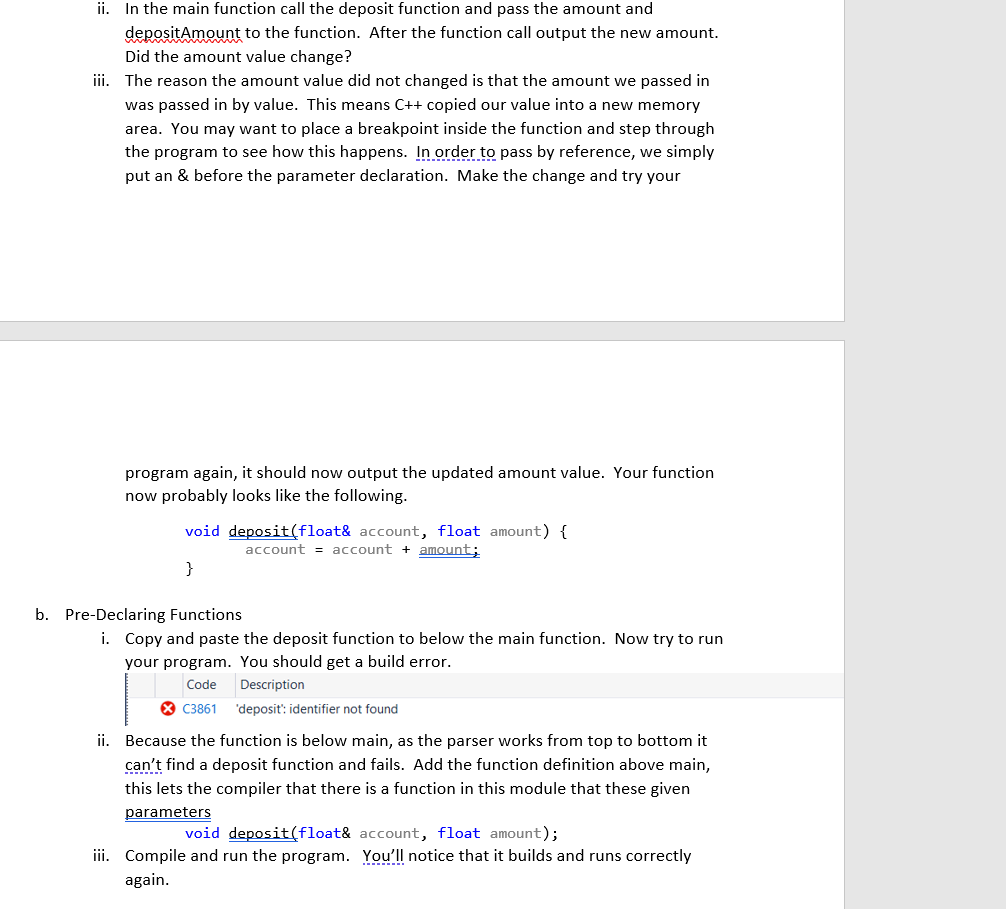
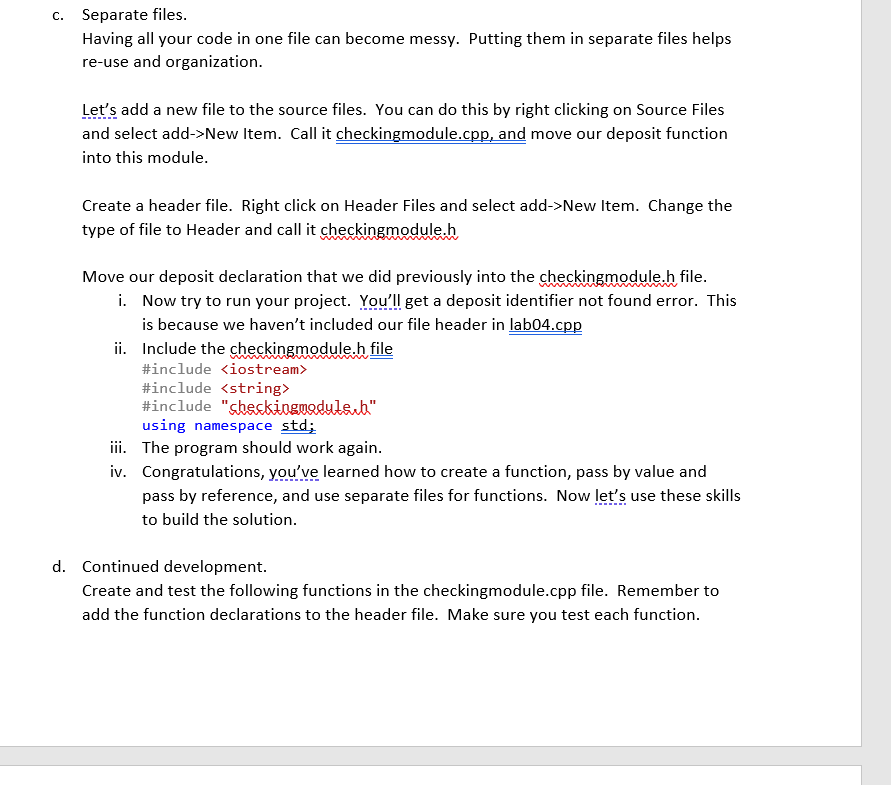
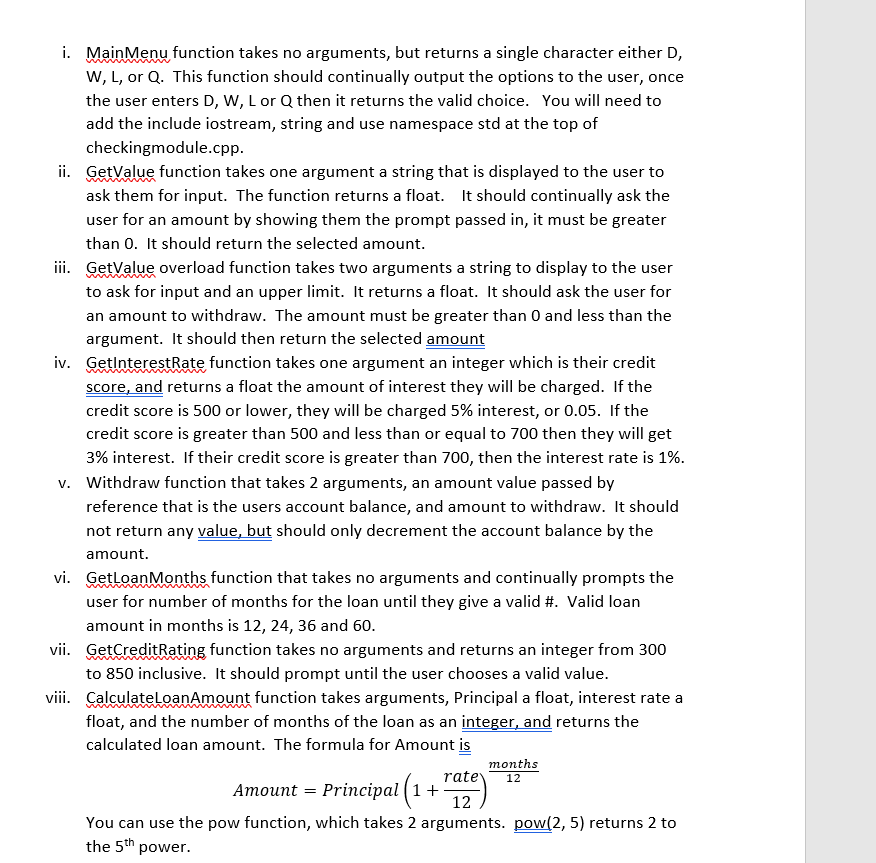
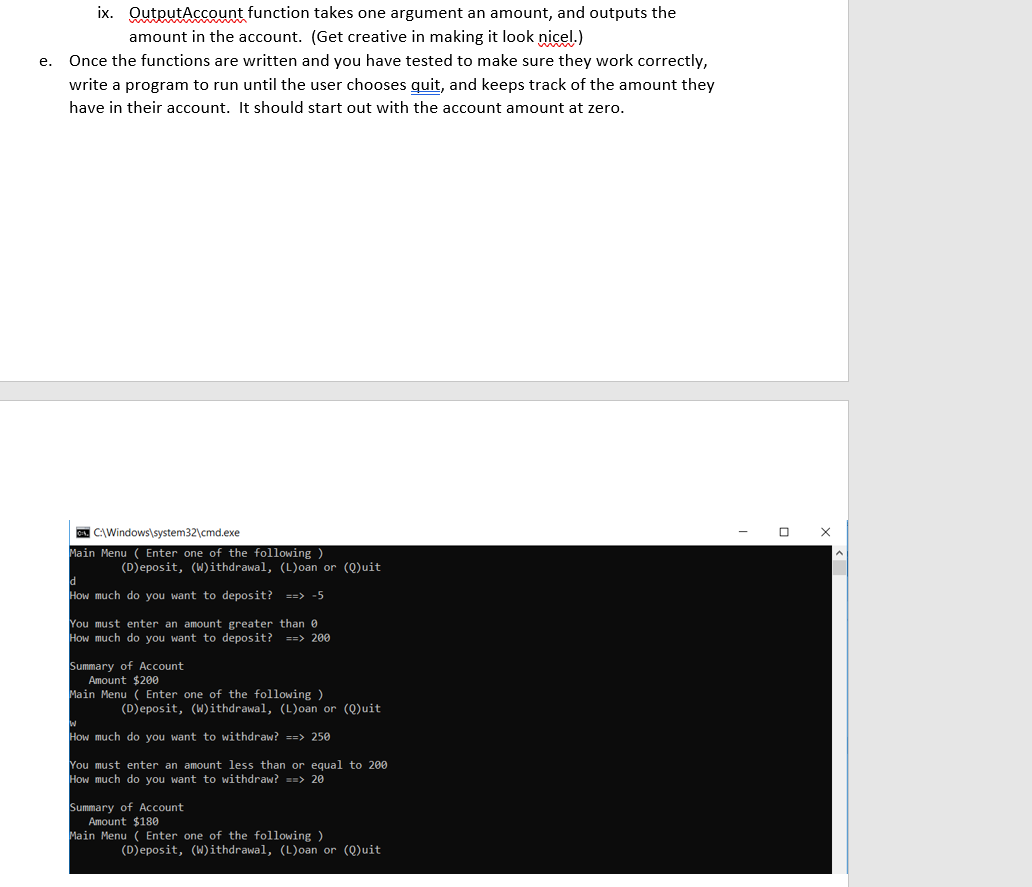
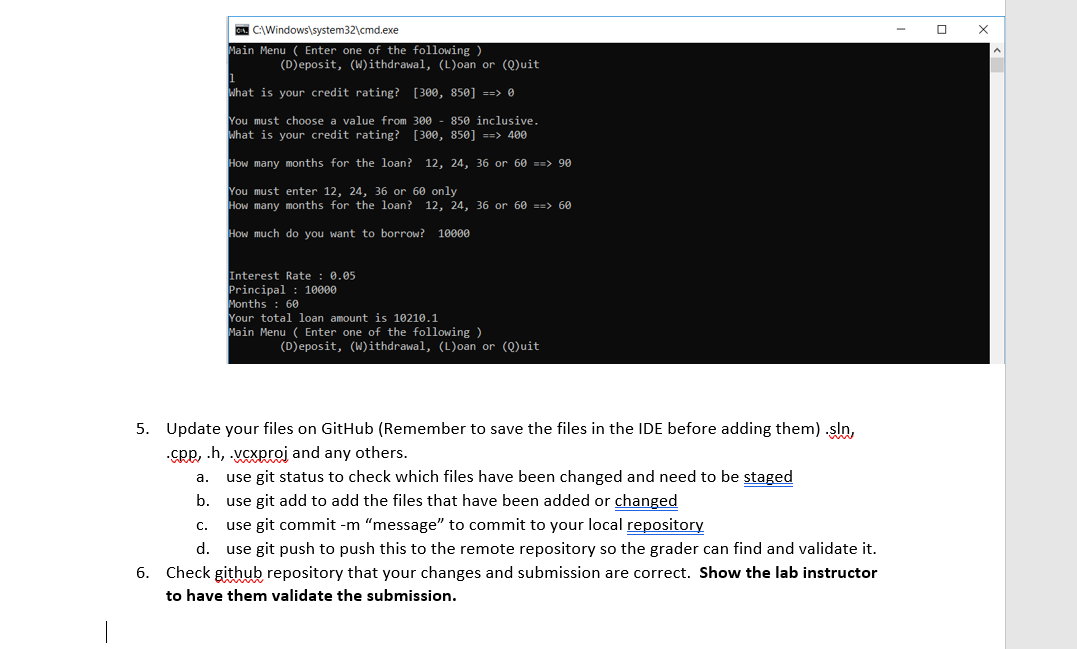
Lab Week 4 User Defined Functions and include files Skills Required Create Functions Include Headers and other files Loops (while, for), Conditional (if, switch), Datatypes, assignment, etc. Basic git commands Requirements You must use functions. You must use pass by value and pass by reference. You must use separate files for functions. . Rubrics - See Canvas assignment for Rubric Breakdown 1. Follow the link that was given on Canvas for this Assignment to create your repository. 2. Use the directions and skills from last week to clone the repository into the directory of your choosing. 3. Create or open Lab Week 4 Project in Visual Studio 2015 like you did in Week 2 a. Create a Lab04.cpp in source files. b. Remember to include iostream. Including string may also be helpful. 4. Assignment This assignment will keep track of a customer's bank account balance. a. Create Functions i. Before the main function in the program, create a new function called deposit that has 2 parameters; account and amount. Both are float. This function will simply add the amount to the account value. This function doesn't return any value, so the return should be void. Your function will probably resemble this function. void deposit (float account, float amount) { account = account + amount; } ii. In the main function call the deposit function and pass the amount and depositAmount to the function. After the function call output the new amount. Did the amount value change? iii. The reason the amount value did not changed is that the amount we passed in was passed in by value. This means C++ copied our value into a new memory area. You may want to place a breakpoint inside the function and step through the program to see how this happens. In order to pass by reference, we simply put an & before the parameter declaration. Make the change and try your program again, it should now output the updated amount value. Your function now probably looks like the following. void deposit(float& account, float amount) { account = account + amount; } b. Pre-Declaring Functions i. Copy and paste the deposit function to below the main function. Now try to run your program. You should get a build error. Description C3861 deposit: identifier not found Code ii. Because the function is below main, as the parser works from top to bottom it can't find a deposit function and fails. Add the function definition above main, this lets the compiler that there is a function in this module that these given parameters void deposit(float& account, float amount); iii. Compile and run the program. You'll notice that it builds and runs correctly again. C. Separate files. Having all your code in one file can become messy. Putting them in separate files helps re-use and organization. Let's add a new file to the source files. You can do this by right clicking on Source Files and select add->New Item. Call it checkingmodule.cpp, and move our deposit function into this module. Create a header file. Right click on Header Files and select add->New Item. Change the type of file to Header and call it checkingmodule.h Move our deposit declaration that we did previously into the checkingmodule.h file. i. Now try to run your project. You'll get a deposit identifier not found error. This is because we haven't included our file header in labo4.cpp ii. Include the checkingmodule.h file #include #include #include "checkingmodule" using namespace std; iii. The program should work again. iv. Congratulations, you've learned how to create a function, pass by value and pass by reference, and use separate files for functions. Now let's use these skills to build the solution. d. Continued development. Create and test the following functions in the checkingmodule.cpp file. Remember to add the function declarations to the header file. Make sure you test each function. i. Main Menu function takes no arguments, but returns a single character either D, W, L, or Q. This function should continually output the options to the user, once the user enters D, W, L or Q then it returns the valid choice. You will need to add the include iostream, string and use namespace std at the top of checkingmodule.cpp. ii. GetValue function takes one argument a string that is displayed to the user to ask them for input. The function returns a float. It should continually ask the user for an amount by showing them the prompt passed in, it must be greater than 0. It should return the selected amount. iii. GetValue overload function takes two arguments a string to display to the user to ask for input and an upper limit. It returns a float. It should ask the user for an amount to withdraw. The amount must be greater than 0 and less than the argument. It should then return the selected amount iv. GetInterestRate function takes one argument an integer which is their credit score, and returns a float the amount of interest they will be charged. If the credit score is 500 or lower, they will be charged 5% interest, or 0.05. If the credit score is greater than 500 and less than or equal to 700 then they will get 3% interest. If their credit score is greater than 700, then the interest rate is 1%. v. Withdraw function that takes 2 arguments, an amount value passed by reference that is the users account balance, and amount to withdraw. It should not return any value, but should only decrement the account balance by the amount. vi. GetLoan Months function that takes no arguments and continually prompts the user for number of months for the loan until they give a valid #. Valid loan amount in months is 12, 24, 36 and 60. vii. GetCreditRating function takes no arguments and returns an integer from 300 to 850 inclusive. It should prompt until the user chooses a valid value. viii. CalculateLoanAmount function takes arguments, Principal a float, interest rate a float, and the number of months of the loan as an integer, and returns the calculated loan amount. The formula for Amount is months rate Amount = Principal (1+! 12 You can use the pow function, which takes 2 arguments. pow(2,5) returns 2 to the 5th power. 12 e. ix. QutputAccount function takes one argument an amount, and outputs the amount in the account. (Get creative in making it look nicel.) Once the functions are written and you have tested to make sure they work correctly, write a program to run until the user chooses quit, and keeps track of the amount they have in their account. It should start out with the account amount at zero. C:\Windows\system32\cmd.exe Main Menu (Enter one of the following ) (Deposit, (W)ithdrawal, (L) oan or (0)uit d How much do you want to deposit? ==> -5 You must enter an amount greater than How much do you want to deposit? ==> 200 Summary of Account Amount $200 Main Menu ( Enter one of the following ) (Deposit, (Withdrawal, (L)oan or (Q)uit w How much do you want to withdraw? ==> 250 You must enter an amount less than or equal to 200 How much do you want to withdraw? ==> 20 Summary of Account Amount $180 Main Menu ( Enter one of the following ) (Deposit, (W) ithdrawal, (L)oan or (Quit X C:\Windows\system32\cmd.exe Main Menu ( Enter one of the following ) (Deposit, (W)ithdrawal, (L)oan or (Q)uit i What is your credit rating? [300, 850] ==> 0 You must choose a value from 300 850 inclusive. What is your credit rating? [300, 850] ==> 400 How many months for the loan? 12, 24, 36 or 60 ==> 90 You must enter 12, 24, 36 or 60 only How many months for the loan? 12, 24, 36 or 60 ==> 60 How much do you want to borrow? 10000 Interest Rate : 0.05 Principal : 10000 Months : 60 Your total loan amount is 10210.1 Main Menu ( Enter one of the following ) (Deposit, (W)ithdrawal, (L)oan or (Quit a. 5. Update your files on GitHub (Remember to save the files in the IDE before adding them) sin, .cpp, .h, . vexproj and any others. use git status to check which files have been changed and need to be staged b. use git add to add the files that have been added or changed use git commit -m "message" to commit to your local repository d. use git push to push this to the remote repository so the grader can find and validate it. 6. Check github repository that your changes and submission are correct. Show the lab instructor to have them validate the submission. C. Lab Week 4 User Defined Functions and include files Skills Required Create Functions Include Headers and other files Loops (while, for), Conditional (if, switch), Datatypes, assignment, etc. Basic git commands Requirements You must use functions. You must use pass by value and pass by reference. You must use separate files for functions. . Rubrics - See Canvas assignment for Rubric Breakdown 1. Follow the link that was given on Canvas for this Assignment to create your repository. 2. Use the directions and skills from last week to clone the repository into the directory of your choosing. 3. Create or open Lab Week 4 Project in Visual Studio 2015 like you did in Week 2 a. Create a Lab04.cpp in source files. b. Remember to include iostream. Including string may also be helpful. 4. Assignment This assignment will keep track of a customer's bank account balance. a. Create Functions i. Before the main function in the program, create a new function called deposit that has 2 parameters; account and amount. Both are float. This function will simply add the amount to the account value. This function doesn't return any value, so the return should be void. Your function will probably resemble this function. void deposit (float account, float amount) { account = account + amount; } ii. In the main function call the deposit function and pass the amount and depositAmount to the function. After the function call output the new amount. Did the amount value change? iii. The reason the amount value did not changed is that the amount we passed in was passed in by value. This means C++ copied our value into a new memory area. You may want to place a breakpoint inside the function and step through the program to see how this happens. In order to pass by reference, we simply put an & before the parameter declaration. Make the change and try your program again, it should now output the updated amount value. Your function now probably looks like the following. void deposit(float& account, float amount) { account = account + amount; } b. Pre-Declaring Functions i. Copy and paste the deposit function to below the main function. Now try to run your program. You should get a build error. Description C3861 deposit: identifier not found Code ii. Because the function is below main, as the parser works from top to bottom it can't find a deposit function and fails. Add the function definition above main, this lets the compiler that there is a function in this module that these given parameters void deposit(float& account, float amount); iii. Compile and run the program. You'll notice that it builds and runs correctly again. C. Separate files. Having all your code in one file can become messy. Putting them in separate files helps re-use and organization. Let's add a new file to the source files. You can do this by right clicking on Source Files and select add->New Item. Call it checkingmodule.cpp, and move our deposit function into this module. Create a header file. Right click on Header Files and select add->New Item. Change the type of file to Header and call it checkingmodule.h Move our deposit declaration that we did previously into the checkingmodule.h file. i. Now try to run your project. You'll get a deposit identifier not found error. This is because we haven't included our file header in labo4.cpp ii. Include the checkingmodule.h file #include #include #include "checkingmodule" using namespace std; iii. The program should work again. iv. Congratulations, you've learned how to create a function, pass by value and pass by reference, and use separate files for functions. Now let's use these skills to build the solution. d. Continued development. Create and test the following functions in the checkingmodule.cpp file. Remember to add the function declarations to the header file. Make sure you test each function. i. Main Menu function takes no arguments, but returns a single character either D, W, L, or Q. This function should continually output the options to the user, once the user enters D, W, L or Q then it returns the valid choice. You will need to add the include iostream, string and use namespace std at the top of checkingmodule.cpp. ii. GetValue function takes one argument a string that is displayed to the user to ask them for input. The function returns a float. It should continually ask the user for an amount by showing them the prompt passed in, it must be greater than 0. It should return the selected amount. iii. GetValue overload function takes two arguments a string to display to the user to ask for input and an upper limit. It returns a float. It should ask the user for an amount to withdraw. The amount must be greater than 0 and less than the argument. It should then return the selected amount iv. GetInterestRate function takes one argument an integer which is their credit score, and returns a float the amount of interest they will be charged. If the credit score is 500 or lower, they will be charged 5% interest, or 0.05. If the credit score is greater than 500 and less than or equal to 700 then they will get 3% interest. If their credit score is greater than 700, then the interest rate is 1%. v. Withdraw function that takes 2 arguments, an amount value passed by reference that is the users account balance, and amount to withdraw. It should not return any value, but should only decrement the account balance by the amount. vi. GetLoan Months function that takes no arguments and continually prompts the user for number of months for the loan until they give a valid #. Valid loan amount in months is 12, 24, 36 and 60. vii. GetCreditRating function takes no arguments and returns an integer from 300 to 850 inclusive. It should prompt until the user chooses a valid value. viii. CalculateLoanAmount function takes arguments, Principal a float, interest rate a float, and the number of months of the loan as an integer, and returns the calculated loan amount. The formula for Amount is months rate Amount = Principal (1+! 12 You can use the pow function, which takes 2 arguments. pow(2,5) returns 2 to the 5th power. 12 e. ix. QutputAccount function takes one argument an amount, and outputs the amount in the account. (Get creative in making it look nicel.) Once the functions are written and you have tested to make sure they work correctly, write a program to run until the user chooses quit, and keeps track of the amount they have in their account. It should start out with the account amount at zero. C:\Windows\system32\cmd.exe Main Menu (Enter one of the following ) (Deposit, (W)ithdrawal, (L) oan or (0)uit d How much do you want to deposit? ==> -5 You must enter an amount greater than How much do you want to deposit? ==> 200 Summary of Account Amount $200 Main Menu ( Enter one of the following ) (Deposit, (Withdrawal, (L)oan or (Q)uit w How much do you want to withdraw? ==> 250 You must enter an amount less than or equal to 200 How much do you want to withdraw? ==> 20 Summary of Account Amount $180 Main Menu ( Enter one of the following ) (Deposit, (W) ithdrawal, (L)oan or (Quit X C:\Windows\system32\cmd.exe Main Menu ( Enter one of the following ) (Deposit, (W)ithdrawal, (L)oan or (Q)uit i What is your credit rating? [300, 850] ==> 0 You must choose a value from 300 850 inclusive. What is your credit rating? [300, 850] ==> 400 How many months for the loan? 12, 24, 36 or 60 ==> 90 You must enter 12, 24, 36 or 60 only How many months for the loan? 12, 24, 36 or 60 ==> 60 How much do you want to borrow? 10000 Interest Rate : 0.05 Principal : 10000 Months : 60 Your total loan amount is 10210.1 Main Menu ( Enter one of the following ) (Deposit, (W)ithdrawal, (L)oan or (Quit a. 5. Update your files on GitHub (Remember to save the files in the IDE before adding them) sin, .cpp, .h, . vexproj and any others. use git status to check which files have been changed and need to be staged b. use git add to add the files that have been added or changed use git commit -m "message" to commit to your local repository d. use git push to push this to the remote repository so the grader can find and validate it. 6. Check github repository that your changes and submission are correct. Show the lab instructor to have them validate the submission. C









 Study Help