







Question: IN C + + PLZ Write a program to determine the time from a non - working LED alarm clock. A LED clock uses four
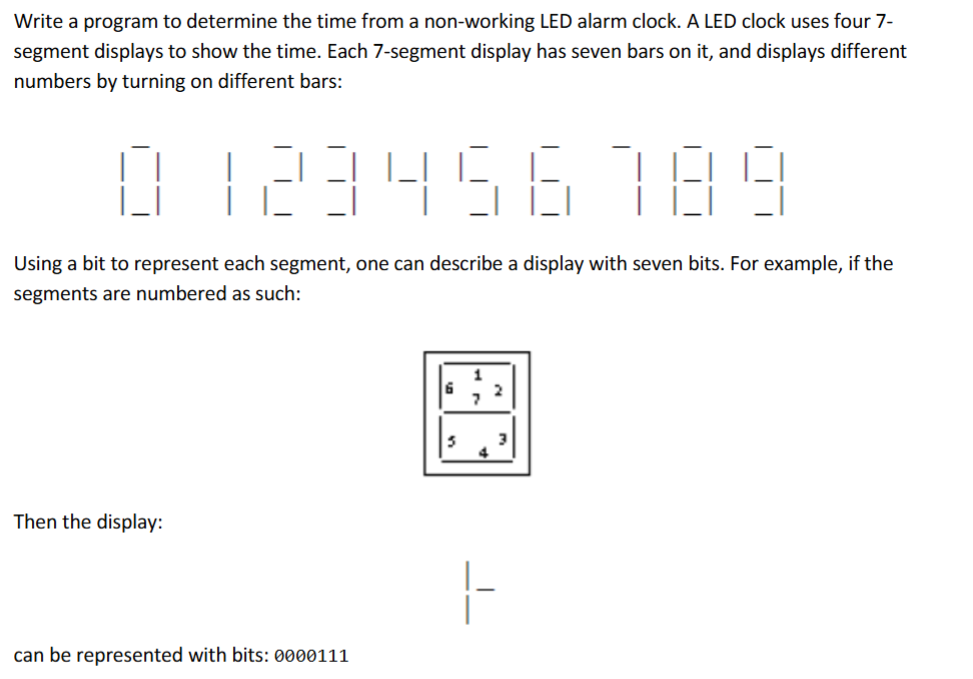
IN C PLZ Write a program to determine the time from a nonworking LED alarm clock. A LED clock uses four segment displays to show the time. Each segment display has seven bars on it and displays different numbers by turning on different bars:
Using a bit to represent each segment, one can describe a display with seven bits. For example, if the segments are numbered as such:
Then the display:
can be represented with bits:
The numbers in this problem are listed on
the table to the right. If a segment on the
display is "burnt out", however, it will not
display even though it should. For
example, if the number three were to be
displayed, but the segment corresponding
with bit were burnt out, the display
would instead be:
Input will be from a data file where the first line contains a single integer n in the range indicates
the number of data sets. For each data set there is a single line containing eight bit strings
representing the LED displays observed. The first four strings will represent the first time displayed and
the next four strings will represent the second time displayed. All the strings will be separated by a
single space and assume it is not given which segments are burnt out.
For each labeled data set, output to the screen the second time observed in the LED display, in
the format HH:MM The segments that are burnt out will be consistent between the first and second time
displayed. Assume there is only one possible solution for each data set, and all times for input and
output will be represented in standard nonmilitary format, with no leading zeros nine o'clock is
: not : Let the user input the file name from the keyboard. Finally, the program should ask if
the user wants to run the program again Check case Refer to the sample output below.
Sample File:
Sample Run:
Enter filename: ledclock.txt
Time : :
Time : :
Run again YN : n
Step by Step Solution
There are 3 Steps involved in it
1 Expert Approved Answer
Step: 1 Unlock

Question Has Been Solved by an Expert!
Get step-by-step solutions from verified subject matter experts
Step: 2 Unlock
Step: 3 Unlock
 Study Help