







Question: In C++ Program 8-1 Program 8-2 In this homework, we compare the scalability of sequential and binary search. Keeping data sorted often results in query
In C++
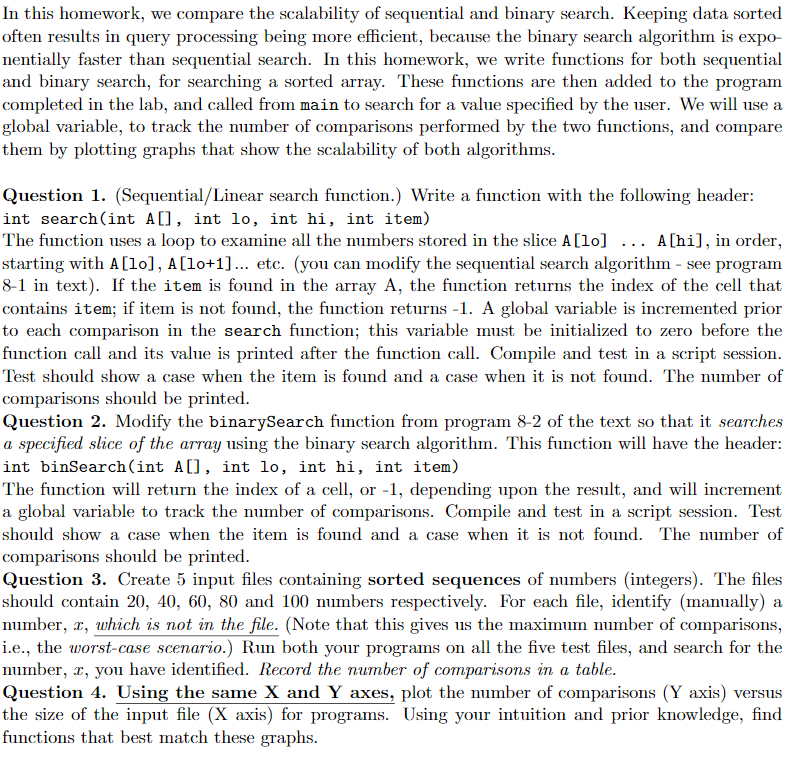
Program 8-1
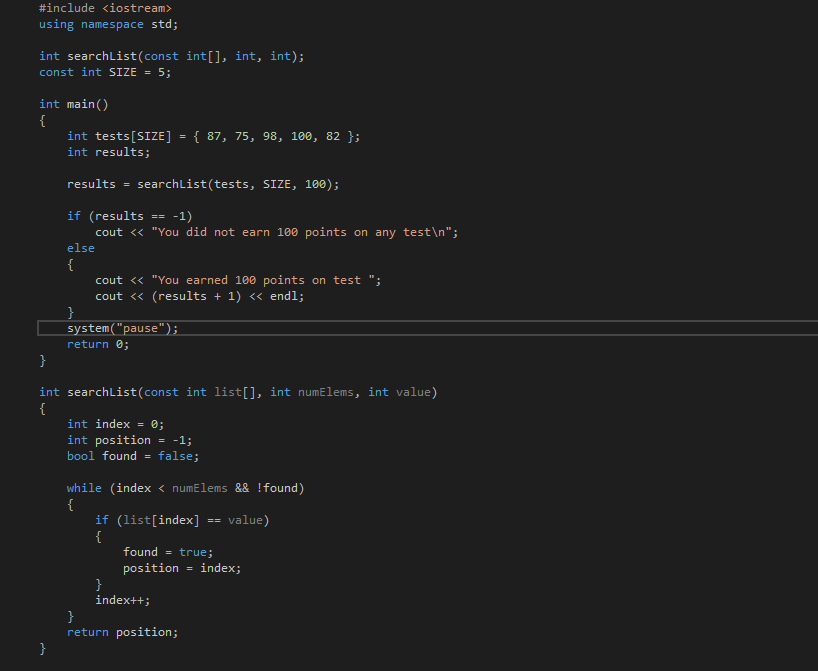
Program 8-2
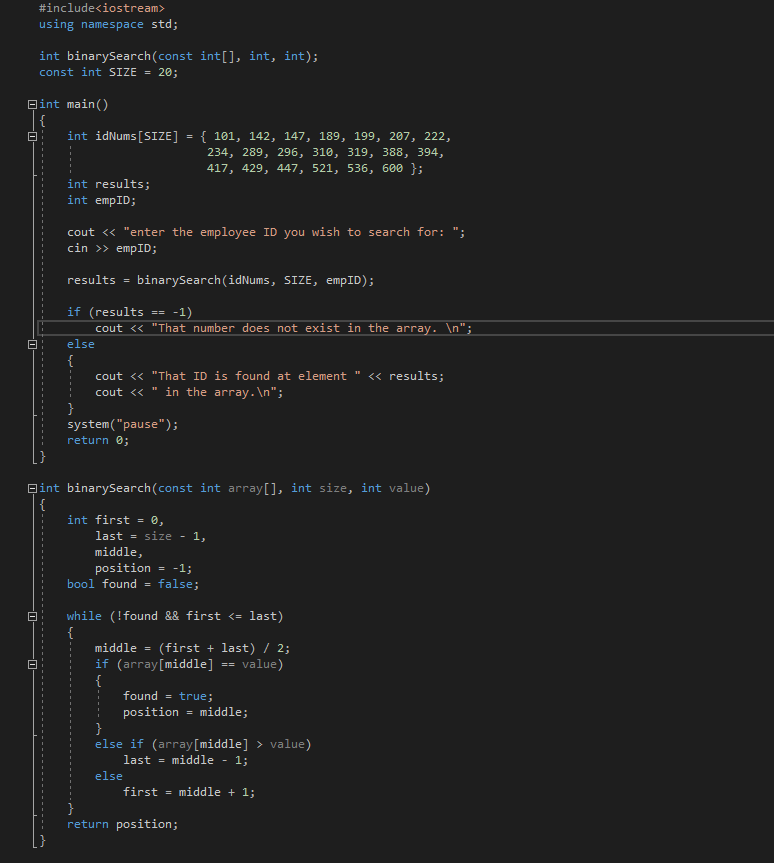
In this homework, we compare the scalability of sequential and binary search. Keeping data sorted often results in query processing being more efficient, because the binary search algorithm is expo- nentially faster than sequential search. In this homework, we write functions for both sequential and binary search, for searching a sorted array. These functions are then added to the program completed in the lab, and called from main to search for a value specified by the user. We will use a global variable, to track the number of comparisons performed by the two functions, and compare them by plotting graphs that show the scalability of both algorithms Question 1. (Sequential/Linear search function.) Write a function with the following header int search(int A[], int lo, int hi, int item) The function uses a loop to examine all the mbers stored in the slice A[lo] A[hi], in order, starting with A[lo], A[lo+1]... etc. (you can modify the sequential search algorithm - see program 8-1 in text). If the item is found in the array A, the function returns the index of the cell that contains item; if item is not found, the function returns -1. A global variable is incremented prior to each comparison in the search function; this variable must be initialized to zero before the function call and its value is printed after the function call. Compile and test in a script session Test should show a case when the item is found and a case when it is not found. The number of comparisons should be printed Question 2. Modify the binarySearch function from program 8-2 of the text so that it searches a specified slice of the array using the binary search algorithm. This function will have the header int binSearch(int A[], int lo, int hi, int item) The function will return the index of a cell, or -1, depending upon the result, and will increment a global variable to track the number of comparisons. Compile and test in a script session. Test should show a case when the item is found and a case when it is not found. The number of comparisons should be printed Question 3. Create 5 input files containing sorted sequences of numbers (integers). The files should contain 20, 40, 60, 80 and 100 numbers respectively. For each file, identify (manually) a number, x, which is not in the file. (Note that this gives us the maximum number of comparisons, i.e., the worst-case scenario.) Run both your programs on all the five test files, and search for the number. x, you have identified. Record the number of comparisons in a table. Question 4. Using the same X and Y axes, plot the number of comparisons (Y axis) versus the size of the input file (X axis) for programs. Using your intuition and prior knowledge, find functions that best miatch these graphs In this homework, we compare the scalability of sequential and binary search. Keeping data sorted often results in query processing being more efficient, because the binary search algorithm is expo- nentially faster than sequential search. In this homework, we write functions for both sequential and binary search, for searching a sorted array. These functions are then added to the program completed in the lab, and called from main to search for a value specified by the user. We will use a global variable, to track the number of comparisons performed by the two functions, and compare them by plotting graphs that show the scalability of both algorithms Question 1. (Sequential/Linear search function.) Write a function with the following header int search(int A[], int lo, int hi, int item) The function uses a loop to examine all the mbers stored in the slice A[lo] A[hi], in order, starting with A[lo], A[lo+1]... etc. (you can modify the sequential search algorithm - see program 8-1 in text). If the item is found in the array A, the function returns the index of the cell that contains item; if item is not found, the function returns -1. A global variable is incremented prior to each comparison in the search function; this variable must be initialized to zero before the function call and its value is printed after the function call. Compile and test in a script session Test should show a case when the item is found and a case when it is not found. The number of comparisons should be printed Question 2. Modify the binarySearch function from program 8-2 of the text so that it searches a specified slice of the array using the binary search algorithm. This function will have the header int binSearch(int A[], int lo, int hi, int item) The function will return the index of a cell, or -1, depending upon the result, and will increment a global variable to track the number of comparisons. Compile and test in a script session. Test should show a case when the item is found and a case when it is not found. The number of comparisons should be printed Question 3. Create 5 input files containing sorted sequences of numbers (integers). The files should contain 20, 40, 60, 80 and 100 numbers respectively. For each file, identify (manually) a number, x, which is not in the file. (Note that this gives us the maximum number of comparisons, i.e., the worst-case scenario.) Run both your programs on all the five test files, and search for the number. x, you have identified. Record the number of comparisons in a table. Question 4. Using the same X and Y axes, plot the number of comparisons (Y axis) versus the size of the input file (X axis) for programs. Using your intuition and prior knowledge, find functions that best miatch these graphs
Step by Step Solution
There are 3 Steps involved in it

Get step-by-step solutions from verified subject matter experts
 Study Help