







Question: In C# Project 3 - 2 Assign tickets with time slots For this project, you'll develop an app that assigns tickets that include a time
In C# Project Assign tickets with time slots
For this project, you'll develop an app that assigns tickets that include a time slot when a guest can return to visit an attraction without waiting in line.
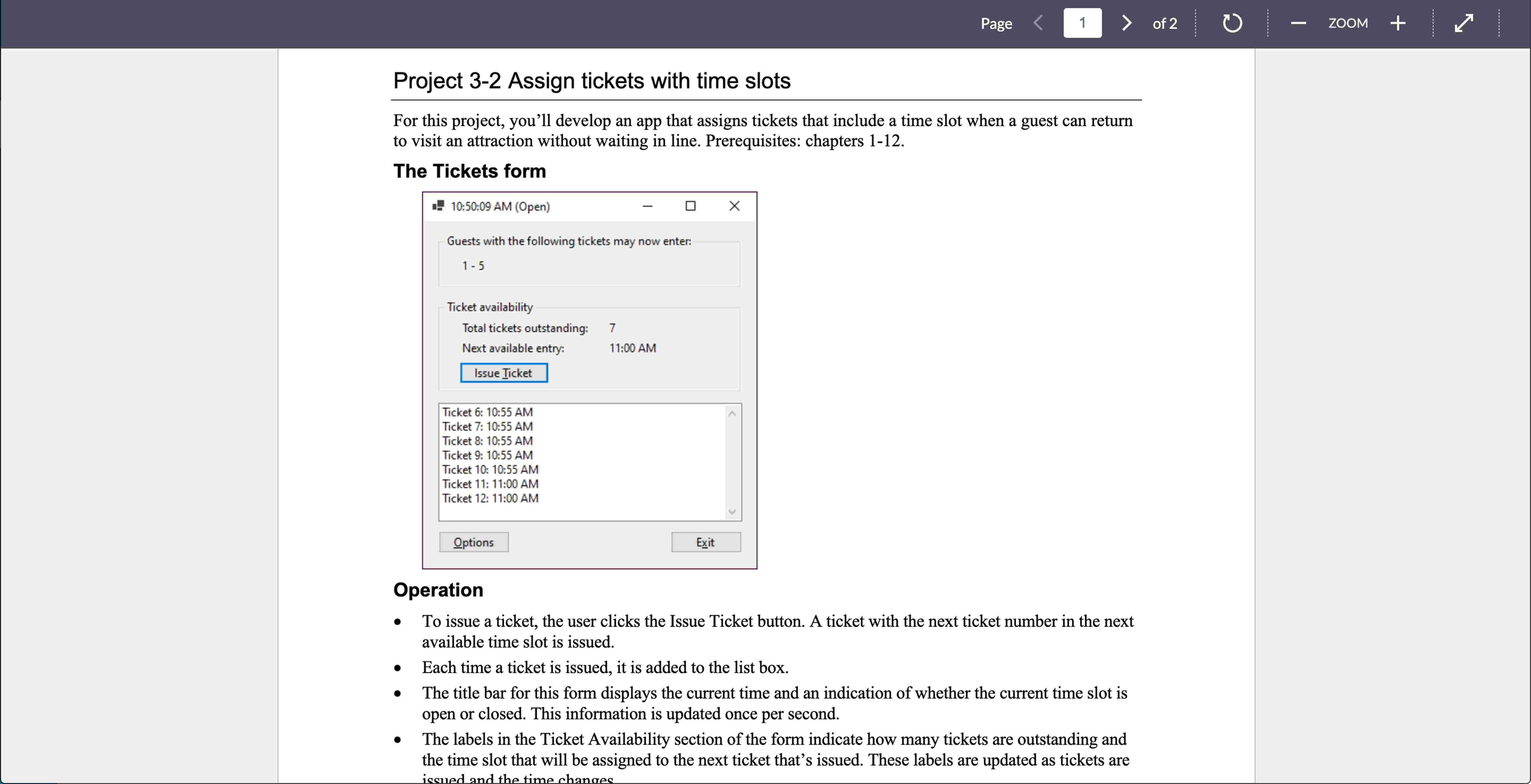
The Tickets form
Operation
To issue a ticket, the user clicks the Issue Ticket button. A ticket with the next ticket number in the next
available time slot is issued.
Each time a ticket is issued, it is added to the list box.
The title bar for this form displays the current time and an indication of whether the current time slot is
open or closed. This information is updated once per second.
The labels in the Ticket Availability section of the form indicate how many tickets are outstanding and
the time slot that will be assigned to the next ticket that's issued. These labels are updated as tickets are
Ticket : : AM
Ticket : : AM
Ticket : : AM
Ticket : : AM
Ticket : : AM
Ticket : : AM
Ticket : : AM
Options
Exit
Operation
To issue a ticket, the user clicks the Issue Ticket button. A ticket with the next ticket number in the next
available time slot is issued.
Each time a ticket is issued, it is added to the list box.
The title bar for this form displays the current time and an indication of whether the current time slot is
open or closed. This information is updated once per second.
The labels in the Ticket Availability section of the form indicate how many tickets are outstanding and
the time slot that will be assigned to the next ticket that's issued. These labels are updated as tickets are
issued and the time changes.
When a time slot begins, any outstanding tickets for that time slot are removed from the list box and the
beginning and ending ticket numbers assigned to that slot are displayed in the label inside the group box
at the top of the form.
To change the options for issuing tickets, the user clicks the Options button. Before the Options dialog
is displayed, a dialog is displayed that warns the user that all outstanding tickets will be deleted and
confirms that the user wants to continue.
The Options form
Operation
The user can enter values into the Options dialog to specify the number of minutes for each time slot,
the number of guests allowed into the attraction during each time slot, the time the attraction opens, the
time the attraction closes, and the number for the first ticket. The defaults are five minutes per time slot,
five guests per time slot, a start time of the current time, an end time of four hours after the current time,
and an initial ticket number of
When the user clicks the OK button, the Tickets form is displayed.
Specifications
Use a Timer control to display the current time in the title bar of the main form and to determine the
current time slot.
When the app starts, it should display the Options dialog from the Load event handler for the Tickets
form. For this to work without an exception being thrown, you'll need to disable the Timer control until
the Options dialog is completed.
The data the user enters in the Options dialog should be validated to be sure that the minutes per time
slot, guests per time slot, and first ticket number are integers; that the start and end times are DateTime
values; and that the difference between the start time and the end time provides for at least two time
slots.
Create a class that represents a time slot for assigning tickets. This class should have public properties
that indicate the time the time slot begins, the length of the time slot, and the number of tickets that have
Operation
The user can enter values into the Options dialog to specify the number of minutes for each time slot,
the number of guests allowed into the attraction during each time slot, the time the attraction opens, the
time the attraction closes, and the number for the first ticket. The defaults are five minutes per time slot,
five guests per time slot, a start time of the current time, an end time of four hours after the current time,
and an initial ticket number of
When the user clicks the OK button, the Tickets form is displayed.
Specifications
Use a Timer control to display the current time in the title bar of the main form and to determine the
current time slot.
When the app starts, it should display the Options dialog from the Load event handler for the Tickets
form. For this to work without an exception being thrown, you'll need to disable the Timer control until
the Options dialog is completed.
The data the user enters in the Options dialog should be validated to be sure that the minutes per time
slot, guests per time slot, and first ticket number are integers; that the start and end times are DateTime
values; and that the difference between the start time and the end time provides for at least two time
slots.
Create a class that represents a time slot for assigning tickets. This class should have public properties
that indicate the time the time slot begins, the length of the time slot, and the number
Step by Step Solution
There are 3 Steps involved in it
1 Expert Approved Answer
Step: 1 Unlock

Question Has Been Solved by an Expert!
Get step-by-step solutions from verified subject matter experts
Step: 2 Unlock
Step: 3 Unlock
 Study Help