







Question: in C++ Q4: Continue with Word class: a) Copy the previous program to a new file. b) Overload the operator + to output Word objects,
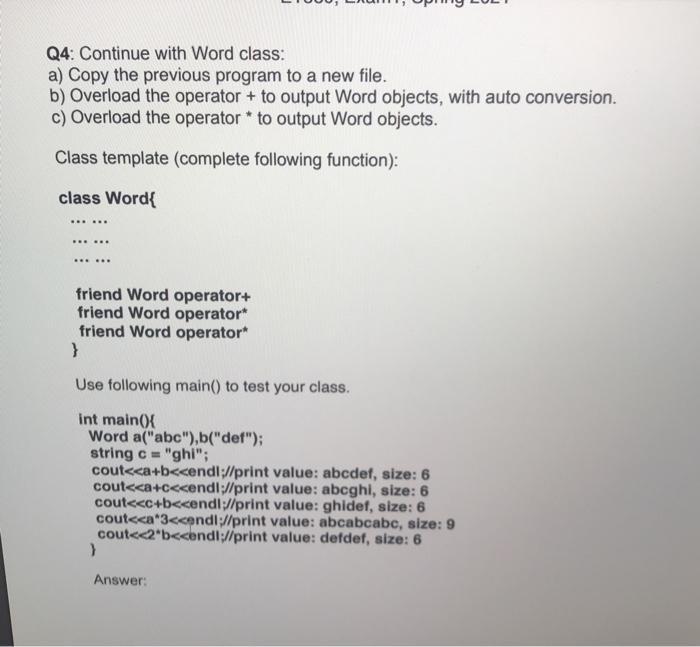
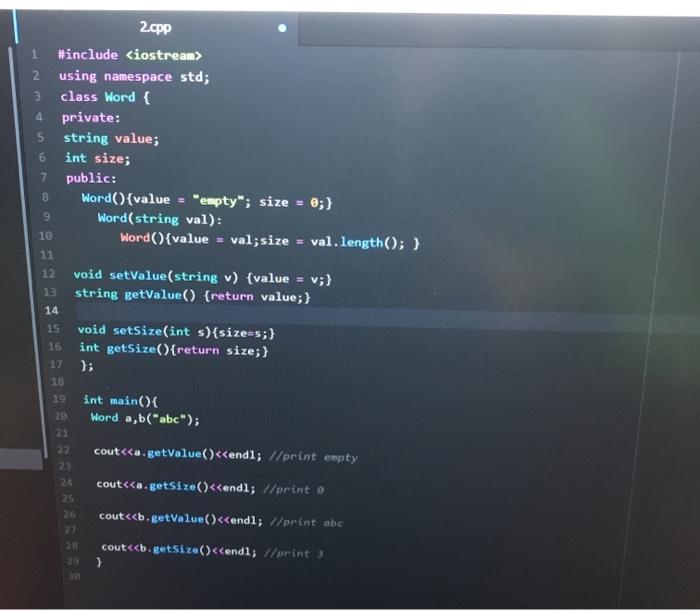
Q4: Continue with Word class: a) Copy the previous program to a new file. b) Overload the operator + to output Word objects, with auto conversion. c) Overload the operator * to output Word objects. Class template (complete following function): class Word{ - friend Word operator+ friend Word operator* friend Word operator* } Use following main() to test your class. int main(){ Word a("abc"),b("def"); string c = "ghi"; cout Answer: 7 CO 10 2.cpp 1 #include
Step by Step Solution
There are 3 Steps involved in it

Get step-by-step solutions from verified subject matter experts
 Study Help