







Question: In C sharp Word File Edit View Insert Format Font Tools Table Window Help e 4)) 70%-), Fri Sep 29 11:08:07 PM a e IT
In C sharp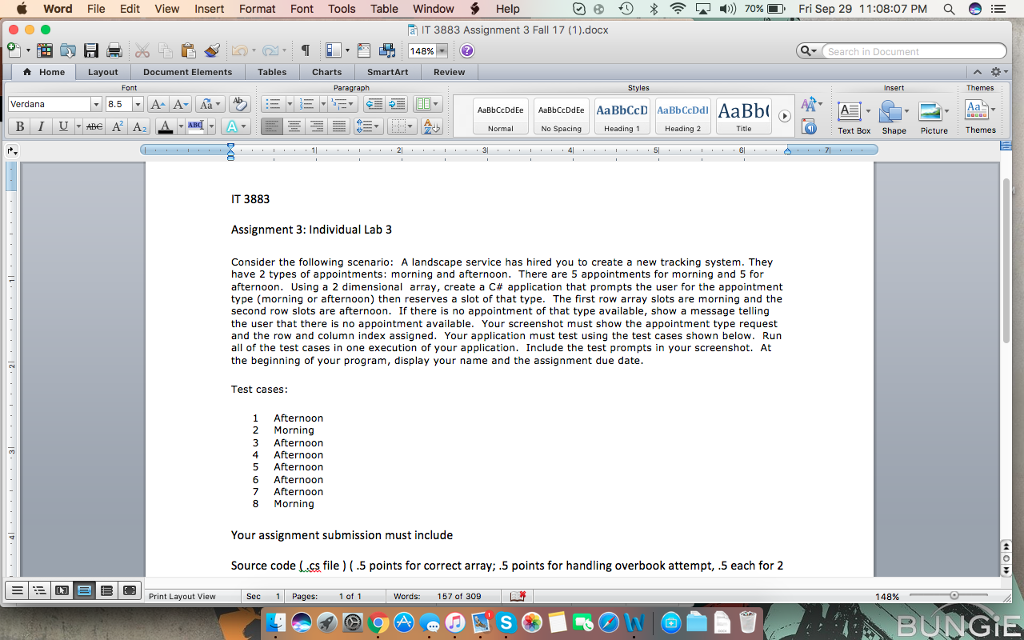
Word File Edit View Insert Format Font Tools Table Window Help e 4)) 70%-), Fri Sep 29 11:08:07 PM a e IT 3883 Assignment 3 Fall 1 7 (1 ).docx 148% Search in Document Home Layout Document Elements Tables | Charts SmartArt Review Font Paragraph Styles Themes Verdana 10 De ABbcDdEe AaBbCcD AaBbCcDd AaBb No Spacing Heading Heading 2 Text Box Shape Picture Themes T 3883 Assignment 3: Individual Lab 3 Consider the following scenario: A landscape service has hired you to create a new tracking system. They have 2 types of appointments: morning and afternoon. There are 5 appointments for morning and 5 for afternoon. Using a 2 dimensional array, create a C# application that prompts the user for the appointment type (morning or afternoon) then reserves a slot of that type. The first row array slots are morning and the second row slots are afternoon. If there is no appointment of that type available, show a message telling the user that there is no appointment available. Your screenshot must show the appointment type request and the row and column index assigned. Your application must test using the test cases shown below. Run all of the test cases in one execution of your application. Include the test prompts in your screenshot. At the beginning of your program, display your name and the assignment due date. Test cases: 1 Afternoon 2 Morning 3 Afternoon 4 Afternoon 5 Afternoon 6 Afternoon 7 Afternoon 8 Morning Your assignment submission must include Source code (cs file) (.5 points for correct array: .5 points for handling overbook attempt, .5 each for 2 Print Layout View Sec 11 Pages: 1011 words: 157 of 309 148% BUNGE
Step by Step Solution
There are 3 Steps involved in it

Get step-by-step solutions from verified subject matter experts
 Study Help