







Question: in c# visual studio We want a program which will keep track of a list of students and their grades. The program will use a
in c# visual studio
We want a program which will keep track of a list of students and their grades. The program will use a array (or a list) of structures. The structure will contain the student name and the number of points earned and points possible for each of 3 tests. The program has text boxes for the student name and the points earned and points possible for each of 3 tests. It has 4 buttons marked Clear New, Find, and Update.
The Clear button will empty the text boxes for the student name and the points earned and points possible.
When the program begins the Update and Find buttons are disabled. The user must enter data and click the New button. This will copy the data into a structure in the array (or into a structure which is added to the list) and add the name to the list box. It will enable the Update and Find buttons.
When the Find button is clicked, the program checks to make sure that a name is selected in the list box. If there is, the program will find the structure with that name (or with a subscript corresponding to that selected item number) and show that data in the text boxes.
When the user clicks the Update button, the program will copy the information from the text boxes into the instance of the structure that corresponds to the item selected in the list box. At this point all of the buttons will be enabled. If you wish to allow for the user changing the name of a student, you will also have to make provision for changing the item in the list box which corresponds to the selected index. Please post design and designer code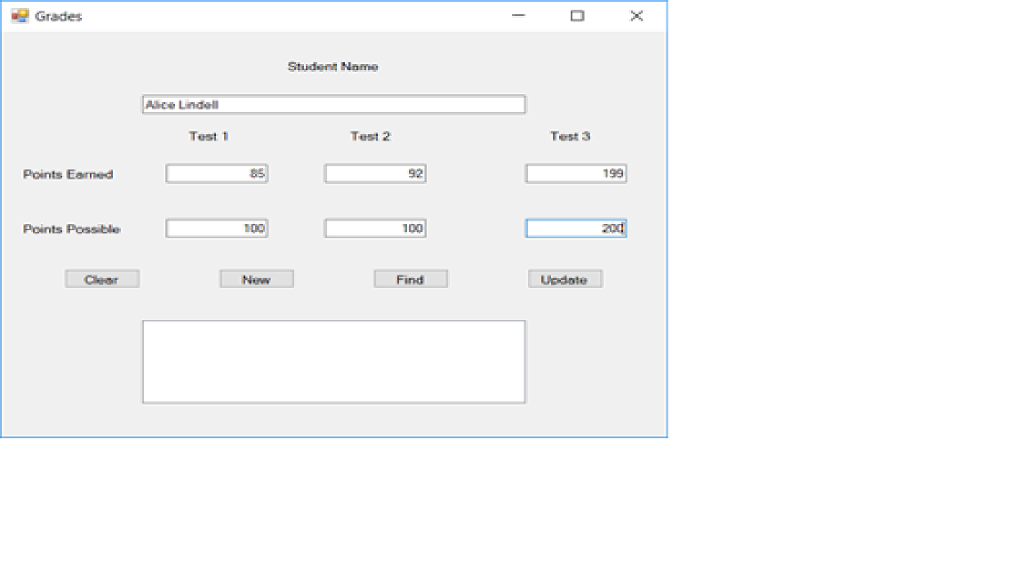
Grades Studen Name Alice Lindall Test 1 Test 2 Test 3 Points Earned 92 199 Points Possible 100 2od 0O Cear Find Update
Step by Step Solution
There are 3 Steps involved in it

Get step-by-step solutions from verified subject matter experts
 Study Help