







Question: In c++. You will have to create 3 files: main.cpp, maze.h, maze.cpp Create a maze generator where you ask the user for the number of
In c++. You will have to create 3 files: main.cpp, maze.h, maze.cpp
Create a maze generator where you ask the user for the number of rows and columns and a random seed generator.
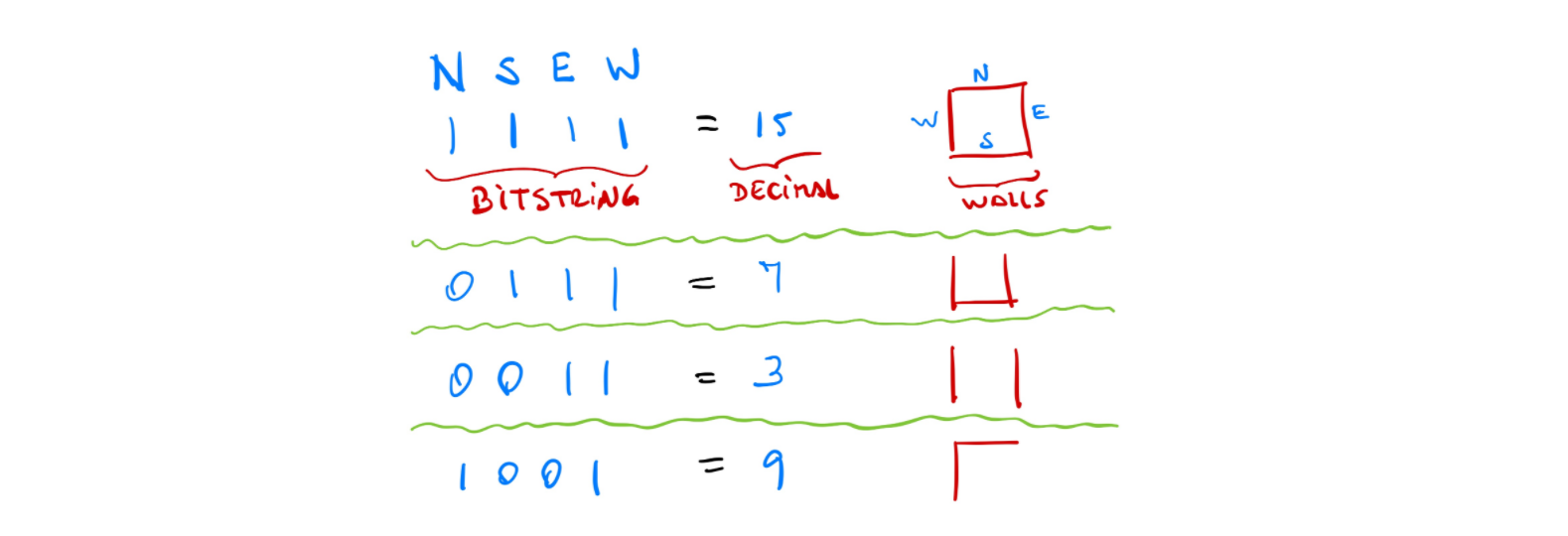
The file format for saving the maze is a two dimensional array of integers, where each integer is used to represent a cell and its walls. Each integer in the matrix ranges from 0 to 15. The idea behind this representation is that the walls are encoded using 4 bits (a nibble), and the integers are their corresponding values in decimal notation. The figure below illustrates the encoding, with 4 of the possible 16 possibilities.
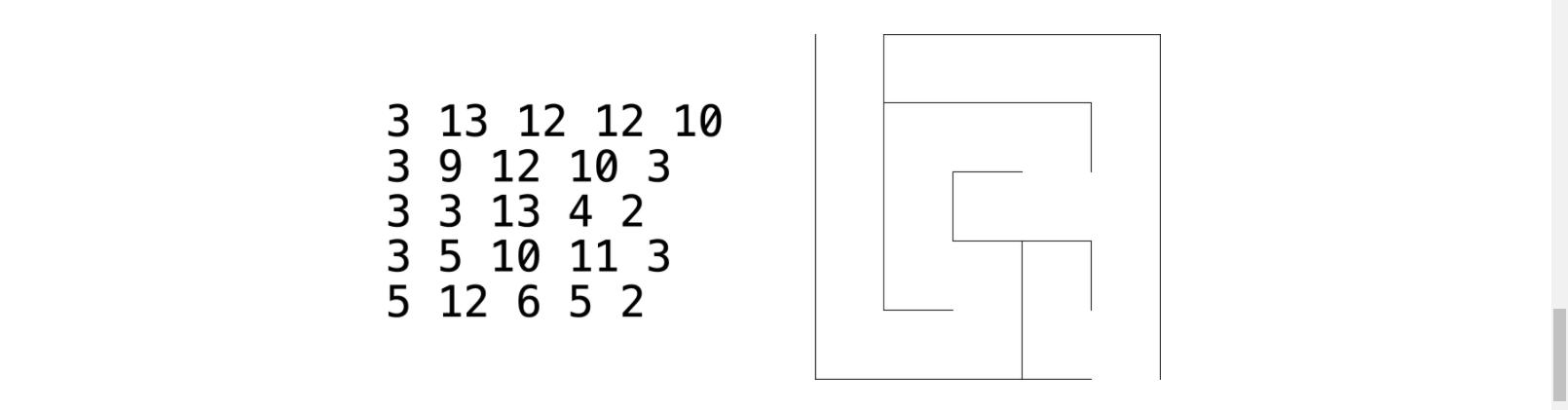
 When saving the grid, the output file must be a text file in which cell values are separated by a single whitespace, and organized in n rows and m columns (the grid dimensions). In the example below Is shows the output textfile and what it visually would look like
The main would need to be able to ask the user the following things
the seed value for the random number generator number of rows in the grid N > 0 number of cols in the grid M > 0 file name for the output
The seed argument is very important as it initializes the random number generator. If you change the seed, you will generate a different maze. In your code make sure you call this function exactly once before generating the maze:
std::srand(seed);
At each iteration a wall is removed to connect two adjacent cells. This iterative process must follow these rules:
- Walls to be removed should be selected randomly.
- Use std::rand() (read more) to generate random numbers and std::srand() (read more) to provide a seed to the random number generator
- There should be exactly one path connecting the starting and ending cells
- Every cell must be reachable from the starting cell
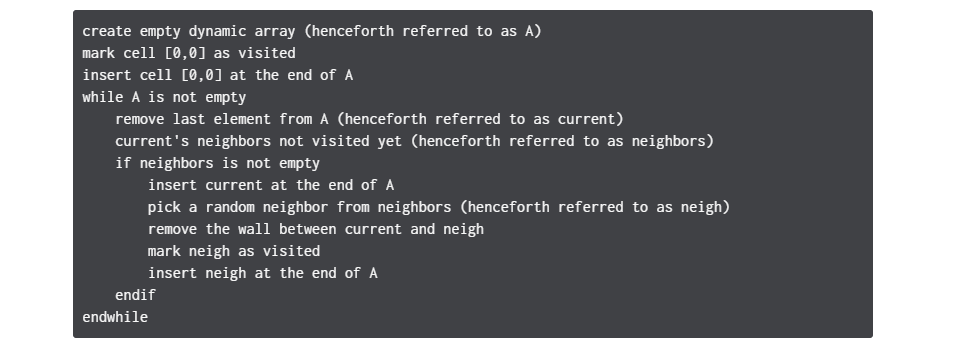
Picking a random neighbor must follow this procedure:
- Check the neighbors of a cell in N-S-E-W order and
- append the neighbors that were not visited yet into an empty vector neighbors
- Then use the index idx, as defined below, to pick a random neighbor with neighbors[idx]
idx = std::rand() / ((RAND_MAX + 1u) / neighbors.size());
N SEW N 15 E w s BITSTRING DECinse WOLLS 0 1 1 1 H F 100, = 9 3 13 12 12 10 3 9 12 10 3 3 3 13 4 2 3 5 10 11 3 5 12 6 5 2 create empty dynamic array (henceforth referred to as A) mark cell [0,0] as visited insert cell [0,0] at the end of A while A is not empty remove last element from A (henceforth referred to as current) current's neighbors not visited yet (henceforth referred to as neighbors) if neighbors is not empty insert current at the end of A pick a random neighbor from neighbors (henceforth referred to as neigh) remove the wall between current and neigh mark neigh as visited insert neigh at the end of A endir endwhile N SEW N 15 E w s BITSTRING DECinse WOLLS 0 1 1 1 H F 100, = 9 3 13 12 12 10 3 9 12 10 3 3 3 13 4 2 3 5 10 11 3 5 12 6 5 2 create empty dynamic array (henceforth referred to as A) mark cell [0,0] as visited insert cell [0,0] at the end of A while A is not empty remove last element from A (henceforth referred to as current) current's neighbors not visited yet (henceforth referred to as neighbors) if neighbors is not empty insert current at the end of A pick a random neighbor from neighbors (henceforth referred to as neigh) remove the wall between current and neigh mark neigh as visited insert neigh at the end of A endir endwhile
Step by Step Solution
There are 3 Steps involved in it

Get step-by-step solutions from verified subject matter experts
 Study Help