







Question: in cell C1, edit the function to round the result to thr nearest penny. File Home Insert Page Layout Formulas Data Review C1 A fx
in cell C1, edit the function to round the result to thr nearest penny.
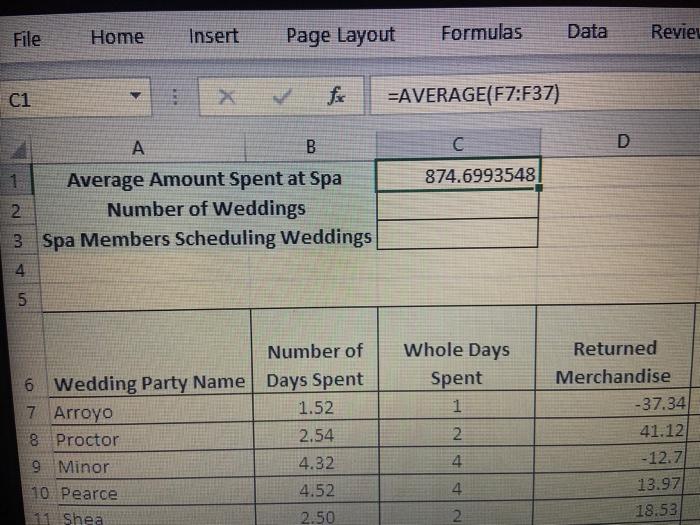
File Home Insert Page Layout Formulas Data Review C1 A fx =AVERAGE(F7:F37) A 1 Average Amount Spent at Spa 2 Number of Weddings 3 Spa Members Scheduling Weddings 4 B C D 874.6993548 5 Number of 6 Wedding Party Name Days Spent 7 Arroyo 1.52 Whole Days Spent 1 Returned Merchandise -37.34 8 Proctor 9 Minor 10 Pearce 11 Shea 2.54 2 41.12 4.32 st -12.7 4.52 4 13.97 2.50 2 18.53
Step by Step Solution
There are 3 Steps involved in it
1 Expert Approved Answer
Step: 1 Unlock

Question Has Been Solved by an Expert!
Get step-by-step solutions from verified subject matter experts
Step: 2 Unlock
Step: 3 Unlock
 Study Help