







Question: In cell E14, enter a date function that calculates the number of days between the Initial Deadline (cell E10) and the Date Received for the
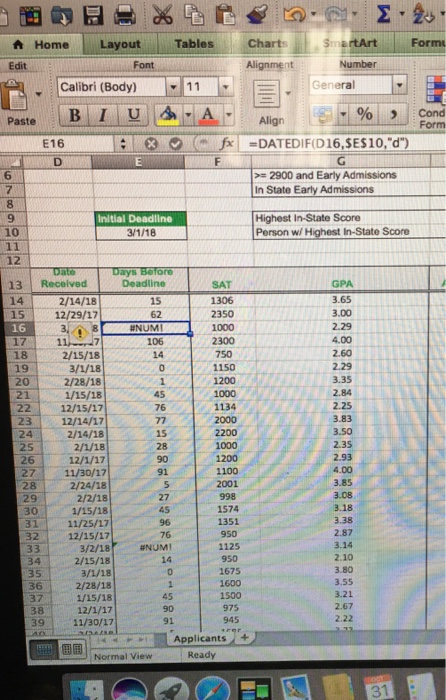
A Home Layout Edit Tables Charts Alignment Calibri (Body)11 EGeneral 1% , Cond fDATEDIF(D16,SES10,"d") 6 >= 2900 and Early Admissions In State Early Admissions 9 Initial Deadline Highest In-State Score Person wi Highest In-State Score 13 Received 14 Deadline SAT GPA 3.65 3.00 2.29 4.00 2.60 2/14/18 15 12/29/17 16 17 182/15/18 62 2350 1000 2300 1107 106 1150 20 21 22 12/15/17 23 12/14/17 24 2/28/18 1/15/18 2.84 76 1134 2000 3.83 3.50 2.35 2/14/18 28 1000 27 11/30/17 2/24/18 2/2/18 1/15/18 3111/25/17 3212/15/17 3/2/18 2/15/18 1100 2001 998 1574 28 29 4.00 3.85 3.38 2.87 3.14 2.10 3.80 3.55 3.21 2.67 2.22 76 #NUM! 950 34 950 1675 1600 2/28/18 1/15/18 37 39 11/30/17 975 945 Applicants + Normal View Ready
Step by Step Solution
There are 3 Steps involved in it

Get step-by-step solutions from verified subject matter experts
 Study Help