







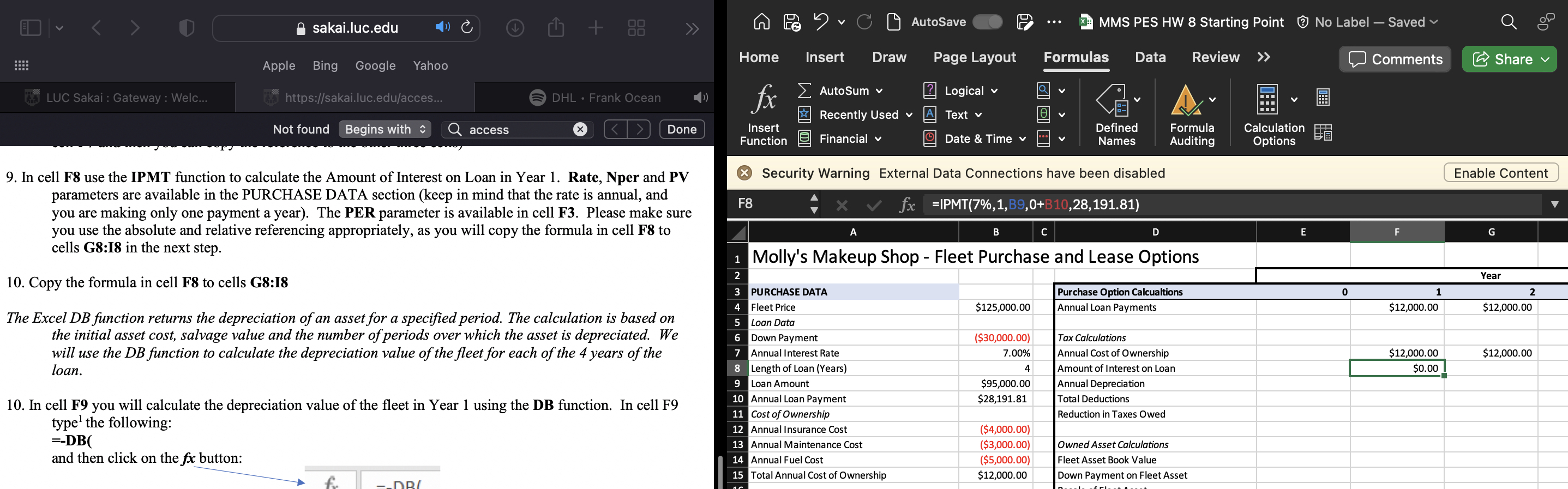
Question: In cell F 8 use the IPMT function to calculate the Amount of Interest on Loan in Year 1 . Rate, Nper and PV parameters
In cell F use the IPMT function to calculate the Amount of Interest on Loan in Year Rate, Nper and PV parameters are available in the PURCHASE DATA section keep in mind that the rate is annual, and you are making only one payment a year The PER parameter is available in cell F Please make sure you use the absolute and relative referencing appropriately, as you will copy the formula in cell to cells G:I in the next step.
Copy the formula in cell to cells G:I
The Excel DB function returns the depreciation of an asset for a specified period. The calculation is based on the initial asset cost, salvage value and the number of periods over which the asset is depreciated. We will use the DB function to calculate the depreciation value of the fleet for each of the years of the loan.
In cell F you will calculate the depreciation value of the fleet in Year using the DB function. In cell F type the following:
and then click on the button:
Step by Step Solution
There are 3 Steps involved in it
1 Expert Approved Answer
Step: 1 Unlock

Question Has Been Solved by an Expert!
Get step-by-step solutions from verified subject matter experts
Step: 2 Unlock
Step: 3 Unlock
 Study Help