



Question: In cell G12, write a formula to calculate the total tax amount for Alternate 1 on the income in cell B12. Use the HLOOKUP function
In cell G12, write a formula to calculate the total tax amount for Alternate 1 on the income in cell B12. Use the HLOOKUP function to determine the Alternate 1 flat tax rate for the income in cell B12 and then multiply by the income to get the dollar amount owed. If done properly the result in G12 should be 14,462.
Make sure you have used absolute references appropriately and then autofill down.
In cell H12, write a formula to calculate the total tax amount for alternate 2 on the income in cell B12. Use the HLOOKUP function to determine the Alternate 2 flat tax rate for the income in cell B12 and then multiply by the income to get the dollar amount owed. If done properly the result in H12 should be 16,528.
Make sure you have used absolute references appropriately and then autofill down.
In cell I12, write a formula to calculate the amount of unpaid taxes based on the Actual Tax Owed (column F) and the Actual Withholding Paid (column D). This is simply the difference between column F and column D. If done properly the result in I12 should be 4,719. Autofill down.
In cell J12, write a formula to calculate the amount of unpaid taxes based on the Alternate 1 Tax Owed (column G) and the Actual Withholding Paid (column D). This is simply the difference between column G and column D. If done properly the result in J12 should be 4,227. Autofill down.
In cell K12, write a formula to calculate the amount of unpaid taxes based on the Alternate 2 Tax Owed (column H) and the Actual Withholding Paid (column D). This is simply the difference between column H and column D. If done properly the result in K12 should be 6,293. Autofill down.
In cell L12, write a formula to calculate the Actual penalty owed IF the Actual unpaid tax in I12 is >0. You can LOOKUP the penalty rate in cells H3:I8. You will need to use IF, VLOOKUP and then multiplication. If done properly the result in L12 should be 236.
If necessary, modify your original formula in cell L12 with the appropriate absolute references so that you could have copied it across to column M and N and down to row 21.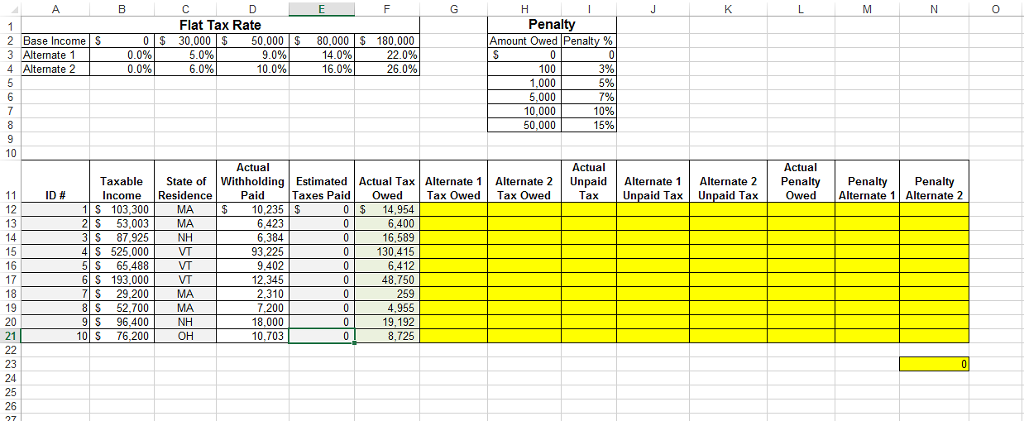 Now, autofill L12 across to N12 and down to N21.
0 Flat Tax Rate Penalty 5 0 30,000 50.000 80,000 S 180.000 Amount Owed Penalty % 2 Base Income 3 Alternate 1 4 Alternate 2 0.0% 0.0% 9.0% 6.0% 10.0% 16.0% 100 1.000 5,000 10,000 50,000 3% 5% 1% 10% 15% Actual Actual Actual TaxableState of Withholding EstimatedActual Tax Alternate 1 Alternate 2 Unpaid Alterate 1 Alternate 2 Penalty Penalty Penalty Income ResidencePaid Taxes PaidOwed Tax OwedTax OwedTaxUnpaid Tax Unpaid Tax Owed Alternate 1 Alternate 2 ID # 12 IIS 103,300 MA $10,235 $ 0 14,954 6,400 003 MA NH 6,423 93.225 9.402 12,345 2.310 7.200 18.000 10,703 130,415 6412 16 5 S 65,488 6 S 193,000 259 4,955 19,192 8,725 S 29.200 MA 8S 52.700 MA 9 S 96,400NH 10 S 76,200OH 8 19
Step by Step Solution
There are 3 Steps involved in it

Get step-by-step solutions from verified subject matter experts