







Question: In cell I9, create a formula without using a function that first adds the selected boxed sets net weight (cell I8 ) to the packing
- In cell I9, create a formula without using a function that first adds the selected boxed sets net weight (cell I8) to the packing weight (cell F5), and then divides the value by 16 to show the shipping weight in pounds.
- The delivery service used by the company charges a higher rate for packages weighing over 40 lbs.
In cell I10, create a formula that uses the IF function to determine if a packaged clothing set is overweight by checking if the shipping weight (cell I9) is greater than 40. If this condition is true, the cell should display Yes, and if it is false, the cell should display No. (Hint: Use Yes for the value if true, and No for the value if false.)
- The company can make more profit by keeping shipping costs to a minimum. Felicia has been put in charge of the packaging redesign project, and she needs to figure out what weight of packaging can keep even the heaviest clothing set from being overweight.
Perform a Goal Seek Analysis to find a packing weight that will bring the shipping weight of the Retro Fit clothing set down to 39.75 lbs. Use cell I9 as the cell to set, 39.75 as the target value, and cell F5 as the changing cell. Keep the values generated by the Goal Seek Analysis as the value for cells F5, I9, and I10.
Your workbook should look like the Final Figures below. (The value in cell F5 generated by the Goal Seek Analysis has been intentionally blurred out in Final Figure 1.) Save your changes, close the workbook, and then exit Excel. Follow the directions on the SAM website to submit your completed project.
- In cell I9, create a formula without using a function that first adds the selected boxed sets net weight (cell I8) to the packing weight (cell F5), and then divides the value by 16 to show the shipping weight in pounds.
- The delivery service used by the company charges a higher rate for packages weighing over 40 lbs.
In cell I10, create a formula that uses the IF function to determine if a packaged clothing set is overweight by checking if the shipping weight (cell I9) is greater than 40. If this condition is true, the cell should display Yes, and if it is false, the cell should display No. (Hint: Use Yes for the value if true, and No for the value if false.)
- The company can make more profit by keeping shipping costs to a minimum. Felicia has been put in charge of the packaging redesign project, and she needs to figure out what weight of packaging can keep even the heaviest clothing set from being overweight.
Perform a Goal Seek Analysis to find a packing weight that will bring the shipping weight of the Retro Fit clothing set down to 39.75 lbs. Use cell I9 as the cell to set, 39.75 as the target value, and cell F5 as the changing cell. Keep the values generated by the Goal Seek Analysis as the value for cells F5, I9, and I10.Your workbook should look like the Final Figures below. (The value in cell F5 generated by the Goal Seek Analysis has been intentionally blurred out in Final Figure 1.) Save your
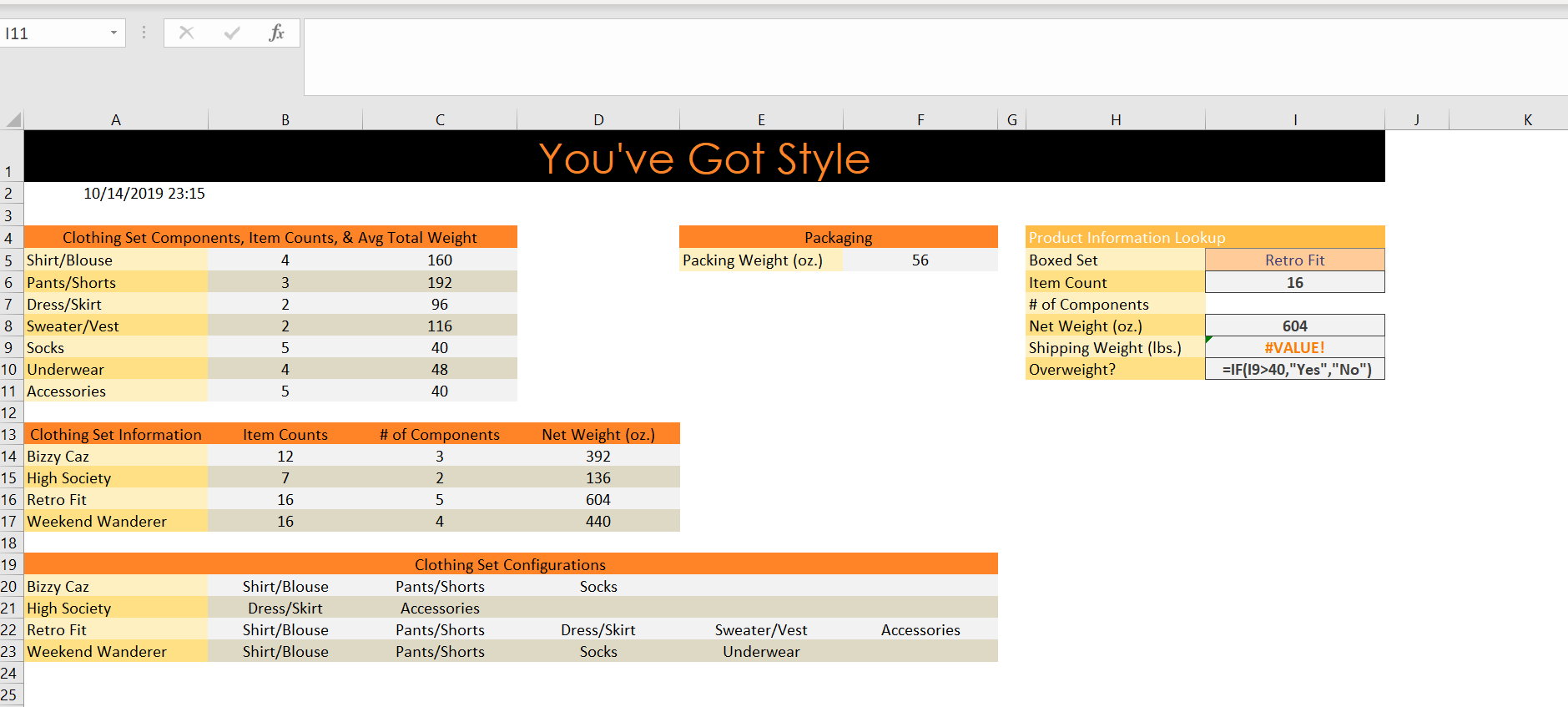
11 A H K You've Got Style 1 10/14/2019 23:15 2 3 Product Information Lookup 4. Clothing Set Components, Item Counts, & Avg Total Weight Packaging 5 Shirt/Blouse Packing Weight (oz.) Boxed Set 4 160 56 Retro Fit 6 Pants/Shorts 3 192 Item Count 16 7 Dress/Skirt #of Components Net Weight (oz.) Shipping Weight (lbs.) Overweight? 2 96 8 Sweater/Vest 9 Socks 2 116 604 #VALUE! 5 40 10 Underwear =IF(19>40,"Yes","No") 4 48 11 Accessories 5 40 12 13 Clothing Set Information 14 Bizzy Caz 15 High Society #of Components Net Weight (oz.) Item Counts 12 3 392 7 2 136 16 Retro Fit 16 5 604 17 Weekend Wanderer 16 4 440 18 Clothing Set Configurations Pants/Shorts 19 Shirt/Blouse Socks 20 Bizzy Caz 21 High Society Dress/Skirt Accessories Pants/Shorts Pants/Shorts Dress/Skirt Socks Sweater/Vest Shirt/Blouse 22 Retro Fit Accessories 23 Weekend Wanderer Shirt/Blouse Underwear 24 25 11 A H K You've Got Style 1 10/14/2019 23:15 2 3 Product Information Lookup 4. Clothing Set Components, Item Counts, & Avg Total Weight Packaging 5 Shirt/Blouse Packing Weight (oz.) Boxed Set 4 160 56 Retro Fit 6 Pants/Shorts 3 192 Item Count 16 7 Dress/Skirt #of Components Net Weight (oz.) Shipping Weight (lbs.) Overweight? 2 96 8 Sweater/Vest 9 Socks 2 116 604 #VALUE! 5 40 10 Underwear =IF(19>40,"Yes","No") 4 48 11 Accessories 5 40 12 13 Clothing Set Information 14 Bizzy Caz 15 High Society #of Components Net Weight (oz.) Item Counts 12 3 392 7 2 136 16 Retro Fit 16 5 604 17 Weekend Wanderer 16 4 440 18 Clothing Set Configurations Pants/Shorts 19 Shirt/Blouse Socks 20 Bizzy Caz 21 High Society Dress/Skirt Accessories Pants/Shorts Pants/Shorts Dress/Skirt Socks Sweater/Vest Shirt/Blouse 22 Retro Fit Accessories 23 Weekend Wanderer Shirt/Blouse Underwear 24 25
Step by Step Solution
There are 3 Steps involved in it

Get step-by-step solutions from verified subject matter experts
 Study Help