







Question: In Chapter 4, we developed an algorithm for converting from binary to decimal. You can generalize this algorithm to work for a representation in any
In Chapter 4, we developed an algorithm for converting from binary to decimal. You can generalize this algorithm to work for a representation in any base. Instead of using a power of 2, this time you use a power of the base. Also, you use digits greater than 9, such as A . . . F, when they occur.
In convert.py, define a function named repToDecimal that expects two arguments, a string, and an integer. The second argument should be the base. For example, repToDecimal("10", 8) returns 8, whereas repToDecimal("10", 16) returns 16.
The function should use a lookup table to find the value of any digit. Make sure that this table (it is actually a dictionary) is initialized before the function is defined.
For its keys, use the 10 decimal digits (all strings) and the letters A . . . F (all uppercase). The value stored with each key should be the integer that the digit represents. (The letter A associates with the integer value 10, and so on.)
The main loop of the function should convert each digit to uppercase, look up its value in the table, and use this value in the computation.
Include a main function that tests the conversion function with numbers in several bases.
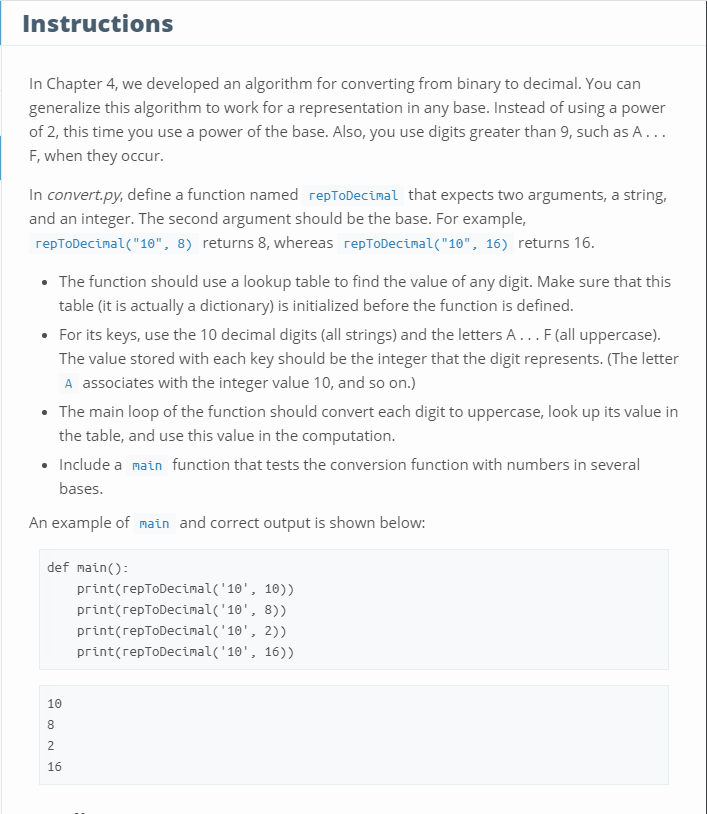
Please have the same output as the example above
Instructions In Chapter 4, we developed an algorithm for converting from binary to decimal. You can generalize this algorithm to work for a representation in any base. Instead of using a power of 2, this time you use a power of the base. Also, you use digits greater than 9, such as A... F,when they occur In convert.py, define a function named repToDecinal that expects two arguments, a string and an integer. The second argument should be the base. For example repToDecinal("10", 8) returns 8, whereas repToDecinal("10", 16) returns 16 The function should use a lookup table to find the value of any digit. Make sure that this table (it is actually a dictionary) is initialized before the function is defined. For its keys, use the 10 decimal digits (all strings) and the letters A.. . F(all uppercase). The value stored with each key should be the integer that the digit represents. (The letter A associates with the integer value 10, and so on.) The main loop of the function should convert each digit to uppercase, look up its value in the table, and use this value in the computation Include a main function that tests the conversion function with numbers in several bases An example of main and correct output is shown belo def main(): print(repToDecinal'1' 10)) print repToDecinal('10,8)) print(repToDecimal('10', 2)) print(repToDecimal('10', 16)) 10 2 16
Step by Step Solution
There are 3 Steps involved in it

Get step-by-step solutions from verified subject matter experts
 Study Help