







Question: In Chapter 6, the textbook introduces the turtle graphics module. Section 6.9 describes how to use the module to draw simple line drawings, and Listing
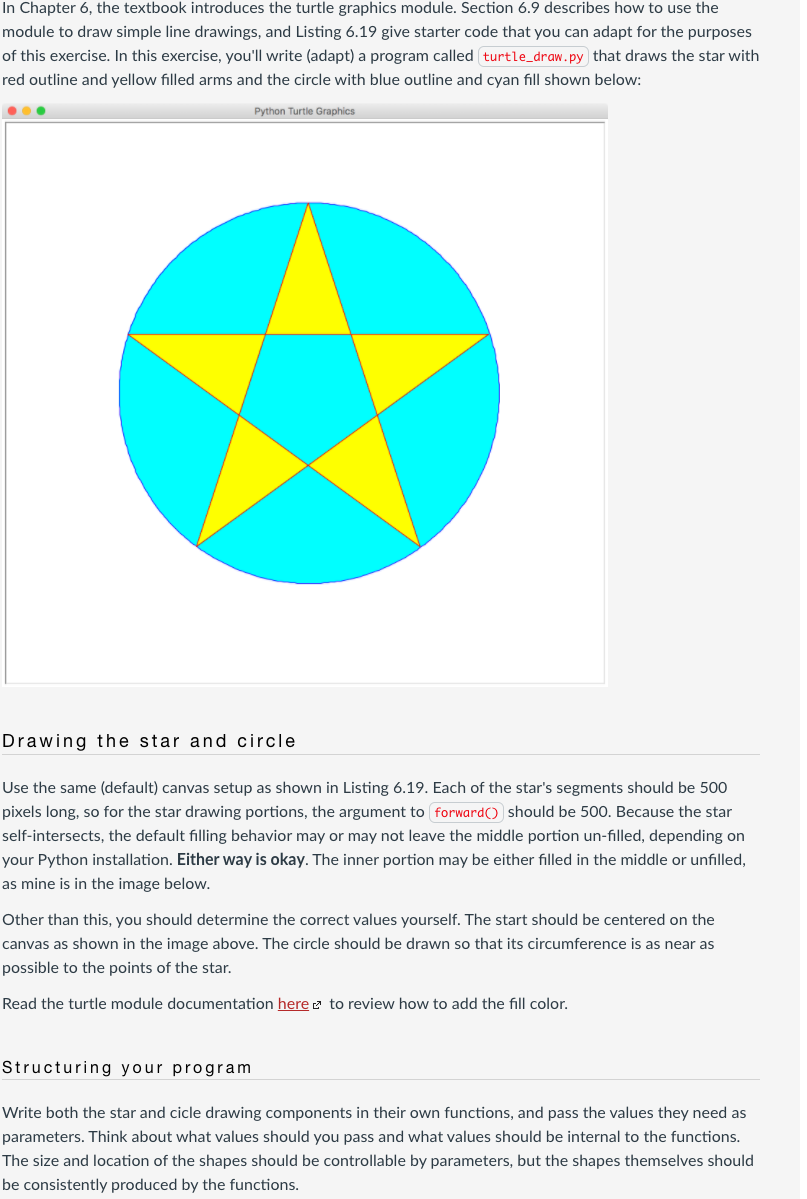
In Chapter 6, the textbook introduces the turtle graphics module. Section 6.9 describes how to use the module to draw simple line drawings, and Listing 6.19 give starter code that you can adapt for the purposes of this exercise. In this exercise, you'll write (adapt) a program called turtle_draw.py that draws the star with red outline and yellow filled arms and the circle with blue outline and cyan fill shown below: Python Turtle Graphics Drawing the star and circle Use the same (default) canvas setup as shown in Listing 6.19. Each of the star's segments should be 500 pixels long, so for the star drawing portions, the argument to forward should be 500. Because the star self-intersects, the default filling behavior may or may not leave the middle portion un-filled, depending on your Python installation. Either way is okay. The inner portion may be either filled in the middle or unfilled, as mine is in the image below. Other than this, you should determine the correct values yourself. The start should be centered on the canvas as shown in the image above. The circle should be drawn so that its circumference is as near as possible to the points of the star. Read the turtle module documentation here e to review how to add the fill color. Structuring your program Write both the star and cicle drawing components in their own functions, and pass the values they need as parameters. Think about what values should you pass and what values should be internal to the functions. The size and location of the shapes should be controllable by parameters, but the shapes themselves should be consistently produced by the functions
Step by Step Solution
There are 3 Steps involved in it

Get step-by-step solutions from verified subject matter experts
 Study Help