







Question: In Drjava Download SecurityAccess.java and load it into Drava. Complete the code for validating security access as detailed in the attached assignment description. public class

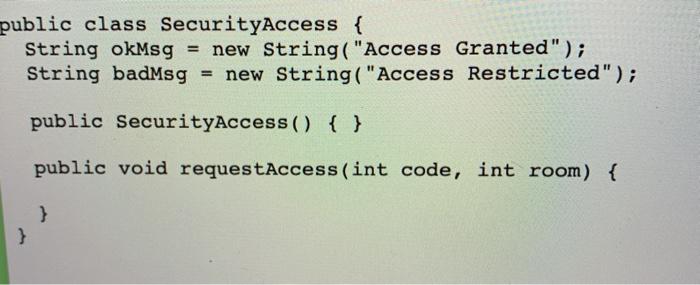
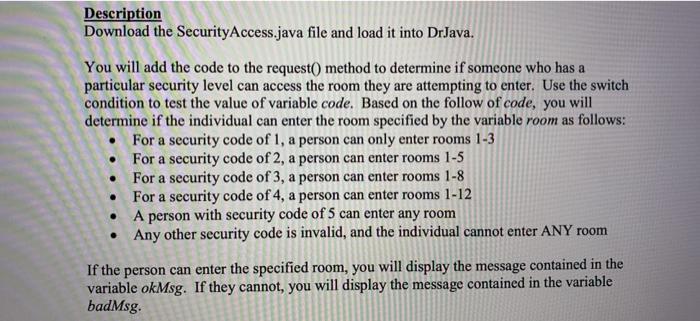
Download SecurityAccess.java and load it into Drava. Complete the code for validating security access as detailed in the attached assignment description. public class SecurityAccess { String okMsg = new String("Access Granted"); String badMsg = new String("Access Restricted"); public SecurityAccess() { } public void requestAccess(int code, int room) { } } Description Download the Security Access.java file and load it into Dr Java. You will add the code to the request() method to determine if someone who has a particular security level can access the room they are attempting to enter. Use the switch condition to test the value of variable code. Based on the follow of code, you will determine if the individual can enter the room specified by the variable room as follows: For a security code of 1, a person can only enter rooms 1-3 For a security code of 2, a person can enter rooms 1-5 For a security code of 3, a person can enter rooms 1-8 For a security code of 4, a person can enter rooms 1-12 A person with security code of 5 can enter any room Any other security code is invalid, and the individual cannot enter ANY room If the person can enter the specified room, you will display the message contained in the variable okMsg. If they cannot, you will display the message contained in the variable badMsg
Step by Step Solution
There are 3 Steps involved in it
To complete the SecurityAccess class you need to implement the requestAccess method using a swit... View full answer

Get step-by-step solutions from verified subject matter experts
 Study Help