


Question: In Dynamics 365, there are several ways to use Excel to analyze data. In this post, we will look at the various different options. Lets
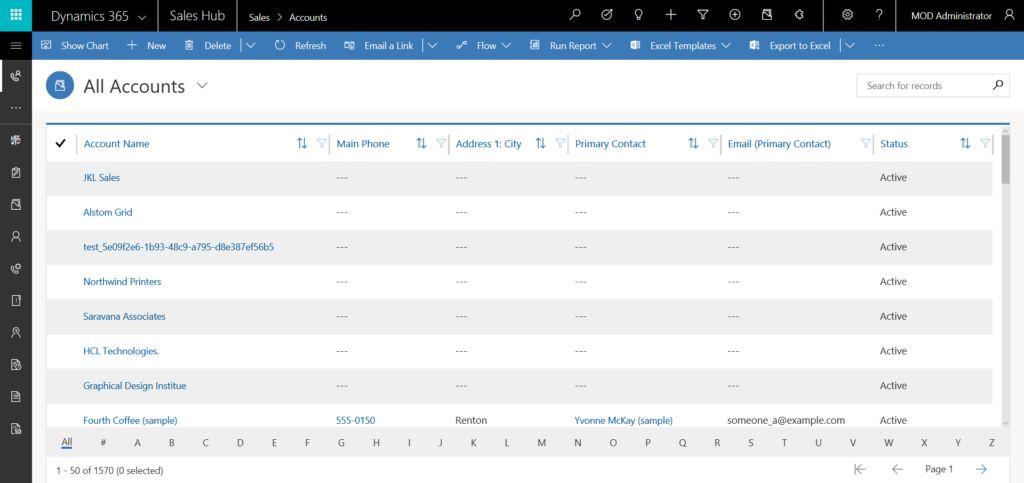
In Dynamics 365, there are several ways to useIn Dynamics 365, there are several ways to use Excel to analyze data. In this post, we will look at the various different options. Lets start with a view of All Accounts. Note were displaying this in the Sales Hub app. The logic applied to the web client as well.

Sales > Accounts 7 MOD Administrator & Dynamics 365 Sales Hub Show Chart + New Delete v Refresh D Email a Link Flow V 6 Run Report Excel Templates Export to Excel v All Accounts Search for records ME Account Name TL Y Main Phone 1. Address 1: City TL y Primary Contact LyEmail (Primary Contact) Status 22 JKL Sales Active Alstom Grid Active 8 test 5e09f2c6-1693-48c9-a795-d8e387ef56b5 Active Northwind Printers Active D Saravana Associates - Active HCL Technologies, Active Graphical Design Institue Active Fourth Coffee (sample) 555-0150 Renton Yvonne McKay (sample) someone a@example.com Active B Al! B C D E F G . 1 1 K M N O P Q R S T U V w Y Y Z 1 - 50 of 1570 (0 selected) Page 1 Sales > Accounts 7 MOD Administrator & Dynamics 365 Sales Hub Show Chart + New Delete v Refresh D Email a Link Flow V 6 Run Report Excel Templates Export to Excel v All Accounts Search for records ME Account Name TL Y Main Phone 1. Address 1: City TL y Primary Contact LyEmail (Primary Contact) Status 22 JKL Sales Active Alstom Grid Active 8 test 5e09f2c6-1693-48c9-a795-d8e387ef56b5 Active Northwind Printers Active D Saravana Associates - Active HCL Technologies, Active Graphical Design Institue Active Fourth Coffee (sample) 555-0150 Renton Yvonne McKay (sample) someone a@example.com Active B Al! B C D E F G . 1 1 K M N O P Q R S T U V w Y Y Z 1 - 50 of 1570 (0 selected) Page 1

Step by Step Solution

There are 3 Steps involved in it

1 Expert Approved Answer
Step: 1 Unlock blur-text-image

Question Has Been Solved by an Expert!

Get step-by-step solutions from verified subject matter experts

Step: 2 Unlock
Step: 3 Unlock

Students Have Also Explored These Related General Management Questions!