







Question: In Excel... General Guidelines: 1. Enter the labels, data, and the compute command button as shown below into the pizza spreadsheet. Delete the two remaining
In Excel...
General Guidelines:
1. Enter the labels, data, and the compute command button as shown below into the pizza spreadsheet. Delete the two remaining sheets from the workbook.
2. The compute button should open a Userform with three checkboxes and two option buttons. The checkboxes are for three ingredients and the option buttons are for the size of the pizza. The spreadsheet cells holds the costs for the ingredients and the prices for 12 and 18 inch pizzas.
3. When the order button is pressed, the VBA code should identify which ingredients and what size pizza is ordered.
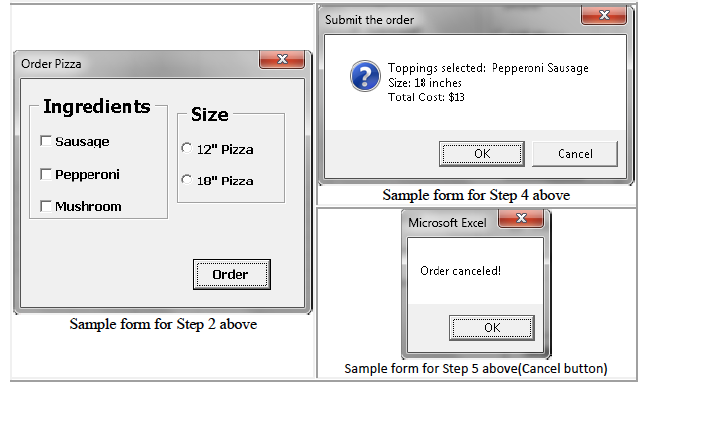
4. A message box with an OK and Cancel button should be used to display the ingredients, size of the pizza and total cost before putting the final cost into the spreadsheet.
5. If the Cancel button is pressed the message Ordered canceled! should be displayed and the form hidden without updating the final cost in the spreadsheet.
6. Using the costs from the spreadsheet, determine the final cost and place it in cell location B7 if the OK button is pressed.
See screen-shot listed below:
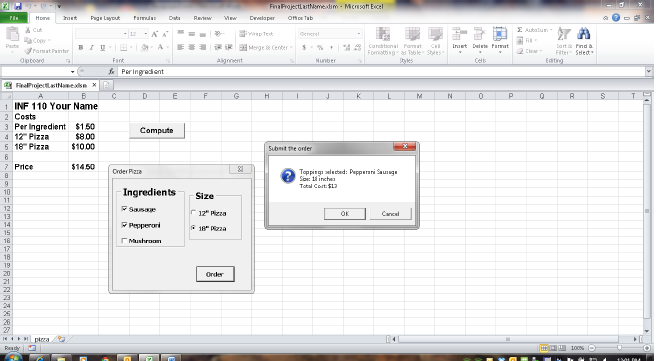
Remember more than one ingredient can be ordered but only one size pizza can be ordered. The code should reflect this. For example, the 18 inch pizza with two ingredients is $13.00.
The workbook will have 1 sheet named pizza and one form named frmOrderPizza.
Do steps 1-6 to produce a single Excel workbook named FinalProjectLastName.xlsm.
Be sure to include header comments in the top of your code window.
Flowchart: Be sure to create a flowchart for the Final Project by using the PowerPoint shapes symbols. You could revise the flowchart from challenge 4 Excel 3 (FlowchartsChallengesChapter3ExcelLastName.pptx) PowerPoint to create a flowchart for the Final Project. Save the flowchart slides in a PowerPoint file named FlowchartFinalProjectlLastName.pptx. Send me this file as an email attachment at least 3 days before the assignment is due so that I can check it for you. Submit this file in Blackboard together with your Excel workbook file.
Hints and corrections:
1. In step 1 listed above; use the following values for the properties of the command button active-X control. (Caption Compute, Name cmdCompute) Substitute your name in row 1, and enter the labels and data in the cells listed on the spreadsheet in the above diagram. Format cells B3, B4, B5, and B7 as currency data type.
2. In step 2 listed above; Rename each of the controls on the form using the proper 3-letter prefix before coding the program. The 3 check boxes for the ingredients and the 2 option buttons for the pizza size are each contained in their own frame.
3. In step 3 listed above; create 3 If-End If statements to determine which ingredient was selected and then increment the number of ingredients counter and update the message string variable (strToppings) with the ingredient chosen. Sample code: (strToppings = strToppings & "Mushrooms") Create another If-Else-End If statement to determine the size of the pizza, update the toppings string variable (strToppings) with the pizza size chosen, then assign the size cost variable to proper cell (B4 or B5) from the spreadsheet for that size pizza.
4. In step 4 listed above; create a message box that is assigned to a variable (named intResponse) so that it can be assigned to a value of the OK or Cancel button on the message box form. (see page 207 of the Access book for an example of using this type of message box) See slide 47 in the Access 8 PowerPoint to see example code using the vbNewLine constant to cause the message box to print on 3 different lines.
5. In step 5 listed above; create an If-Else-End If statement that checks the intResponse variable from the MsgBox function to see if the Cancel button is pressed (If intResponse = vbCancel Then), if Cancel button selected display Ordered canceled! using the MsgBox function and hide the form. See slides 60 and 61 in the Access 8 PowerPoint to see example code using the MsgBox function assigned to a response variable to see which button was clicked by the user when responding to the message box..
| 6. If OK button clicked then update cell B7 on the spreadsheet with the total price of the pizza. Note: There should be 5 total If statements used in the program that will correspond to 5 decision boxes (diamond-shaped) used in the flowchart. Sample form for Step 2 above | Sample form for Step 4 above |
| Sample form for Step 5 above(Cancel button) |
Fih itu r "tr A Per Ingroient INF 110 Your Name 2 Costs 3 Per Ingredient $150 $800 $1000 Compute 4 12Pizza Submt the onter $1450 00erRzn Total Cort $1 IngredientsSize F sausa Pepperori Ready
Step by Step Solution
There are 3 Steps involved in it

Get step-by-step solutions from verified subject matter experts
 Study Help