







Question: in excel sheets please! Sheet 1: Formatting Grades Professor Streterstein is a bit absentminded. His instructor's grade book is a mess, and he would like
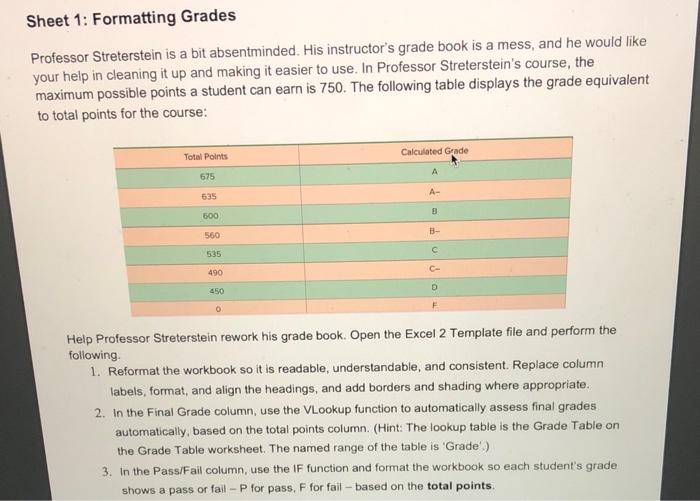
Sheet 1: Formatting Grades Professor Streterstein is a bit absentminded. His instructor's grade book is a mess, and he would like your help in cleaning it up and making it easier to use. In Professor Streterstein's course, the maximum possible points a student can earn is 750 . The following table displays the grade equivalent to total points for the course: Help Professor Streterstein rework his grade book. Open the Excel 2 Template file and perform the following. 1. Reformat the workbook so it is readable, understandable, and consistent. Replace column labels, format, and align the headings, and add borders and shading where appropriate. 2. In the Final Grade column, use the VLookup function to automatically assess final grades automatically, based on the total points column. (Hint: The lookup table is the Grade Table on the Grade Table worksheet. The named range of the table is 'Grade'.) 3. In the PassiFail column, use the IF function and format the workbook so each student's grade shows a pass or fail - P for pass. F for fail - based on the
Step by Step Solution
There are 3 Steps involved in it

Get step-by-step solutions from verified subject matter experts
 Study Help