







Question: In Exercises I through 6, evaluate the numeric expression without a computer, and then use Visual Basic to check your answer. 1. 3* 4 3.
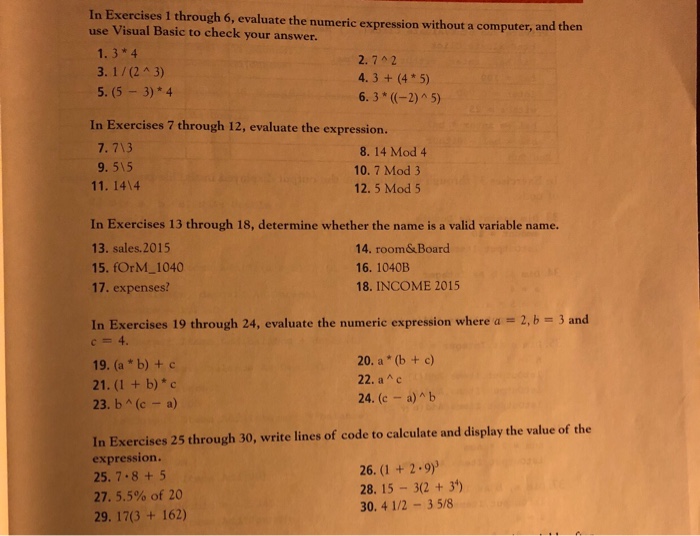
In Exercises I through 6, evaluate the numeric expression without a computer, and then use Visual Basic to check your answer. 1. 3* 4 3. 1/(2A 3) 5. (5 -3)*4 2. 72 4. 3+ (4 5) 6.3*((-2) ^ 5) In Exercises 7 through 12, evaluate the expression. 7. 713 9. 515 11. 1414 8. 14 Mod 4 10. 7 Mod3 12. 5 Mod 5 In Exercises 13 through 18, determine whether the name is a valid variable name. 13. sales.2015 15. fOrM_1040 17. expenses? 14. room&Board 16. 1040B 18. INCOME 2015 2, b = 3 and In Exercises 19 through 24, evaluate the numeric expression where a c= 4. 19. (a * b)+c 21. (1 + b)*c 23. b (c- a) 20. a (b + c) 22, a ^ c 24. (c -a) b In Exercises 25 through 30, write lines of code to calculate and display the value of the expression. 25. 7.8+5 27, 5.5% of 20 29. 17(3 + 162) 26. (I + 2.9) 28. 15 3(2 +31) 30. 4 1/2 -3 5/8
Step by Step Solution
There are 3 Steps involved in it

Get step-by-step solutions from verified subject matter experts
 Study Help