







Question: In general, when you use a jQuery UI feature, the JavaScript is minimal, but you must carefully set up the HTML elements and their id
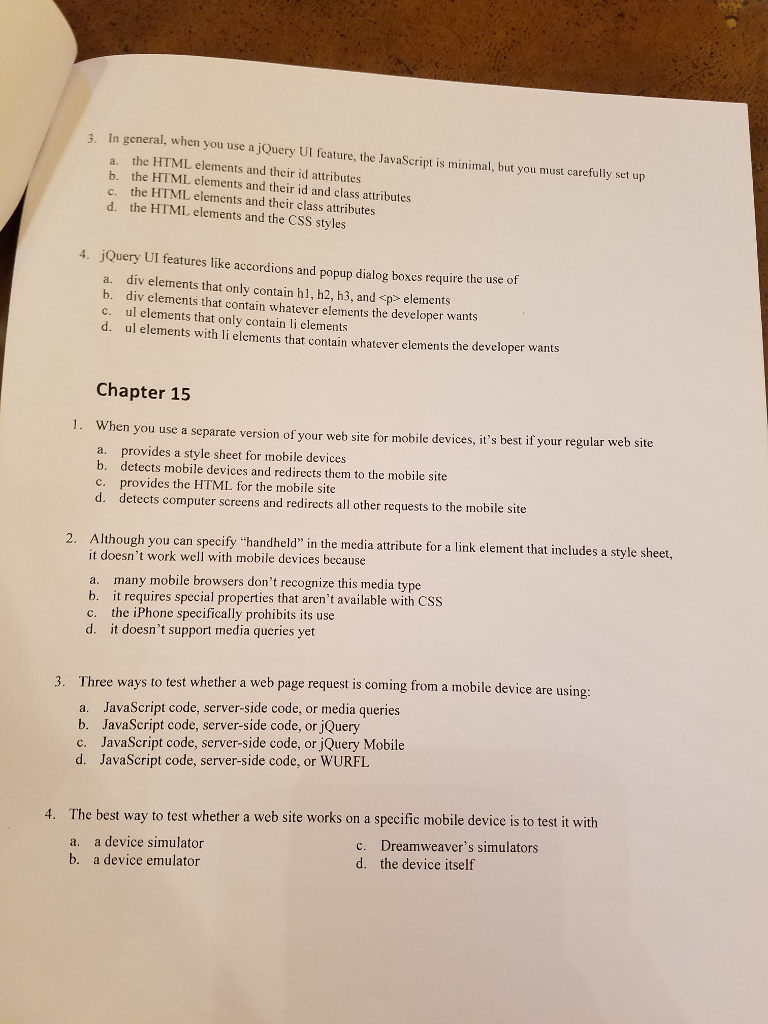
In general, when you use a jQuery UI feature, the JavaScript is minimal, but you must carefully set up the HTML elements and their id attributes the HTML elements and their id and class attributes the HTML elements and their class attributes the HTML elements and the CSS styles jQuery UI features like accordions and popup dialog boxes require the use of div elements that only contain h1, h2, h3, and elements div elements that contain whatever elements the developer wants ul elements that only contain li elements ul elements with li elements that contain whatever elements the developer wants When you use a separate version of your web site for mobile devices, it's best if your regular web site provides a style sheet for mobile devices detects mobile devices and redirects them to the mobile site provides the HTML for the mobile site detects computer screens and redirects all other requests to the mobile site Although you can specify "handheld" in the media attribute for a link element that includes a style sheet, it doesn't work well with mobile devices because many mobile browsers don't recognize this media type it requires special properties that aren't available with CSS the iPhone specifically prohibits its use it doesn't support media queries yet Three ways to test whether a web page request is coming from a mobile device are using: JavaScript code, server-side code, or media queries JavaScript code, server-side code, or jQuery JavaScript code, server-side code, or jQuery Mobile JavaScript code, server-side code, or WURFL The best way to test whether a web site works on a specific mobile device is to test it with a device simulator a device emulator Dreamweaver's simulators the device itself
Step by Step Solution
There are 3 Steps involved in it

Get step-by-step solutions from verified subject matter experts
 Study Help