







Question: In GO Programming Language Please Follow these instructions and submit the appropriate files here to be evaluated. Copy the code below to grocery.go and list.html
In GO Programming Language Please
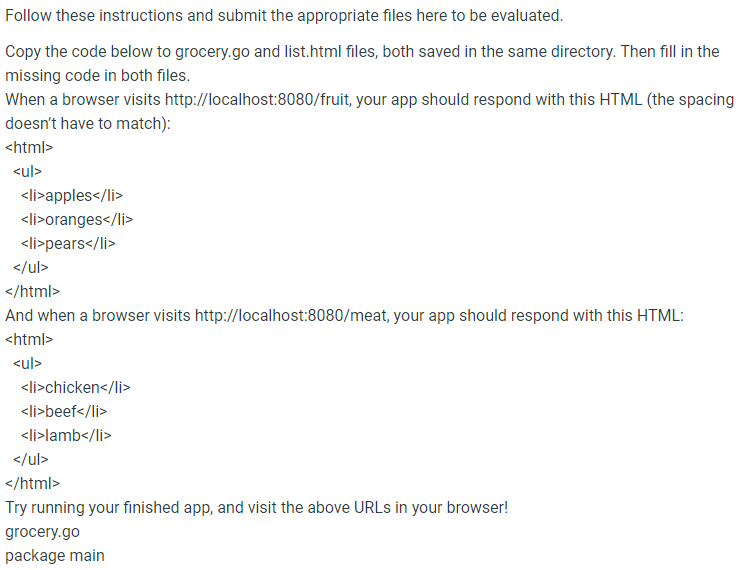
Follow these instructions and submit the appropriate files here to be evaluated. Copy the code below to grocery.go and list.html files, both saved in the same directory. Then fill in the missing code in both files. When a browser visits http://localhost:8080/fruit, your app should respond with this HTML (the spacing doesn't have to match): > apples li> oranges ul> html> And when a browser visits http://localhost: 8080/ meat, your app should respond with this HTML:
- chicken li > beef li > lamb li >
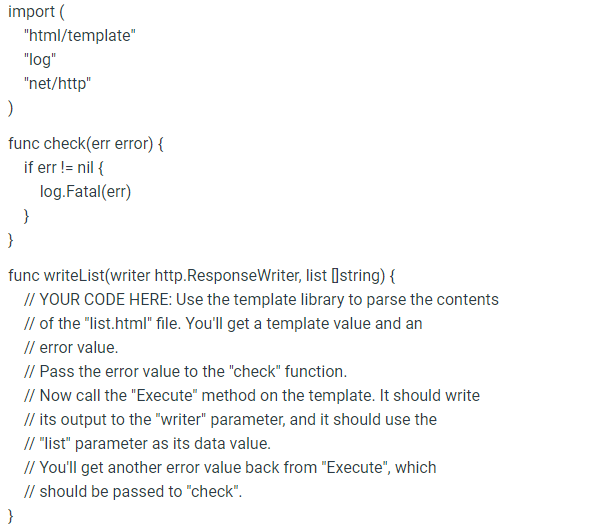
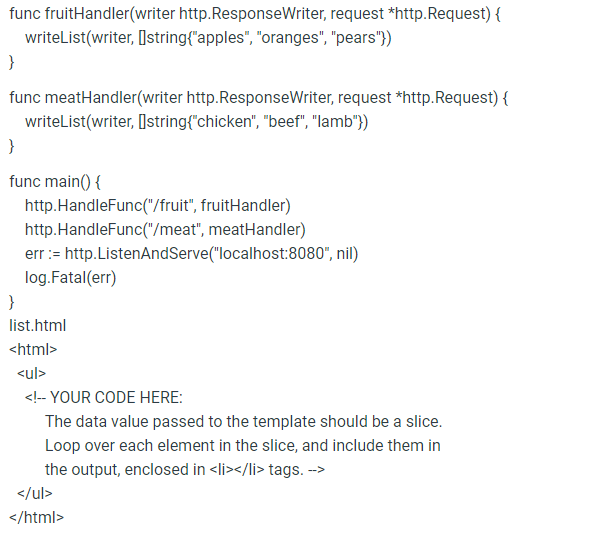
Try running your finished app, and visit the above URLs in your browser! grocery.go import ( "html/template" "log" "net/http" func check(err error) \{ if err != nil \{ log.Fatal(err) \} func writeList(writer http.ResponseWriter, list [string) \{ // YOUR coDE HERE: Use the template library to parse the contents // of the "list.html" file. You'll get a template value and an // error value. // Pass the error value to the "check" function. // Now call the "Execute" method on the template. It should write // its output to the "writer" parameter, and it should use the // "list" parameter as its data value. // You'll get another error value back from "Execute", which // should be passed to "check". func fruitHandler(writer http.ResponseWriter, request *http.Request) \{ writeList(writer, [lstring\{"apples", "oranges", "pears"\}) func meatHandler(writer http.ResponseWriter, request *http.Request) \{ writeList(writer, [lstring\{"chicken", "beef", "lamb"\}) func main() \{ http.HandleFunc("/fruit", fruitHandler) http.HandleFunc("/meat", meatHandler) err := http.ListenAndServe("localhost:8080", nil) log.Fatal(err) \} list.html ul> html>
Step by Step Solution
There are 3 Steps involved in it

Get step-by-step solutions from verified subject matter experts
 Study Help