







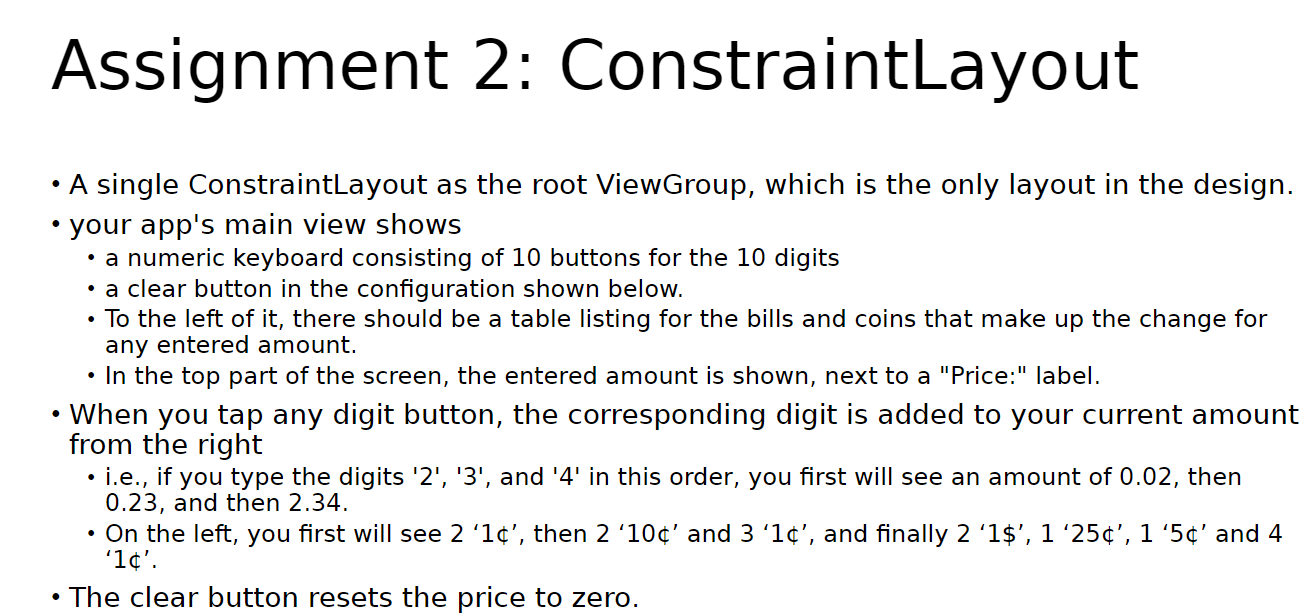
Question: in java android studio provide xml and all files necessary. will give upvotes for good work Assignment 2: Constraintlayout - A single ConstraintLayout as the
in java android studio provide xml and all files necessary. will give upvotes for good work
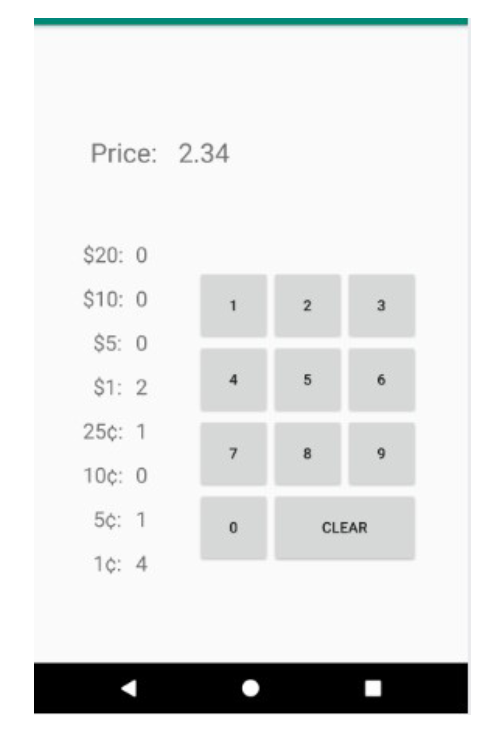
Assignment 2: Constraintlayout - A single ConstraintLayout as the root ViewGroup, which is the only layout in the design. - your app's main view shows - a numeric keyboard consisting of 10 buttons for the 10 digits - a clear button in the configuration shown below. - To the left of it, there should be a table listing for the bills and coins that make up the change for any entered amount. - In the top part of the screen, the entered amount is shown, next to a "Price:" label. - When you tap any digit button, the corresponding digit is added to your current amount from the right - i.e., if you type the digits '2', ' 3 ', and ' 4 ' in this order, you first will see an amount of 0.02, then 0.23, and then 2.34. - On the left, you first will see 2 ' 1, then 2 ' 10 and 3 ' 1, and finally 2 ' 1$,1 ' 25,1 ' 5 and 4 ' 1 '. - The clear button resets the price to zero. Price: 2.34 \$20: 0 \$10: 0 \$5: 0 \$1: 2 25: 1 10: 0 5: 1 16:: 4
Step by Step Solution
There are 3 Steps involved in it

Get step-by-step solutions from verified subject matter experts
 Study Help