







Question: In Java: DrawPanel.java ( 30 points ) Override the method paintComponent to produce the following pattern: Use a loop to draw 5 overlapping rectangles (see
In Java:
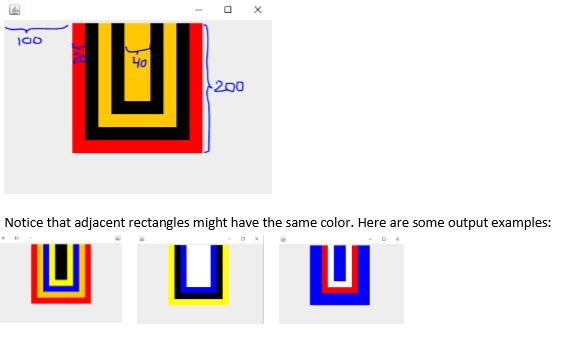
DrawPanel.java ( 30 points ) Override the method paintComponent to produce the following pattern:
Use a loop to draw 5 overlapping rectangles (see sample output below) ( 8 points ) All rectangles touch the top of the DrawPanel (the small space on the top is the empty border of the contentPane and it has nothing to do with the drawing)
Each rectangle has a random color that is white, yellow, orange, red, blue, or black ( 5 points ) (colors change when the window is resized see sample outputs below)
When the colors of adjacent rectangles are different (like in the sample output below) all the rectangles except for the top one in the center, appear as U-frames and the area shown has the same width ( 20 ) on all three sides: left, right, bottom. ( 5 points )
The smallest rectangle in the center has width 40 ( 3 points )
The distance between the left side of the DrawPanel and the largest rectangle is 100 ( 3 points )
The height of the largest rectangle is 200 ( 3 points )
Once you have a working program refactor your code. Watch out for meaningful names, simplify mathematical expression where appropriate to make the code clear and easy to read, avoid redundancy, and watch out for proper indentation. ( 3 points )
DrawApp
***********
package drawing;
import java.awt.BorderLayout;
import java.awt.EventQueue;
import javax.swing.JFrame;
import javax.swing.JPanel;
import javax.swing.border.EmptyBorder;
public class DrawApp extends JFrame
{
private static final long serialVersionUID = -7117092494428011067L;
private JPanel contentPane;
public static void main(String[] args)
{
EventQueue.invokeLater(new Runnable()
{
public void run()
{
try
{
DrawApp frame = new DrawApp();
frame.setVisible(true);
}
catch (Exception e)
{
e.printStackTrace();
}
}
});
}
/**
* Create the frame.
*/
public DrawApp()
{
setDefaultCloseOperation(JFrame.EXIT_ON_CLOSE);
setBounds(100, 100, 450, 300);
contentPane = new JPanel();
contentPane.setBorder(new EmptyBorder(5, 5, 5, 5));
contentPane.setLayout(new BorderLayout(0, 0));
setContentPane(contentPane);
DrawPanel drawPanel = new DrawPanel();
contentPane.add(drawPanel);
}
}
DrawPanel
*************
package drawing;
import java.awt.Color;
import java.awt.Graphics;
import javax.swing.JPanel;
public class DrawPanel extends JPanel {
private static final long serialVersionUID = 6091129515936517403L;
public DrawPanel() {
}
@Override
protected void paintComponent(Graphics g) {
super.paintComponent(g);
// g.setColor(Color.RED);
// g.fillRect(50, 50, 100, 100);
}
}
Output:
The main issue is how do I get them to overlap without covering up the rectangles behind them so that it will match the conditions up top.
Step by Step Solution
There are 3 Steps involved in it

Get step-by-step solutions from verified subject matter experts
 Study Help