







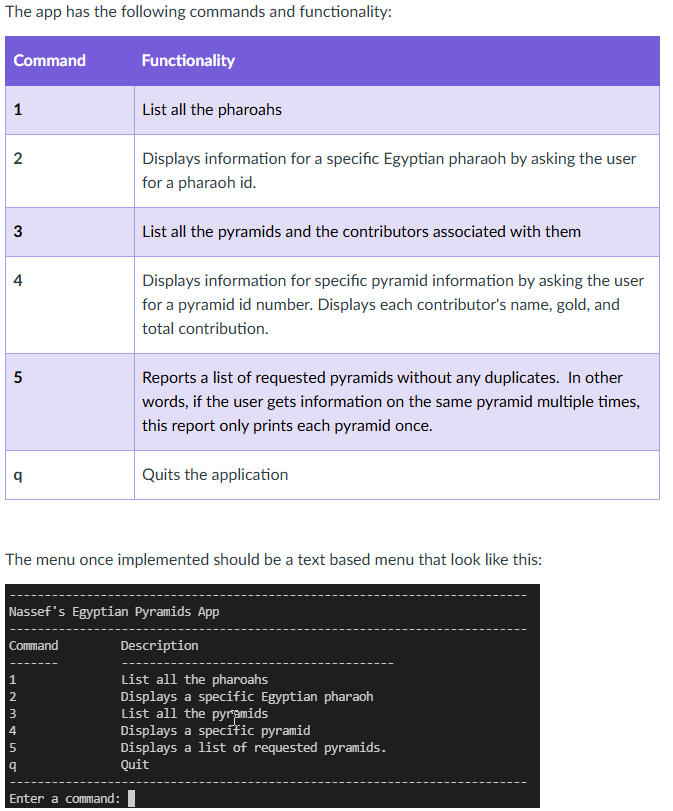
Question: In Java, how do get the program to accept the following user input and implement the command? Example Code so far: package com.egyptianExample; import java.util.
In Java, how do get the program to accept the following user input and implement the command?
Example Code so far:
package com.egyptianExample;
import java.util.;
import org.json.simple.;
public class EgyptianPyramidsAppExample
protected Pharaoh pharaohArray;
protected Pyramid pyramidArray;
public static void mainString args
create and start the app
EgyptianPyramidsAppExample app new EgyptianPyramidsAppExample;
app.start;
main loop for app
public void start
Scanner scan new ScannerSystemin;
Character command ;
loop until user quits
while command q
printMenu;
System.out.printEnter a command: ;
command menuGetCommandscan;
executeCommandscan command;
constructor to initialize the app and read commands
public EgyptianPyramidsAppExample
read egyptian pharaohs
String pharaohFile
UsersjeromDocumentsGitHubclassjavaegyptianpyramidsdemosrcmainjavacomegyptianExamplepharaohjson";
JSONArray pharaohJSONArray JSONFile.readArraypharaohFile;
create and intialize the pharaoh array
initializePharaohpharaohJSONArray;
read pyramids
String pyramidFile
UsersjeromDocumentsGitHubclassjavaegyptianpyramidsdemosrcmainjavacomegyptianpyramidjson";
JSONArray pyramidJSONArray JSONFile.readArraypyramidFile;
create and initialize the pyramid array
initializePyramidpyramidJSONArray;
initialize the pharaoh array
private void initializePharaohJSONArray pharaohJSONArray
create array and hash map
pharaohArray new PharaohpharaohJSONArraysize;
initalize the array
for int i ; i pharaohJSONArray.size; i
get the object
JSONObject o JSONObject pharaohJSONArray.geti;
parse the json object
Integer id toIntegeroid;
String name ogetnametoString;
Integer begin toIntegero "begin";
Integer end toIntegero "end";
Integer contribution toIntegero "contribution";
String hieroglyphic ogethieroglyphictoString;
add a new pharoah to array
Pharaoh p new Pharaohid name, begin, end, contribution, hieroglyphic;
pharaohArrayi p;
initialize the pyramid array
private void initializePyramidJSONArray pyramidJSONArray
create array and hash map
pyramidArray new PyramidpyramidJSONArraysize;
initalize the array
for int i ; i pyramidJSONArray.size; i
get the object
JSONObject o JSONObject pyramidJSONArray.geti;
parse the json object
Integer id toIntegeroid;
String name ogetnametoString;
JSONArray contributorsJSONArray JSONArray ogetcontributors;
String contributors new StringcontributorsJSONArraysize;
for int j ; j contributorsJSONArray.size; j
String c contributorsJSONArray.getjtoString;
contributorsj c;
add a new pyramid to array
Pyramid p new Pyramidid name, contributors;
pyramidArrayi p;
get a integer from a json object, and parse it
private Integer toIntegerJSONObject o String key
String s ogetkeytoString;
Integer result Integer.parseInts;
return result;
get first character from input
private static Character menuGetCommandScanner scan
Character command ;
String rawInput scan.nextLine;
if rawInputlength
rawInput rawInput.toLowerCase;
command rawInput.charAt;
return command;
print all pharaohs
private void printAllPharaoh
for int i ; i pharaohArray.length; i
printMenuLine;
pharaohArrayiprint;
printMenuLine;
private Boolean executeCommandScanner scan, Character command
Boolean success true;
switch command
case :
printAllPharaoh;
break;
case q:
System.out.printlnThank you for using Nassef's Egyptian Pyramid App!";
break;
default:
System.out.printlnERROR: Unknown commmand";
success false;
return success;
private static void printMenuCommandCharacter command, String desc
System.out.printfstts
command, desc;
private static void printMenuLine
System.out.println
Step by Step Solution
There are 3 Steps involved in it
1 Expert Approved Answer
Step: 1 Unlock

Question Has Been Solved by an Expert!
Get step-by-step solutions from verified subject matter experts
Step: 2 Unlock
Step: 3 Unlock
 Study Help