







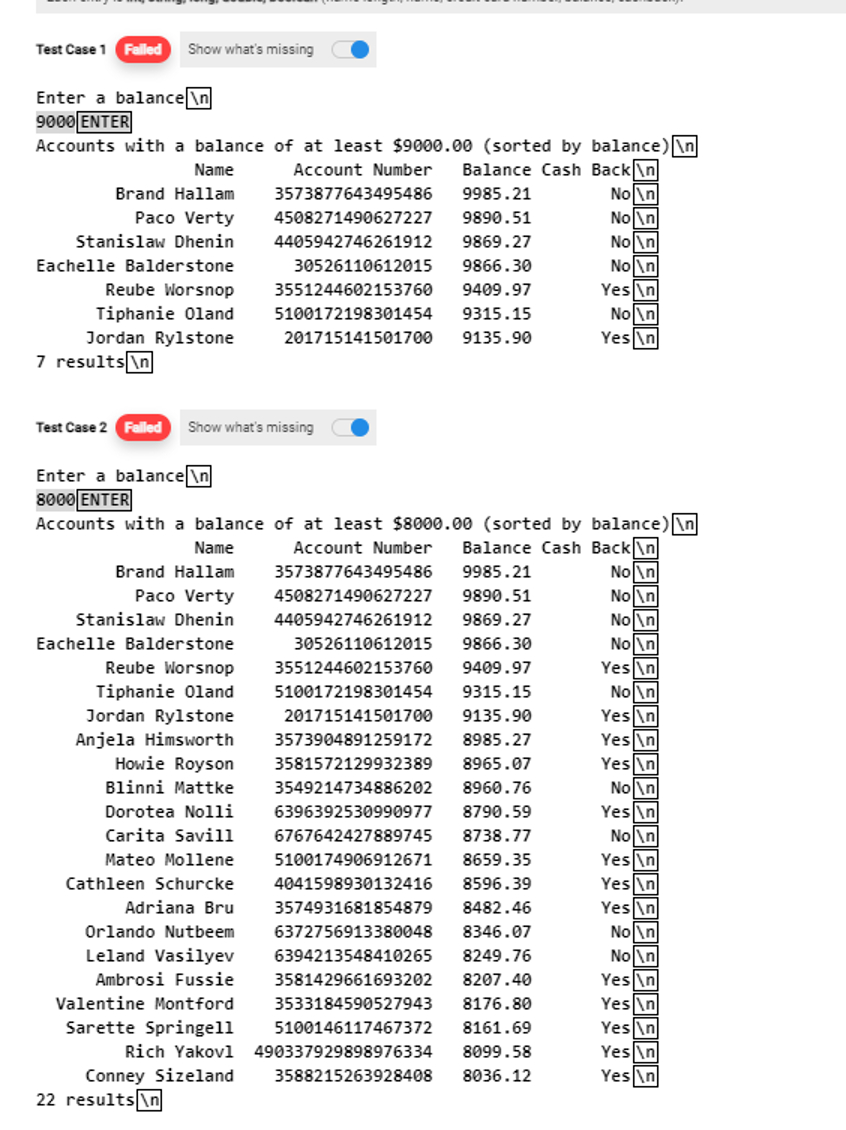
Question: In JAVA. I need help with my code!! It needs to display exactly as seen for all my problems with correct spacing. I only have
In JAVA. I need help with my code!! It needs to display exactly as seen for all my problems with correct spacing. I only have it outputing on number along with a couple people when I need it to output the list and give a total along with the correct spacing. Question is: Ask the user for an account balance. Show, in descending order, all the accounts that have a balance greater than what the user input. Each entry is int, string, long, double, boolean name length, name, credit card number, balance, cashbackMY CODE import java.ioFile;
import java.ioFileNotFoundException;
import java.ioFileWriter;
import java.ioIOException;
import java.util.ArrayList;
import java.util.Scanner;
public class BalanceAccount
public static void mainString args throws FileNotFoundException
writedatFile;
ArrayList personList new ArrayList;
File f new Fileaccountswithnames.dat";
Scanner sc new Scannerf;
while schasNext
String line scnextLine;
String lineArr line.split;
int nameLength Integer.parseIntlineArr;
String name lineArr;
long account Long.parseLonglineArr;
double balance Double.parseDoublelineArr;
boolean YN lineArrequalsIgnoreCasetrue true : false;
personList.addnew Personname account, balance, YN;
sc new ScannerSystemin;
System.out.printlnEnter a balance";
double userEnteredBalance scnextDouble;
System.out.printlnAccounts with a balance of at least $sorted by balance;
System.out.printfssss
"Name", "Account Number", "Balance", "Cash Back";
int count ;
for Person p : personList
if pgetBalance userEnteredBalance
System.out.printlnptoString;
count;
System.out.printlncount results
;
private static void writedatFile
try
FileWriter fileStream null;
fileStream new FileWriternew Fileaccountswithnames.dat";
long val L;
fileStream.write "Brand Hallam" val "false";
fileStream.write
;
val L;
fileStream.write "Paco Verty" val "false";
fileStream.write
;
val L;
fileStream.write "Tom C val "false";
fileStream.write
;
fileStream.close;
catch IOException ex
exgetMessage;
MY CODE PERSON import java.ioIOException;
public class Person implements Comparable
private long account;
private String name;
private double balance;
private boolean YN;
public PersonString name, long account, double balance, boolean YN
this.account account;
this.balance balance;
this.YN YN;
this.name name;
@Override
public int compareToPerson per
int compare name.compareTopername;
if compare
return ;
else if compare
return ;
else
return ;
public double getBalance
return balance;
@Override
public String toString
String yesno;
String bs String.valueOfbalance;
int b bslength;
if YN
yesno No;
else
yesno "Yes";
if b
bs b ;
return String.formats name String.formats account String.formats bs
String.formats yesno;
Step by Step Solution
There are 3 Steps involved in it
1 Expert Approved Answer
Step: 1 Unlock

Question Has Been Solved by an Expert!
Get step-by-step solutions from verified subject matter experts
Step: 2 Unlock
Step: 3 Unlock
 Study Help