







Question: In Java jGrasp!! Battleship Lab understand GUI components and layout managers, and to use two matrices. Background This version has two matrices, one that displays
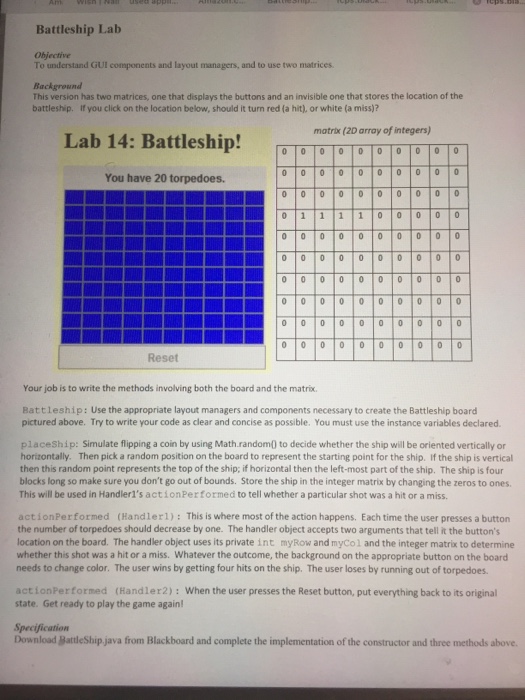
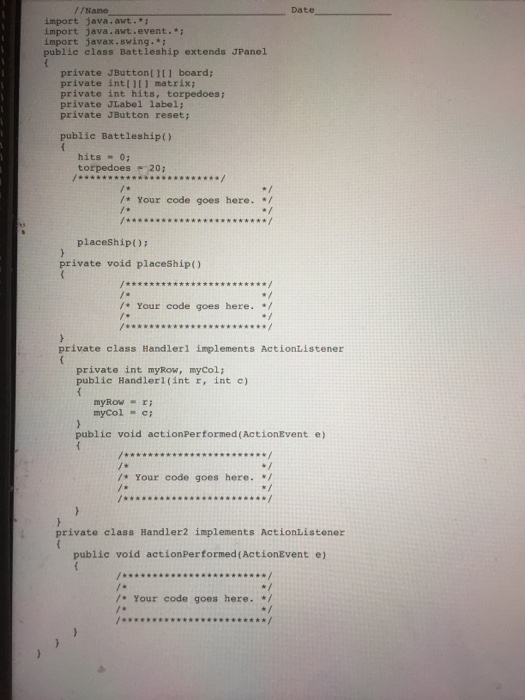
Battleship Lab understand GUI components and layout managers, and to use two matrices. Background This version has two matrices, one that displays the buttons and an invisible one that stores the location of the battleship. If you click on the location below, should it turn red (a hit) or white (a miss)? matrix (2D array of integers) Lab 14: Battleship! r Tra To To To To To T You have 20 torpedoes. Your job is to write the methods involving both the board and the matrix. attleship: Use the appropriate layout managers and components necessary to create the Battleship board pictured above. Try to write your code as clear and ooncise as possible. You must use the instance variables declared place Ship: Simulate flipping a coin by using Math random0 to decide whether the ship will be oriented vertically or horizontally. Then pick a random position on the board to represent the starting point for the ship. If the ship is vertical then this random point represents the top of the ship; ifhorizontal then the left-most part of the ship. The ship is four blocks long so make sure you don't go out of bounds. Store the ship in the integer matrix by changing the zeros to ones. This will be used in Handlerl's actionPerformed to tell whether a particular shot was a hit or a miss tion Performed (Handlerl) This is where most of the action happens. Each time the user presses a button the number of torpedoes should decrease by one. The handler object accepts two arguments that tell it the button's location on the board. The handler object uses its private int myRow and myColand the integer matrix to determine whether this shot was a hit or a miss. Whatever the outcome, the background on the appropriate button on the board needs to change color. The user wins by getting four hits on the ship. The user loses by running out of torpedoes. action Performed (Handler2) When the user presses the Reset button, put everything back to its original tate. Get ready to play the game again! Download Battleship java from Blackboard and complete the implementation of the constructor and three methods above
Step by Step Solution
There are 3 Steps involved in it

Get step-by-step solutions from verified subject matter experts
 Study Help