







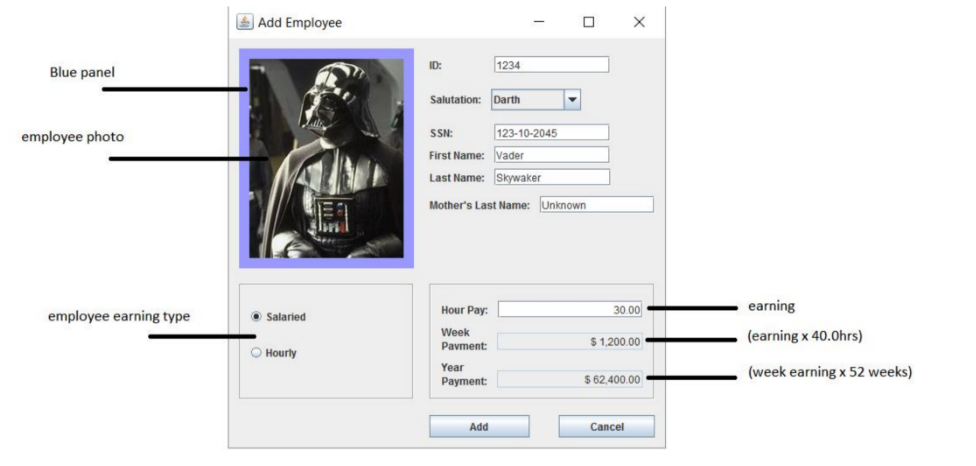
Question: In java. Make the screen or GUI attached. The Add button must instantiate the class Employee below Populating all attributes with the text of the
In java. Make the screen or GUI attached. The Add button must instantiate the class Employee below Populating all attributes with the text of the components of your GUI then print all the fields into the console using method toString(). The cancel button must close the frame. There are two types of earnings: Salaried and Hourly, when you select the hourly checkbox the GUI will show the Week payment and Year payment and they must be calculated , it must show all the components in addiotion Week payment and Year payment fields should be disable. When the user select Salaried checkbox the GUI will change label Hour Pay: to Salary:, and will hide the rest of the components. Please apply exception handling if needed.
import java.util.Scanner;
package edu.pupr.employeeFrame;
public abstract class Employee {
private int ID;
private String ssn;
private String salutation;
private String firstName;
private String lastName;
private String maidenName;
private int earningType1;
private double earning;
public Employee()
{
}
public Employee(int ID, String ssn, String salutation, String firstName, String lastName, String maideName, double earning, String maidenName,
int earningType1)
{
this.ID = ID;
this.ssn = ssn; //Social Security Number
this.salutation = salutation;
this.firstName = firstName;
this.lastName = lastName;
this.maidenName = maidenName;
this.earningType1 = earningType1;
this.earning = earning; //Hour Pay
}
//set ID
public void setID(int ID)
{
this.ID = ID;
}
//get ID
public int getID()
{
return ID;
}
//set ssn
public void setSSN(String ssn)
{
this.ssn = ssn;
}
//get ssn
public String getSSN()
{
return ssn;
}
//set salutation
public void setSalutation(String salutation)
{
this.salutation = salutation;
}
//get salutation
public String getSalutation()
{
return salutation;
}
//setter first name
public void setFirstName(String firstName)
{
this.firstName = firstName;
}
//getter first name
public String getFirstName() {
return firstName;
}
//setter last name
public void setLastName(String lastName)
{
this.lastName = lastName;
}
//getter last name
public String getLastName(){
return lastName;
}
//setter maiden name
public void setMaidenName(String maidenName)
{
this.maidenName = maidenName;
}
//getter maiden name
public String getMaidenName()
{
return maidenName;
}
//setter earning
public void setEarning(double earning)
{
if(earning != 0.00)
this.earning = earning;
else
throw new ArithmeticException("\"The hourly pay\" can not be zero!");
}
public void setEarningType1(int earningType1) {
this.earningType1 = earningType1;
}
//getter earning
public double getEarning()
{
return earning;
}
public double weeklyPayment()
{
return earning * 40.0;
}
public double yearlyPayment()
{
return weeklyPayment() * (52*7);
}
public String toString()
{
return String.format("ID:", getID(),
"Salutation", getSalutation(),
"First Name: ", getFirstName(),
"Last Name: " , getLastName(),
"Mothers Last Name: ", getMaidenName(),
"SSN:", getSSN() );
} // end method toString
public void EarningType(int earningType1) {
if(earningType1 == 1)
System.out.print("Salaried");
else if(earningType1 == 2)
System.out.print("Hourly");
else
System.out.print("Nothing");
}
public void askEmployeeInfo()
{
Scanner input = new Scanner(System.in);
System.out.print("ID: ");
ID = input.nextInt();
System.out.print("First Name: ");
firstName = input.nextLine();
System.out.print("Last Name: ");
lastName = input.nextLine();
System.out.print("Mother's Last Name: ");
maidenName = input.nextLine();
System.out.print("SSN: ");
ssn = input.nextLine();
System.out.print("Earning Type: ");
earningType1 = input.nextInt();
System.out.print("Hourly Pay: ");
earning = input.nextDouble();
}
}
Add Employee 1234 Blue panel Salutation: Darth SSN: First Name: Vader Last Name: Mother's Last Name: 123-10-2045 employee photo aker Hour Pay: Week Pavment: Year Payment: 3000 -earning 1.200.00- (earning x 40.0hrs) 62,400.00 (week earning x 52 weeks) employee earning type Salaried Hourly Add Cancel Add Employee 1234 Blue panel Salutation: Darth SSN: First Name: Vader Last Name: Mother's Last Name: 123-10-2045 employee photo aker Hour Pay: Week Pavment: Year Payment: 3000 -earning 1.200.00- (earning x 40.0hrs) 62,400.00 (week earning x 52 weeks) employee earning type Salaried Hourly Add Cancel
Step by Step Solution
There are 3 Steps involved in it

Get step-by-step solutions from verified subject matter experts
 Study Help