







Question: In Java please. 1. Create an input file for your program. See below for the input file format and sample data. 2. Report column specifications.
In Java please.
1. Create an input file for your program. See below for the input file format and sample data.
2. Report column specifications. Define the columns in the printf statements that generate the report such that they are wide enough to hold data at least as large as the data that appears in the sample input file below. All data in each column should be properly lined up (see example report below). The name column should be left justified and the other columns should be right justified.
3. Ask the user to enter the name of both the input and output files. Whatever names they enter at the command line during execution should be used for input and output.
For example, if the user types in the string VetVisit.txt for the input filename then the input data should be read from that file. The same goes for the output file. If the user enters the string Report.txt for the output file then the report should be written to that file.
Tip: (DO NOT HARD CODE THE FILENAMES INTO THE PROGRAM)
4. Comment the code using javadoc by generating the HTML documents that the Javadoc utility creates. (all classes and methods should have a specific type of javadoc comment.)
5. Indent correctly ( first statment after start of a block should be indented, end of a block should be unindented with respect to previous statement, start and end of a block should be at the same level of indent)
File Format / Sample Input File (Visit.txt) : 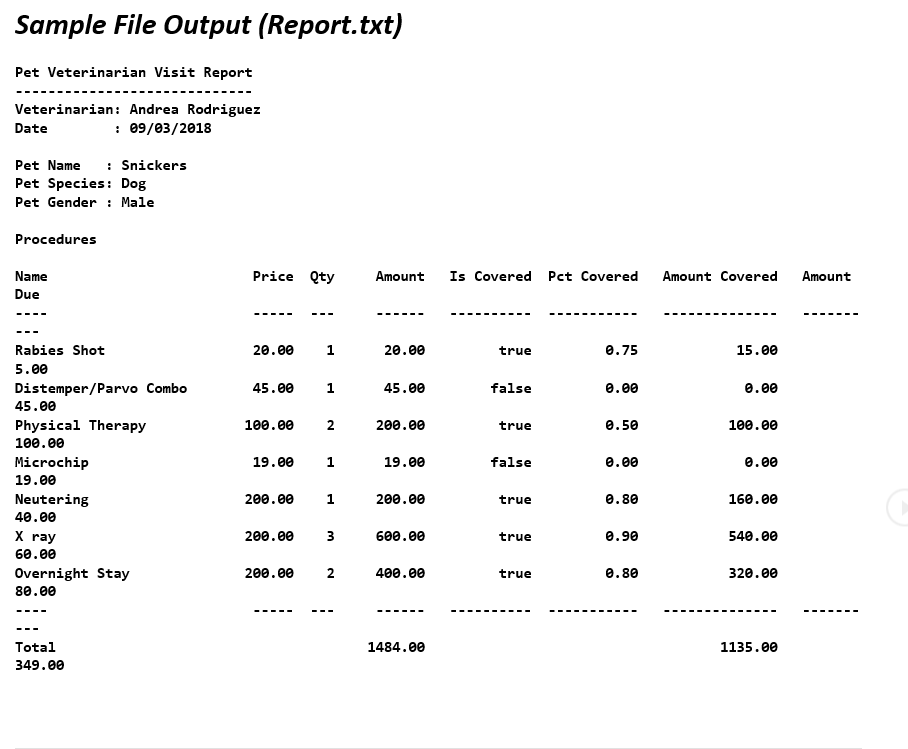
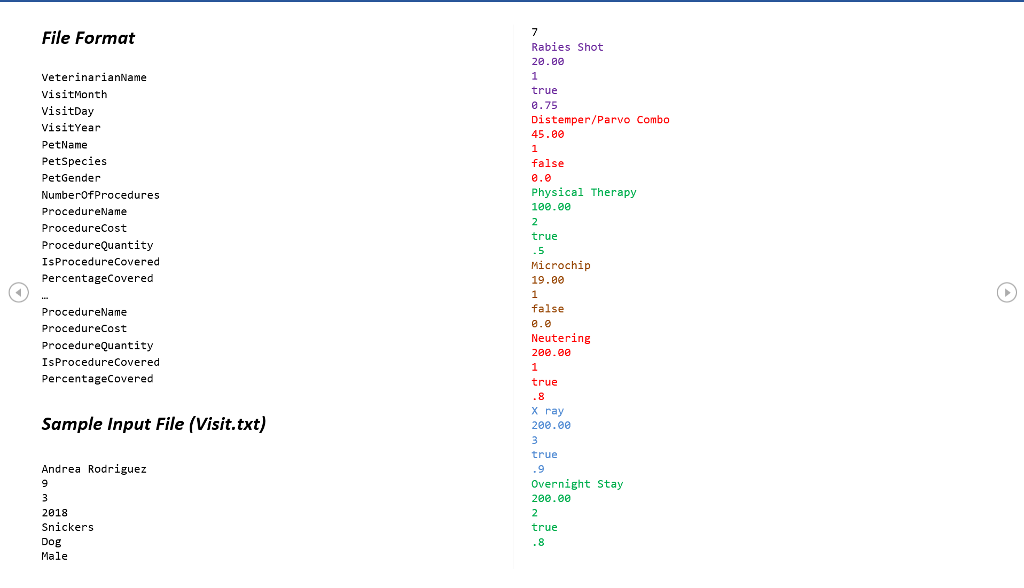
Sample File Output (Report.txt) Pet Veterinarian Visit Report Veterinarian: Andrea Rodriguez Date : 09/03/2018 Pet Name Snickers Pet Species: Dog Pet Gender Male Procedures Name Due Price Qty Amount Is Covered Pct Covered Amount Covered Amount 15.0e Rabies Shot 5.00 Distemper/Parvo Combo 45.00 Physical Therapy 100.00 Microchip 19.00 Neutering 46.00 x ray 60.00 Overnight Stay 80.00 20.00 1 20.00 true 0.75 45.00 1 45.00 false 0.00 100.00 2 200.00 true .50 100 . 19.00 1 19.00 false 0.00 206. 1 200 . 00 true 160. 200 . 600.00 true 0.90 540 . 200 . 2 400.00 true e.80 320.00 Total 349.00 1484.06e 1135
Step by Step Solution
There are 3 Steps involved in it

Get step-by-step solutions from verified subject matter experts
 Study Help