







Question: IN JAVA PLEASE Also, the code should print the output that follows: public static void main(String [] args) { Rolodex r = new Rolodex ();
IN JAVA PLEASE
![public static void main(String [] args) { Rolodex r = new Rolodex](https://dsd5zvtm8ll6.cloudfront.net/si.experts.images/questions/2024/09/66fa26c913dad_96066fa26c88ad81.jpg)
!["23"); System.out.println(r); } ' The code public static void main(String [] args)](https://dsd5zvtm8ll6.cloudfront.net/si.experts.images/questions/2024/09/66fa26caac5c2_96266fa26ca223dc.jpg)
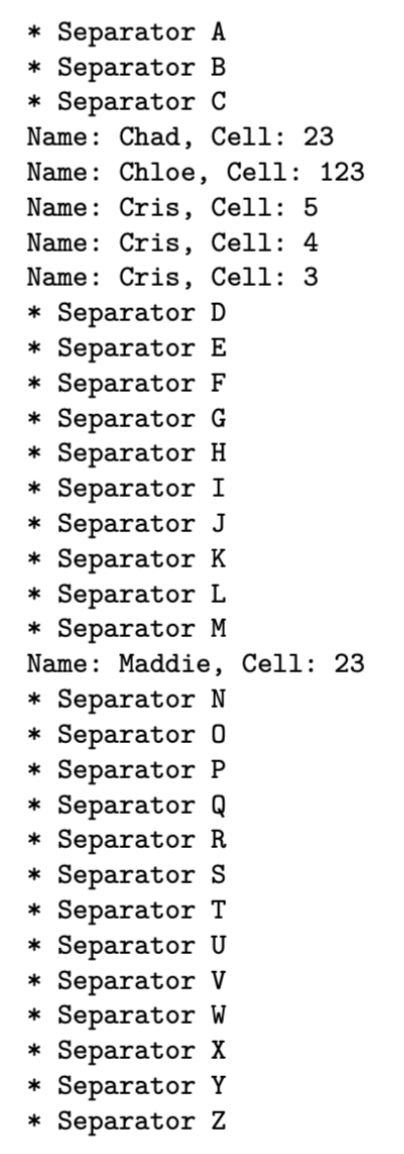
Also, the code should print the output that follows:
public static void main(String [] args) { Rolodex r = new Rolodex (); r.addCard("Chloe", "123"); r.addCard("Chad", "23"); r.addCard("Cris", "3");
r.addCard("Cris", "4"); r.addCard("Cris", "5"); r.addCard("Maddie", "23"); System.out.println(r);
}
 '
'
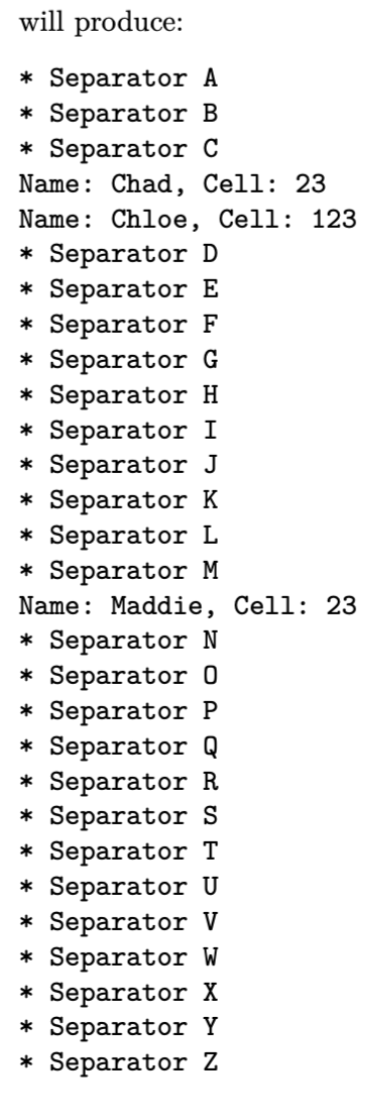
The code
public static void main(String [] args) { Rolodex r = new Rolodex (); r.addCard("Chloe", "123"); r.addCard("Chad", "23"); r.addCard("Cris", "3"); r.addCard("Cris", "4"); r.addCard("Cris", "5"); r.addCard("Maddie", "23");
r.removeAllCards("Cris");
System.out.println(r); }
 r.initializeCursor (); for (int i=0; i
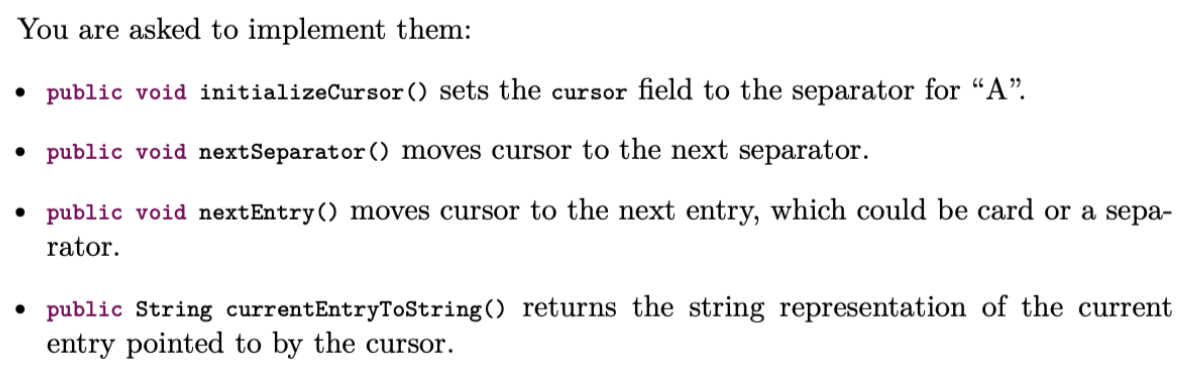
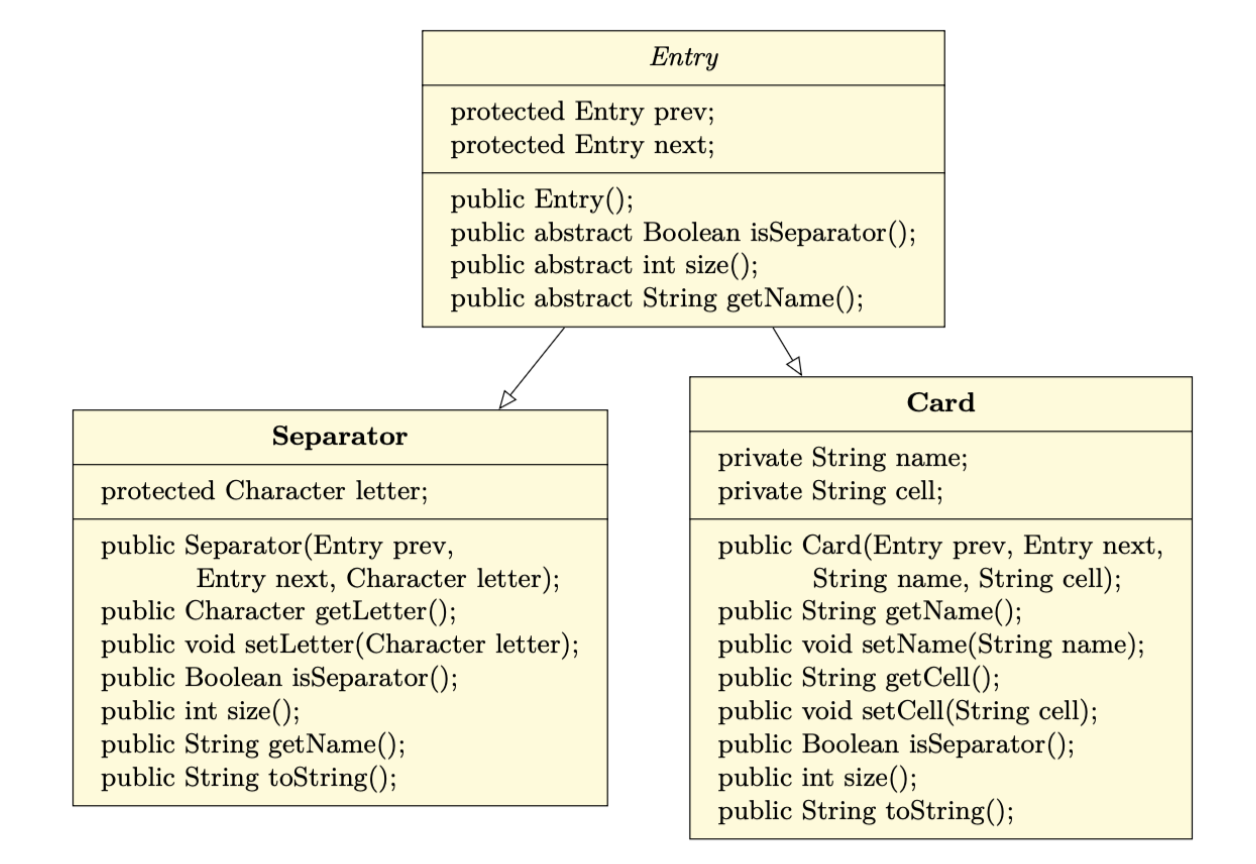
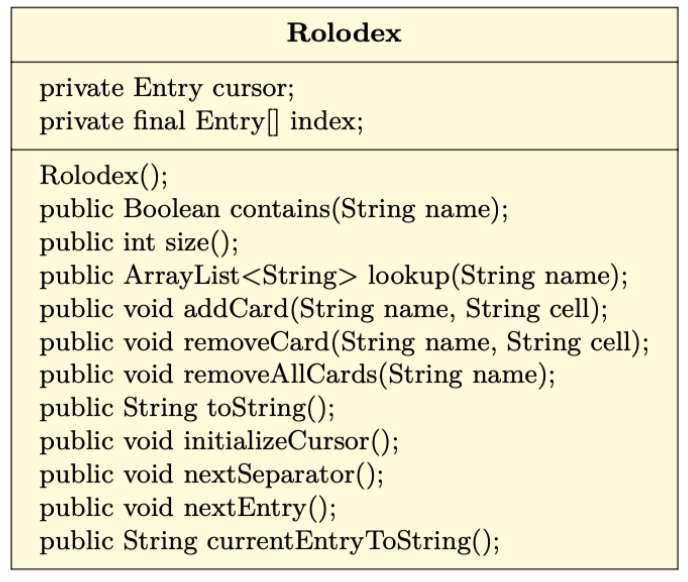
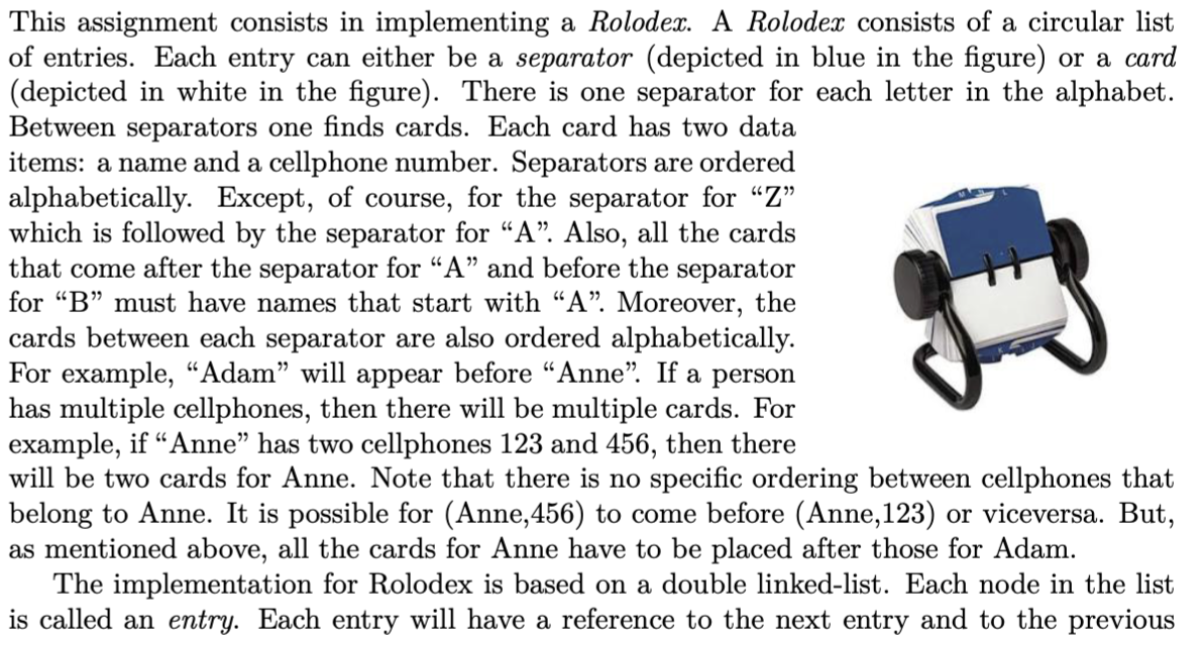
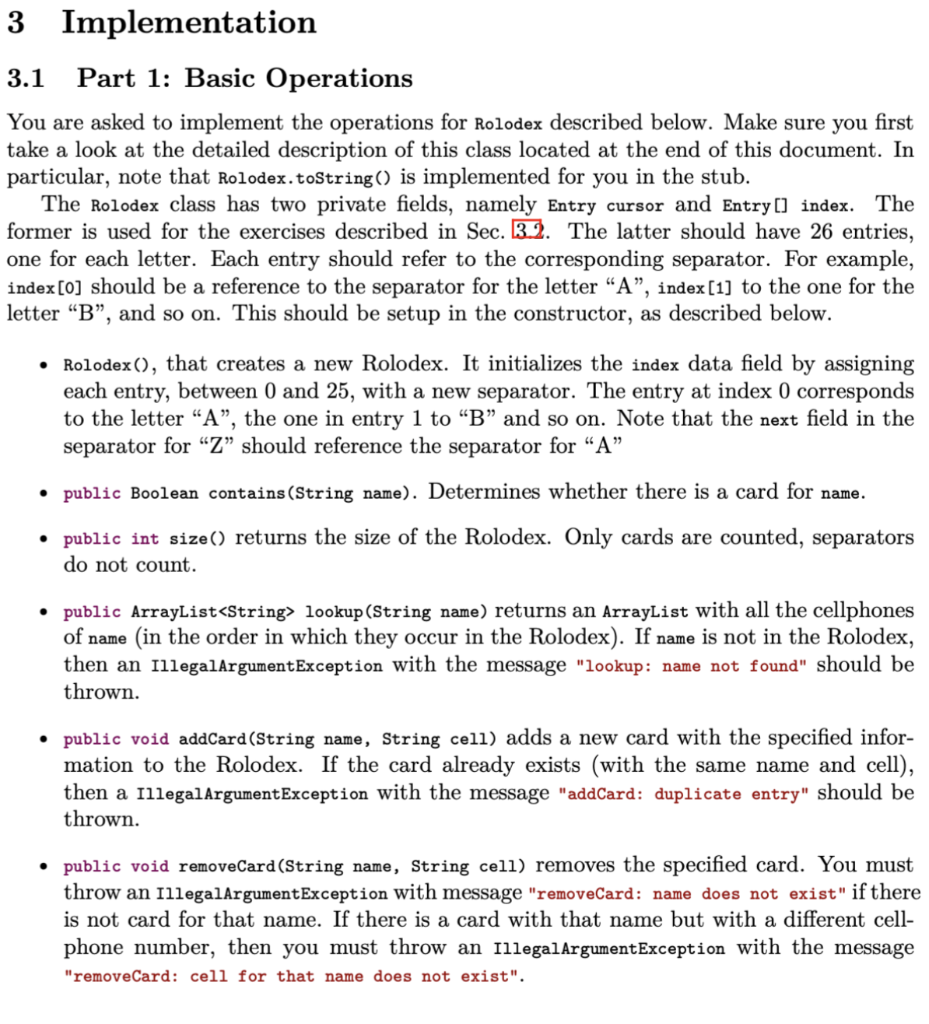
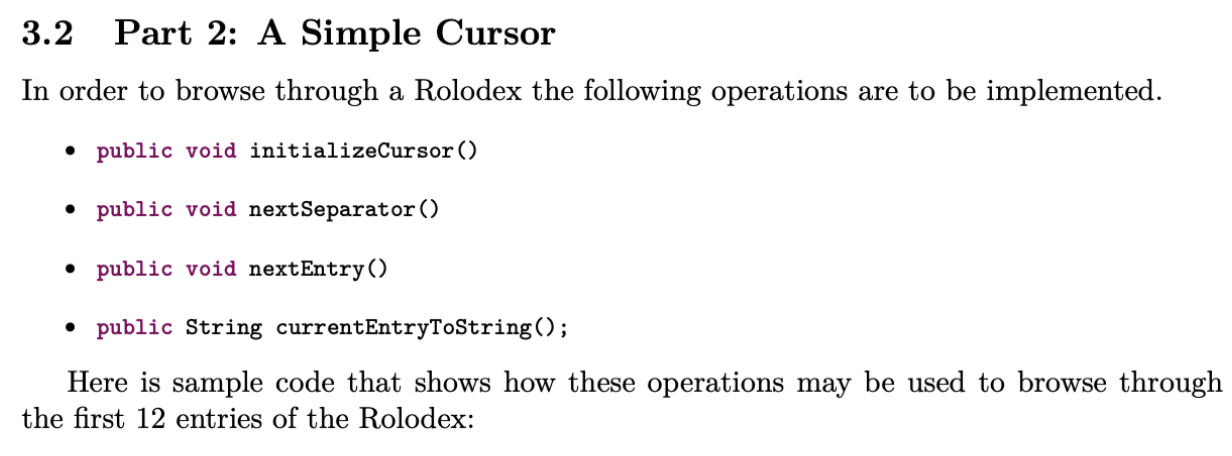
This assignment consists in implementing a Rolodex. A Rolodex consists of a circular list of entries. Each entry can either be a separator (depicted in blue in the figure) or a card (depicted in white in the figure). There is one separator for each letter in the alphabet. Between separators one finds cards. Each card has two data items: a name and a cellphone number. Separators are ordered alphabetically. Except, of course, for the separator for "Z" which is followed by the separator for "A". Also, all the cards that come after the separator for "A" and before the separator for "B" must have names that start with "A". Moreover, the cards between each separator are also ordered alphabetically. For example, "Adam" will appear before "Anne". If a person has multiple cellphones, then there will be multiple cards. For example, if "Anne" has two cellphones 123 and 456, then there will be two cards for Anne. Note that there is no specific ordering between cellphones that belong to Anne. It is possible for (Anne,456) to come before (Anne,123) or viceversa. But, as mentioned above, all the cards for Anne have to be placed after those for Adam. The implementation for Rolodex is based on a double linked-list. Each node in the list is called an entry. Each entry will have a reference to the next entry and to the previous entry. An entry may either be a separator or a card. The application is organized into four Java classes. Further details on these classes are listed at the end of this document: - Rolodex: This is the main class. Your code will go here. - Entry: Implemented for you. Abstract class. - Card: Implemented for you. Subclass of Entry. - Separator: Implemented for you. Subclass of Entry. P.1 Part 1: Basic Operations You are asked to implement the operations for Rolodex described below. Make sure you first ake a look at the detailed description of this class located at the end of this document. In particular, note that Rolodex.toString() is implemented for you in the stub. The Rolodex class has two private fields, namely Entry cursor and Entry[] index. The ormer is used for the exercises described in Sec. 3.2. The latter should have 26 entries, one for each letter. Each entry should refer to the corresponding separator. For example, ndex [0] should be a reference to the separator for the letter "A", index [1] to the one for the etter "B", and so on. This should be setup in the constructor, as described below. - Rolodex(), that creates a new Rolodex. It initializes the index data field by assigning each entry, between 0 and 25 , with a new separator. The entry at index 0 corresponds to the letter "A", the one in entry 1 to "B" and so on. Note that the next field in the separator for "Z" should reference the separator for "A" - public Boolean contains(String name). Determines whether there is a card for name. - public int size() returns the size of the Rolodex. Only cards are counted, separators do not count. - public ArrayList lookup(String name) returns an ArrayList with all the cellphones of name (in the order in which they occur in the Rolodex). If name is not in the Rolodex, then an IllegalArgumentException with the message "lookup: name not found" should be thrown. - public void addCard(String name, String cell) adds a new card with the specified information to the Rolodex. If the card already exists (with the same name and cell), then a IllegalargumentException with the message "addCard: duplicate entry" should be thrown. - public void removeCard(String name, String cell) removes the specified card. You must throw an IllegalArgumentException with message "removeCard: name does not exist" if there is not card for that name. If there is a card with that name but with a different cellphone number, then you must throw an IllegalArgumentException with the message "removeCard: cell for that name does not exist". - public void removeAllCards(String name) removes all cards for name. You must throw an IllegalArgumentException with message "removeAllCards: name does not exist" if the name is not in the Rolodex. Important: For all methods above that have a name parameter, you must only search through the cards that start with the same letter as that of the first letter of name. In particular, you cannot exhaustively search through the entire Rolodex. Some examples follow. public static void main(String [] args) \{ Rolodex r= new Rolodex(); System. out.println (r); Should print: * Separator A * Separator B * Separator C * Separator D * Separator E * Separator F * Separator G * Separator H * Separator I * Separator J * Separator K * Separator L * Separator M * Separator N * Separator O * Separator P * Separator Q * Separator R * Separator S * Separator T * Separator U * Separator V * Separator W * Separator X * Separator Y * Separator Z * Separator A * Separator B * Separator C Name: Chad, Cell: 23 Name: Chloe, Cell: 123 Name: Cris, Cell: 5 Name: Cris, Cell: 4 Name: Cris, Cell: 3 * Separator D * Separator E * Separator F * Separator G * Separator H * Separator I * Separator J * Separator K * Separator L * Separator M Name: Maddie, Cell: 23 * Separator N * Separator 0 * Separator P * Separator Q * Separator R * Separator S * Separator T * Separator U * Separator V * Separator W * Separator X * Separator Y * Separator Z will produce: * Separator A * Separator B * Separator C Name: Chad, Cell: 23 Name: Chloe, Cell: 123 * Separator D * Separator E * Separator F * Separator G * Separator H * Separator I * Separator J * Separator K * Separator L * Separator M Name: Maddie, Cell: 23 * Separator N * Separator 0 * Separator P * Separator Q * Separator R * Separator S * Separator T * Separator U * Separator V * Separator W * Separator X * Separator Y * Separator Z 3.2 Part 2: A Simple Cursor In order to browse through a Rolodex the following operations are to be implemented. - public void initializeCursor() - public void nextSeparator() - public void nextEntry() - public String currentEntryToString(); Here is sample code that shows how these operations may be used to browse through the first 12 entries of the Rolodex: You are asked to implement them: - public void initializeCursor() sets the cursor field to the separator for "A". - public void nextSeparator () moves cursor to the next separator. - public void nextEntry() moves cursor to the next entry, which could be card or a separator. - public String currentEntryToString() returns the string representation of the current entry pointed to by the cursor. \begin{tabular}{|l|} \hline \multicolumn{1}{|c|}{ Rolodex } \\ \hline private Entry cursor; \\ private final Entry[] index; \\ Rolodex (); \\ public Boolean contains(String name); \\ public int size(); \\ public ArrayList lookup(String name); \\ public void addCard(String name, String cell); \\ public void removeCard(String name, String cell ); \\ public void removeAllCards(String name); \\ public String toString( ); \\ public void initializeCursor (); \\ public void nextSeparator( ); \\ public void nextEntry (); \\ public String currentEntryToString (); \\ \hline \end{tabular} This assignment consists in implementing a Rolodex. A Rolodex consists of a circular list of entries. Each entry can either be a separator (depicted in blue in the figure) or a card (depicted in white in the figure). There is one separator for each letter in the alphabet. Between separators one finds cards. Each card has two data items: a name and a cellphone number. Separators are ordered alphabetically. Except, of course, for the separator for "Z" which is followed by the separator for "A". Also, all the cards that come after the separator for "A" and before the separator for "B" must have names that start with "A". Moreover, the cards between each separator are also ordered alphabetically. For example, "Adam" will appear before "Anne". If a person has multiple cellphones, then there will be multiple cards. For example, if "Anne" has two cellphones 123 and 456, then there will be two cards for Anne. Note that there is no specific ordering between cellphones that belong to Anne. It is possible for (Anne,456) to come before (Anne,123) or viceversa. But, as mentioned above, all the cards for Anne have to be placed after those for Adam. The implementation for Rolodex is based on a double linked-list. Each node in the list is called an entry. Each entry will have a reference to the next entry and to the previous entry. An entry may either be a separator or a card. The application is organized into four Java classes. Further details on these classes are listed at the end of this document: - Rolodex: This is the main class. Your code will go here. - Entry: Implemented for you. Abstract class. - Card: Implemented for you. Subclass of Entry. - Separator: Implemented for you. Subclass of Entry. P.1 Part 1: Basic Operations You are asked to implement the operations for Rolodex described below. Make sure you first ake a look at the detailed description of this class located at the end of this document. In particular, note that Rolodex.toString() is implemented for you in the stub. The Rolodex class has two private fields, namely Entry cursor and Entry[] index. The ormer is used for the exercises described in Sec. 3.2. The latter should have 26 entries, one for each letter. Each entry should refer to the corresponding separator. For example, ndex [0] should be a reference to the separator for the letter "A", index [1] to the one for the etter "B", and so on. This should be setup in the constructor, as described below. - Rolodex(), that creates a new Rolodex. It initializes the index data field by assigning each entry, between 0 and 25 , with a new separator. The entry at index 0 corresponds to the letter "A", the one in entry 1 to "B" and so on. Note that the next field in the separator for "Z" should reference the separator for "A" - public Boolean contains(String name). Determines whether there is a card for name. - public int size() returns the size of the Rolodex. Only cards are counted, separators do not count. - public ArrayList lookup(String name) returns an ArrayList with all the cellphones of name (in the order in which they occur in the Rolodex). If name is not in the Rolodex, then an IllegalArgumentException with the message "lookup: name not found" should be thrown. - public void addCard(String name, String cell) adds a new card with the specified information to the Rolodex. If the card already exists (with the same name and cell), then a IllegalargumentException with the message "addCard: duplicate entry" should be thrown. - public void removeCard(String name, String cell) removes the specified card. You must throw an IllegalArgumentException with message "removeCard: name does not exist" if there is not card for that name. If there is a card with that name but with a different cellphone number, then you must throw an IllegalArgumentException with the message "removeCard: cell for that name does not exist". - public void removeAllCards(String name) removes all cards for name. You must throw an IllegalArgumentException with message "removeAllCards: name does not exist" if the name is not in the Rolodex. Important: For all methods above that have a name parameter, you must only search through the cards that start with the same letter as that of the first letter of name. In particular, you cannot exhaustively search through the entire Rolodex. Some examples follow. public static void main(String [] args) \{ Rolodex r= new Rolodex(); System. out.println (r); Should print: * Separator A * Separator B * Separator C * Separator D * Separator E * Separator F * Separator G * Separator H * Separator I * Separator J * Separator K * Separator L * Separator M * Separator N * Separator O * Separator P * Separator Q * Separator R * Separator S * Separator T * Separator U * Separator V * Separator W * Separator X * Separator Y * Separator Z * Separator A * Separator B * Separator C Name: Chad, Cell: 23 Name: Chloe, Cell: 123 Name: Cris, Cell: 5 Name: Cris, Cell: 4 Name: Cris, Cell: 3 * Separator D * Separator E * Separator F * Separator G * Separator H * Separator I * Separator J * Separator K * Separator L * Separator M Name: Maddie, Cell: 23 * Separator N * Separator 0 * Separator P * Separator Q * Separator R * Separator S * Separator T * Separator U * Separator V * Separator W * Separator X * Separator Y * Separator Z will produce: * Separator A * Separator B * Separator C Name: Chad, Cell: 23 Name: Chloe, Cell: 123 * Separator D * Separator E * Separator F * Separator G * Separator H * Separator I * Separator J * Separator K * Separator L * Separator M Name: Maddie, Cell: 23 * Separator N * Separator 0 * Separator P * Separator Q * Separator R * Separator S * Separator T * Separator U * Separator V * Separator W * Separator X * Separator Y * Separator Z 3.2 Part 2: A Simple Cursor In order to browse through a Rolodex the following operations are to be implemented. - public void initializeCursor() - public void nextSeparator() - public void nextEntry() - public String currentEntryToString(); Here is sample code that shows how these operations may be used to browse through the first 12 entries of the Rolodex: You are asked to implement them: - public void initializeCursor() sets the cursor field to the separator for "A". - public void nextSeparator () moves cursor to the next separator. - public void nextEntry() moves cursor to the next entry, which could be card or a separator. - public String currentEntryToString() returns the string representation of the current entry pointed to by the cursor. \begin{tabular}{|l|} \hline \multicolumn{1}{|c|}{ Rolodex } \\ \hline private Entry cursor; \\ private final Entry[] index; \\ Rolodex (); \\ public Boolean contains(String name); \\ public int size(); \\ public ArrayList lookup(String name); \\ public void addCard(String name, String cell); \\ public void removeCard(String name, String cell ); \\ public void removeAllCards(String name); \\ public String toString( ); \\ public void initializeCursor (); \\ public void nextSeparator( ); \\ public void nextEntry (); \\ public String currentEntryToString (); \\ \hline \end{tabular}
Step by Step Solution
There are 3 Steps involved in it

Get step-by-step solutions from verified subject matter experts
 Study Help