







Question: In Java please Create class FillAndSortArray Fill AndSortArray should (all in main): .Prompt the user to enter the number of elements desired in array Create
In Java please
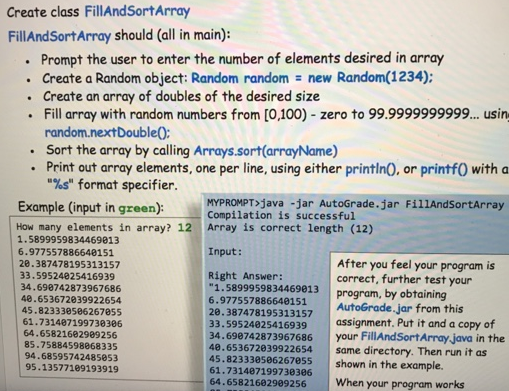
Create class FillAndSortArray Fill AndSortArray should (all in main): .Prompt the user to enter the number of elements desired in array Create a Random object: Random random new Random(1234): Create an array of doubles of the desired size Fill array with random numbers from [0,100) zero to 99.9999999999... usin random.nextDouble0: Sort the array by calling Arrays.sort(arrayName) Print out array elements, one per line, using either println0. or printf0 with a "%s" format specifier MYPROMPT java -jar AutoGrade.jar FillAndsortArray Compilation is successful Example (input in green): How many elements in array? 12 Array is correct length (12) 6.977557886648151 1.5899959834469813 Input: 20.387478195313157 33.59524825416939 34.698742873967686 40.653672039922654 45.823338586267855 61.731487199738386 64.65821682989256 85.75884598868335 94.68595742485053 95.13577189193919 After you feel your program is correct, further test your Right Answer: 1.5899959834469813 program, by obtaining 6.977557886640151 AutoGrade.jar from this 28.387478195313157a 33.59524825416939 assignment. Put it and a copy of 34.698742873967686 your FillAndSortArray java in the 48.653672039922654 same directory. Then run it as 45.823338586267055 shown in the example. 61.731487199738386 64.65821682909256 When your program works
Step by Step Solution
There are 3 Steps involved in it

Get step-by-step solutions from verified subject matter experts
 Study Help