







Question: In Java: Please modify the following source code so the program looks like the following pictures : Current Output: Desired Output: The colors are already
In Java: Please modify the following source code so the program looks like the following pictures :
Current Output:
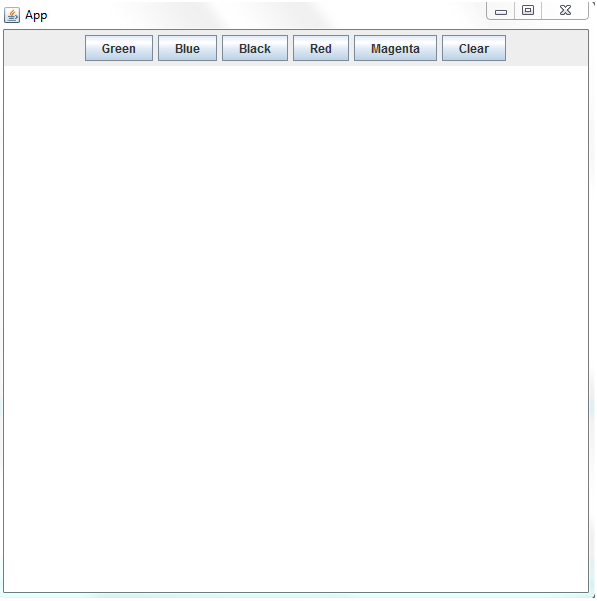
Desired Output:
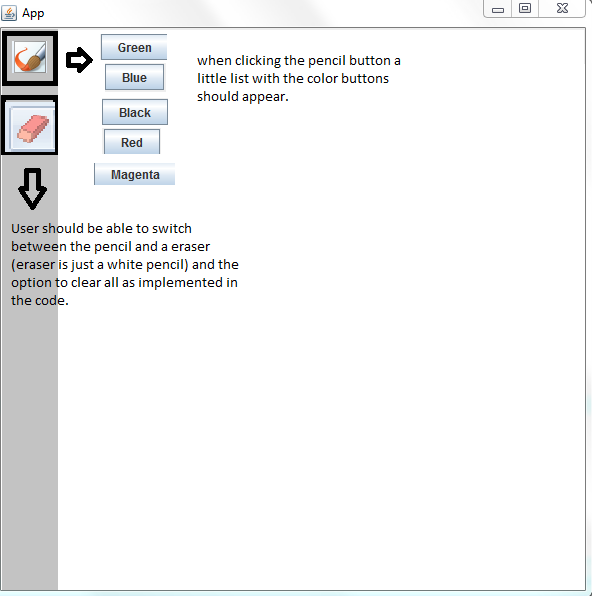
The colors are already implemented, just gotta create the pencil button and the eraser button to the left of the window and add the colors to the pencil.
Source Code: (2 Java classes)
package javaapplication1;
import java.awt.Color;
import java.awt.Graphics;
import java.awt.Graphics2D;
import java.awt.Image;
import java.awt.RenderingHints;
import java.awt.event.MouseAdapter;
import java.awt.event.MouseEvent;
import java.awt.event.MouseMotionAdapter;
import javax.swing.JComponent;
public class JavaApplication1 extends JComponent {
// Image in which we're going to draw
private Image image;
// Graphics2D object ==> used to draw on
private Graphics2D g2;
// Mouse coordinates
private int currentX, currentY, oldX, oldY;
public JavaApplication1() {
setDoubleBuffered(false);
addMouseListener(new MouseAdapter() {
public void mousePressed(MouseEvent e) {
// save coord x,y when mouse is pressed
oldX = e.getX();
oldY = e.getY();
}
});
addMouseMotionListener(new MouseMotionAdapter() {
public void mouseDragged(MouseEvent e) {
// coord x,y when drag mouse
currentX = e.getX();
currentY = e.getY();
if (g2 != null) {
// draw line if g2 context not null
g2.drawLine(oldX, oldY, currentX, currentY);
// refresh draw area to repaint
repaint();
// store current coords x,y as olds x,y
oldX = currentX;
oldY = currentY;
}
}
});
}
protected void paintComponent(Graphics g) {
if (image == null) {
// image to draw null ==> we create
image = createImage(getSize().width, getSize().height);
g2 = (Graphics2D) image.getGraphics();
// enable antialiasing
g2.setRenderingHint(RenderingHints.KEY_ANTIALIASING, RenderingHints.VALUE_ANTIALIAS_ON);
// clear draw area
clear();
}
g.drawImage(image, 0, 0, null);
}
// now we create exposed methods
public void clear() {
g2.setPaint(Color.white);
// draw white on entire draw area to clear
g2.fillRect(0, 0, getSize().width, getSize().height);
g2.setPaint(Color.black);
repaint();
}
public void red() {
// apply red color on g2 context
g2.setPaint(Color.red);
}
public void black() {
g2.setPaint(Color.black);
}
public void magenta() {
g2.setPaint(Color.magenta);
}
public void green() {
g2.setPaint(Color.green);
}
public void blue() {
g2.setPaint(Color.blue);
}
}
*********************************************************************************************
package javaapplication1;
import java.awt.BorderLayout;
import java.awt.Container;
import java.awt.event.ActionEvent;
import java.awt.event.ActionListener;
import javax.swing.JButton;
import javax.swing.JFrame;
import javax.swing.JPanel;
public class SwingPaint {
JButton clearBtn, blackBtn, blueBtn, greenBtn, redBtn, magentaBtn;
JavaApplication1 drawArea;
ActionListener actionListener = new ActionListener() {
public void actionPerformed(ActionEvent e) {
if (e.getSource() == clearBtn) {
drawArea.clear();
} else if (e.getSource() == blackBtn) {
drawArea.black();
} else if (e.getSource() == blueBtn) {
drawArea.blue();
} else if (e.getSource() == greenBtn) {
drawArea.green();
} else if (e.getSource() == redBtn) {
drawArea.red();
} else if (e.getSource() == magentaBtn) {
drawArea.magenta();
}
}
};
public static void main(String[] args) {
new SwingPaint().show();
}
public void show() {
// create main frame
JFrame frame = new JFrame("BlackBoar");
Container content = frame.getContentPane();
// set layout on content pane
content.setLayout(new BorderLayout());
// create draw area
drawArea = new JavaApplication1();
// add to content pane
content.add(drawArea, BorderLayout.CENTER);
// create controls to apply colors and call clear feature
JPanel controls = new JPanel();
JPanel subPanel = new JPanel();
clearBtn = new JButton("Clear");
clearBtn.addActionListener(actionListener);
blackBtn = new JButton("Black");
blackBtn.addActionListener(actionListener);
blueBtn = new JButton("Blue");
blueBtn.addActionListener(actionListener);
greenBtn = new JButton("Green");
greenBtn.addActionListener(actionListener);
redBtn = new JButton("Red");
redBtn.addActionListener(actionListener);
magentaBtn = new JButton("Magenta");
magentaBtn.addActionListener(actionListener);
// add to panel
controls.add(greenBtn);
controls.add(blueBtn);
controls.add(blackBtn);
controls.add(redBtn);
controls.add(magentaBtn);
controls.add(clearBtn);
// add to content pane
content.add(controls, BorderLayout.NORTH);
frame.setSize(600, 600);
// can close frame
frame.setDefaultCloseOperation(JFrame.EXIT_ON_CLOSE);
// show the swing paint result
frame.setVisible(true);
}
}
App Green Blue Black Red Magenta Clear
Step by Step Solution
There are 3 Steps involved in it

Get step-by-step solutions from verified subject matter experts
 Study Help