







Question: in java, please The main idea of this assignment is to work with classes and methods. You will create classes and methods to complete a
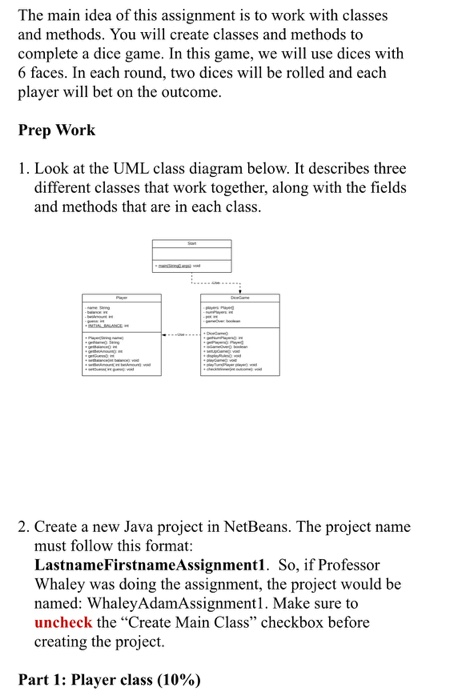
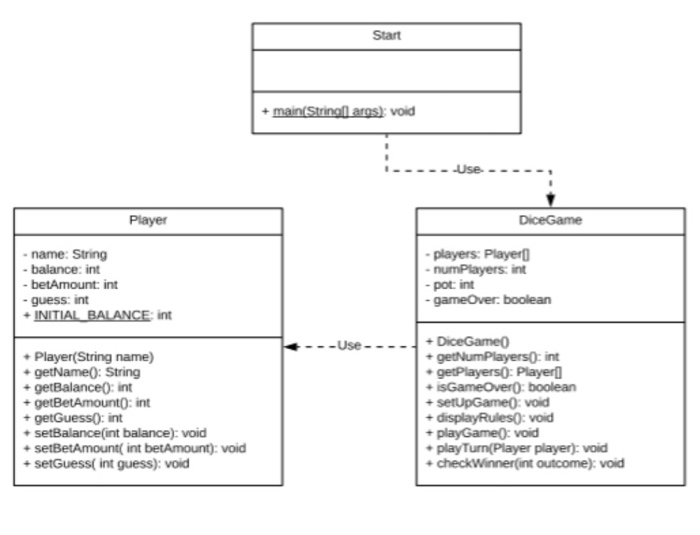
The main idea of this assignment is to work with classes and methods. You will create classes and methods to complete a dice game. In this game, we will use dices with 6 faces. In each round, two dices will be rolled and each player will bet on the outcome. Prep Work 1. Look at the UML class diagram below. It describes three different classes that work together, along with the fields and methods that are in each class. 2. Create a new Java project in NetBeans. The project name must follow this format: LastnameFirstnameAssignment1. So, if Professor Whaley was doing the assignment, the project would be named: Whaley AdamAssignmentl. Make sure to uncheck the "Create Main Class checkbox before creating the project. Part 1: Player class (10%) Part 1: Player class (10%) 1. Add a new Java class to your project. Name your new class Player. This class stores information for the game players. 2. Add fields to your newly created class according to the UML class diagram. Initialize INITIAL BALANCE to 500. 3. Add and implement the constructor. The constructor will initialize the name field and initialize balance to the INITIAL BALANCE. 4. Add and implement the getters and the setters. Part 2: DiceGame class (40%) 1. Add a new Java class to your project. Name this class DiceGame. This class handles all of the game logistics. 2. Add fields to your newly created class according to the UML class diagram. 3. Add a constructor. In the constructor, call setUpGame method. 4. Add and implement the getters. 5. Add the method stub for the rest of the methods in this class. 6. Now add code to the setUpGame method. In this method, 6. Now add code to the setUpGame method. In this method, 1) ask how many people are going to play. Use the scanner's nextInt() method to get the number they enter. Assign the input to the numOfPlayers field; 2) create an array of Player objects and assign that to the players field; 3) ask for each player's name and use that to create a new Player object with that name and add that Player object to the array of players; 4) call the displayRules() method; 7. Implement displayRules method. This method displays the follow message when it is called. RULES: Each player player places a bet and chooses a number between 2 and 12. The total of all the bets forms a "pot" Then two dices are rolled. If one of the players bet on the result correctly, she or he wins the entire pot. If more than one player bet on that nunber, the one who bet the most wins the entire pot. If there is a tie, they split the pot. If nobody bet on that number, the money remains in the pot for the next round. The game is over if one of the players run out of money. 8. Implement playGame method. In this method, 1) loop through each player in the array, call the play Turn method with each player. Further, accumulate each player's bet amount to the pot; 2) display the balance in the pot; 3) randomly generate two integers between 1 and 6 to simulate the outcome of rolling two dices. Add these two integers together and assign the value to a local variable named outcome; 4) call check Winner(outcome); 5) loop through each player to check if any player's balance is 0. Set gameOver to true if any player's balance is 0. 9. Implement playTurn method. In this method: 1) Tell the player his or her balance, and ask him or her to enter the amount to bet. If the amount exceeds the balance, output Bet balance exceeds available funds" and ask the player to enter the amount of the bet. Repeat until the player's bet is less or equal to the bet balance. Assign the input to the player's betAmount field. Update the player's balance by subtracting the bet Amount. 2) ask the player to enter his or her guess. Assign the input to his or her guess field. Your program should not accept the input if it is not in the range of 2 and 12. 10. Implement check Winner method. In this method, you will find out if any player correctly guessed the outcome and update each player's balance and the balance of the pot accordingly. Here are the rules you apply: . if no one made the correct guess, all of the players bets will be kept in the pot. If one player made the correct guess, he or she wins everything in the pot. If more than one player made the correct guess, the player with the highest bet wins everything in the pot; if multiple winning players have the highest bet, they will evenly split the balance in the pot. This method should also display how much each player won or lost in this round. Part 3: Test your project (0%) 1. Add a new Java class to your project. Name your new class Start. This class will start your game. Start + main(Strinal aras): void Player DiceGame name: String - balance: int - betAmount: int - guess: int - INITIAL BALANCE int - players: Player - numPlayers: int - pot int - gameOver: boolean --Use ---- -Player(String name) getName(): String + getBalance(): int + getBetAmount(): int + getGuess(): int setBalance(int balance): void - setBetAmount(int betAmount): void + setGuess(int guess): void + DiceGame + getNumPlayers: int getPayers Player is Game Over): boolean + setUp Game(): void + displayRules(): void playGame(): void play Turn(Player player): void checkWinner(int outcome): void
Step by Step Solution
There are 3 Steps involved in it

Get step-by-step solutions from verified subject matter experts
 Study Help