







Question: In java plz don't copy someone's answer: Start by working on the CannonBall class. Complete the constructor and add instance variables as needed. Each CannonBall
In java plz don't copy someone's answer:
Start by working on the CannonBall class. Complete the constructor and add instance variables as needed.
Each CannonBall object must keep track of the following state:
-the balls current center position (x and y),
-the balls current velocity (dx and dy), and
-the maximum x and y values for the boundaries outside of which the ball should stop moving.
The constructor
CannonBall provides an empty constructor. You will need to fill it in.
Use the parameters to initialize the starting state of the class. There is a comment with a hint about computing the initial velocity.
Initialize ballShape by creating an Ellipse of the appropriate size.
Property accessors
Add getter methods for the center x and center y.
updatePosition
This method moves the ball if it is still in bounds, then applies gravity by adjusting the balls velocity.
Your method should do this:
Calculate new x and y coordinates by adding the x and y velocities times dt to the current coordinates.
If the new positions are greater than zero and less than the maximum:
Move the CannonBall to the new position. (Hint: A CannonBall has an Ellipse named ballShape, which will need to move to the new x and y position so that you can see the cannonball moving on the screen. Look at the methods of Ellipse for ideas.)
Subtract GRAVITY times dt from the y velocity.
Return true, meaning in bounds.
Otherwise, if the ball is out of bounds:
Return false, meaning out of bounds.
CannonBall class code:(* import Canvas Window as well as Ellipse*)
/**
* Represents a cannon ball that follows a parabolic arc based on physics equations.
*/
@SuppressWarnings("WeakerAccess")
public class CannonBall {
public static final double GRAVITY = -9.8;
public static final double BALL_RADIUS = 2.5;
//TODO: Add instance variables. Remember that instance variables may or may not have corresponding constructor parameters.
private Ellipse ballShape;
public CannonBall(
double centerX,
double centerY,
double initialSpeed,
double initialAngle,
double maxX,
double maxY) {
// TODO: implement me.
//
// You'll need to initialize ballShape.
// Hint: Look at Ellipse's available constructors.
//
// You'll also need to initialize the instance variables you added above.
//
// To compute the initial velocity:
//
//double initialAngleRadians = Math.toRadians(initialAngle);
//initialSpeed * cos(initialAngleInRadians) // initial x velocity
//initialSpeed * -sin(initialAngleInRadians) // initial y velocity
//
// (You'll need to figure out how to use those values.)
}
/**
* Update the cannon ball's position if it is in bounds
* @return true if the ball is in within the maxXBound and maxYBound
*/
public boolean updatePosition(double dt) {
//TODO: fix me
return false;
}
/**
* Adds the cannonball's shape to the given canvas.
*/
public void addToCanvas(CanvasWindow canvas) {
canvas.add(ballShape);
}
/**
* Removes the cannonball's shape from the given canvas.
*/
public void removeFromCanvas(CanvasWindow canvas) {
canvas.remove(ballShape);
}
}
Test Case:
public class CannonBallTest {
// TODO: Uncomment this test
// @Test
// public void testBasicUpdatePosition() {
// CannonBall ball = new CannonBall(100, 100, 100, 45, 1100, 600);
//
// ball.updatePosition(0.1);
// assertEquals(107.071, ball.getCenterX(), 0.001);
// assertEquals(92.9289, ball.getCenterY(), 0.001);
//
// ball.updatePosition(0.1);
// assertEquals(114.142, ball.getCenterX(), 0.001);
// assertEquals(85.9558, ball.getCenterY(), 0.001);
//
// ball.updatePosition(0.1);
// assertEquals(121.213, ball.getCenterX(), 0.001);
// assertEquals(79.0807, ball.getCenterY(), 0.001);
// }
//TODO: Add more test methods
}
Here is how the outcome should look: The cannon code i have already
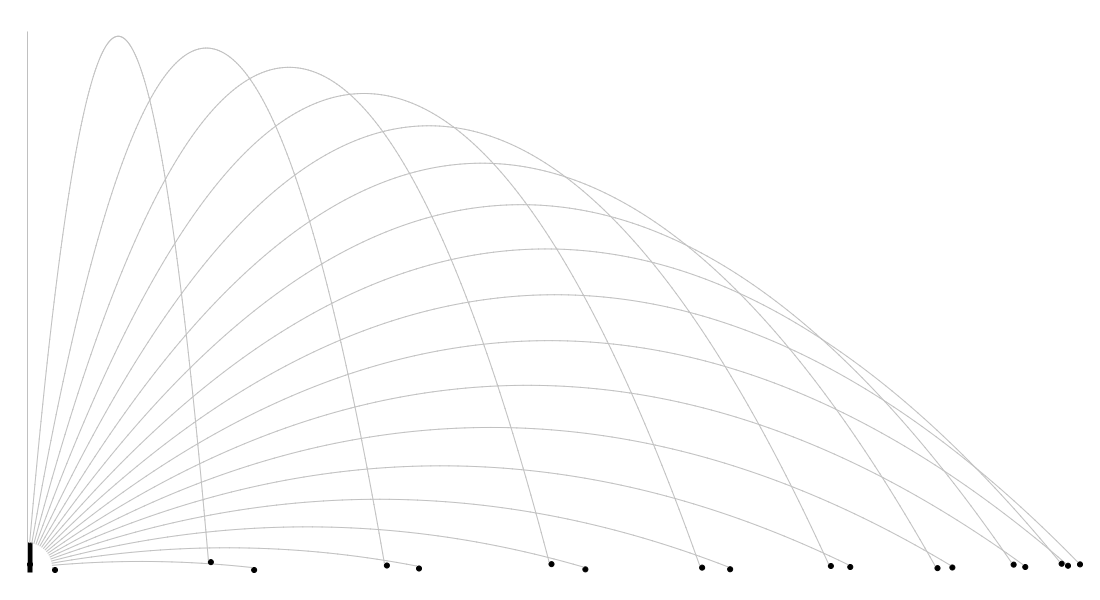
Transcribed image text
Step by Step Solution
There are 3 Steps involved in it

Get step-by-step solutions from verified subject matter experts
 Study Help