Question: In Java This is the flight.txt file: SBA => DEN, United, $393 SBA => DEN, American, $589 LAX => DEN, United, $67 LAX => DEN,
 In Java
This is the flight.txt file:
SBA => DEN, United, $393 SBA => DEN, American, $589 LAX => DEN, United, $67 LAX => DEN, American, $73 BUR => SFO, American, $360 BUR => SFO, United, $110 LAX => DEN, Frontier, $75 BUR => SFO, United, $155
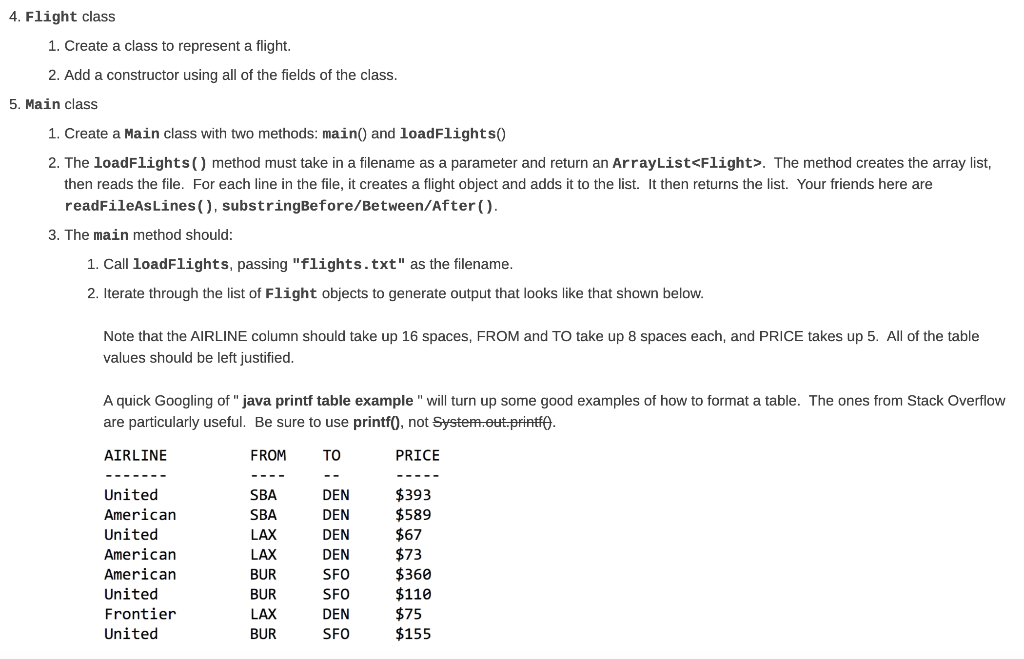
4. Flight class 1. Create a class to represent a flight. 2. Add a constructor using all of the fields of the class. 5. Main class 1. Create a Main class with two methods: main() and loadFlights 2. The loadFlights() method must take in a filename as a parameter and return an ArrayList. The method creates the array list, then reads the file. For each line in the file, it creates a flight object and adds it to the list. It then returns the list. Your friends here are readFileAsLines (), substringBefore/Between/After(). 3. The main method should: 1. Call loadFlights, passing "flights.txt" as the filename. 2. Iterate through the list of Flight objects to generate output that looks like that shown below. Note that the AIRLINE column should take up 16 spaces, FROM and To take up 8 spaces each, and PRICE takes up 5. All of the table values should be left justified. A quick Googling of"java printf table example" will turn up some good examples of how to format a table. The ones from Stack Overflow are particularly useful. Be sure to use printf(), not System.out.printl. AIRLINE FROM TO PRICE United American United American American United Frontier United SBA SBA LAX LAX BUR BUR LAX BUR DEN DEN DEN DEN SFO SFO DEN SFO $393 $589 $67 $73 $360 $110 $75 $155









 Study Help