







Question: In Java using JavaFX Yes, another field for size is required. Design and implement a Java program that creates a GUI that will allow a
In Java using JavaFX
Yes, another field for size is required.
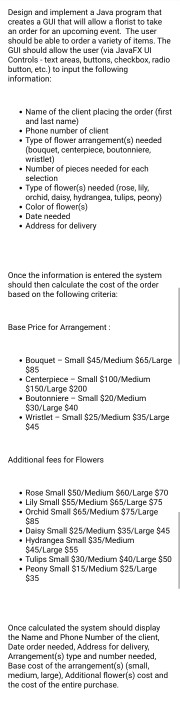
Design and implement a Java program that creates a GUI that will allow a florist to take an order for an upcoming event. The user should be able to order a variety of items. The GUI should allow the user (via JavaFX UI Controls - text areas, buttons, checkbox, radio button, etc.) to input the following information:
Name of the client placing the order (first and last name)
Phone number of client
Type of flower arrangement(s) needed (bouquet, centerpiece, boutonniere, wristlet)
Number of pieces needed for each selection
Type of flower(s) needed (rose, lily, orchid, daisy, hydrangea, tulips, peony)
Color of flower(s)
Date needed
Address for delivery
Once the information is entered the system should then calculate the cost of the order based on the following criteria:
Base Price for Arrangement :
Bouquet Small $45/Medium $65/Large $85
Centerpiece Small $100/Medium $150/Large $200
Boutonniere Small $20/Medium $30/Large $40
Wristlet Small $25/Medium $35/Large $45
Additional fees for Flowers
Rose Small $50/Medium $60/Large $70
Lily Small $55/Medium $65/Large $75
Orchid Small $65/Medium $75/Large $85
Daisy Small $25/Medium $35/Large $45
Hydrangea Small $35/Medium $45/Large $55
Tulips Small $30/Medium $40/Large $50
Peony Small $15/Medium $25/Large $35
Once calculated the system should display the Name and Phone Number of the client, Date order needed, Address for delivery, Arrangement(s) type and number needed, Base cost of the arrangement(s) (small, medium, large), Additional flower(s) cost and the cost of the entire purchase.
Design and implement a Java program that creates a GUI that will allow a florist to take an order for an upcoming event. The user should be able to order a variety of items. The GUI should allow the user (via JavaFX UI Controls text areas, buttons, checkbox, radio button, etc.) to input the following information: Name of the client placing the order (first and last name) Phone number of client Type of flower arrangements) needed (bouquet, centerpiece, boutonniere, wristlet) Number of places needed for each selection Type of flower's) needed (rose, lily, orchid, daisy, hydrangea, tulips, peony) . Color of flower(s) Date needed Address for delivery Once the information is entered the system should then calculate the cost of the order based on the following criteria: Base Price for Arrangement: Bouquet - Small $45/Mediurn $65/Large $85 Centerpiece - Small $100/Medium $150/Large $200 Boutonniere - Small $20/Medium $30/Large $40 Wristlet - Small $25/Medium $35/Large $45 Additional fees for Flowers Rose Small $50/Medium $60/Large $70 Lily Small S55/Medium $65/Large $75 Orchid Small $65/Medium $75/Large $85 Daisy Small $25/Medium $35/Large $45 Hydrangea Small $35/Medium $45/Large $55 Tulips Small $30/Mediurn $40/Large $50 Peony Small $15/Medium $25/Large $35 Once calculated the system should display the Name and Phone Number of the client, Date order needed, Address for delivery, Arrangement(s) type and number needed, Base cost of the arrangements) (small, medium, large). Additional flower(s) cost and the cost of the entire purchase
Step by Step Solution
There are 3 Steps involved in it

Get step-by-step solutions from verified subject matter experts
 Study Help