







Question: IN JAVA: Write code to convert a color image to a greyscale image (with only shades of grey). To do this, recall that every pixel
IN JAVA:
Write code to convert a color image to a greyscale image (with only shades of grey). To do this, recall that every pixel is four values (alpha, red, green, blue). If you make the values of red, green and blue the same, it becomes grey. So, what you need to do is:
Download this template and this test image. Implement your code in the method toGreyScale(). The pixels for the original image and the creation of the pixel array for the grey-image have been done for you. Remember to copy the alpha value without changing it. To make the RGB values the same in the grey-image, simply take the average of the R, G and B values in the original.
import java.awt.*; import java.awt.image.*; public class GreyScale { static ImageTool imTool = new ImageTool (); public static void main (String[] argv) { // Read in an image and display. Image image = imTool.readImageFile ("statue.jpg"); imTool.showImage (image, "original"); // Convert to grey scale and display. Image greyImage = toGreyScale (image); imTool.showImage (greyImage, "grey-scale"); } static Image toGreyScale (Image image) { // Extract pixels and size. int[][][] pixels = imTool.imageToPixels (image); int numRows = pixels.length; int numCols = pixels[0].length; // Make array of exactly the same size. int[][][] greyPixels = new int [numRows][numCols][4]; // INSERT YOUR CODE HERE Image greyImage = imTool.pixelsToImage (greyPixels); return greyImage; } }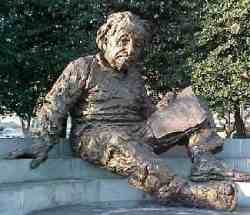
Step by Step Solution
There are 3 Steps involved in it
1 Expert Approved Answer
Step: 1 Unlock

Question Has Been Solved by an Expert!
Get step-by-step solutions from verified subject matter experts
Step: 2 Unlock
Step: 3 Unlock
 Study Help