







Question: In Javascript/CSS, whenever I hover over my horizontal menu, each item gets a background color of orange. However, for the Contact item, the hover does
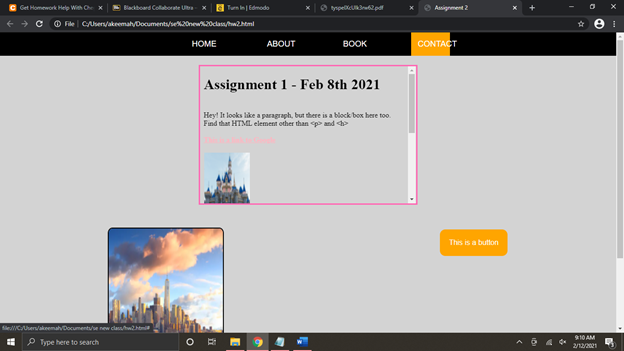
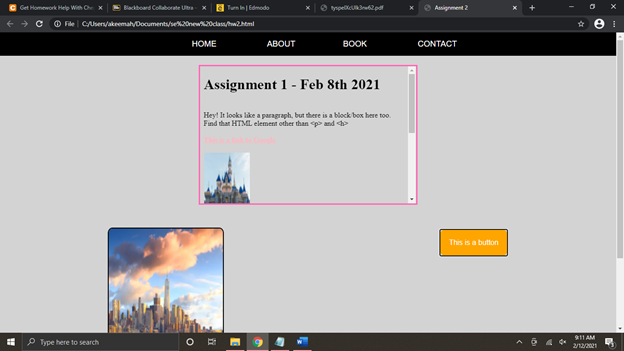
In Javascript/CSS, whenever I hover over my horizontal menu, each item gets a background color of orange. However, for the "Contact" item, the hover does not cover the entire word as I would like it to do for all of the items. This error is seen in picture 1. Also, in picture 2, another error that I would like to fix is that, whenever I click on my orange button named "This is a button,"(which is supposed to lead to nowhere), a black border surrounds the button, I do not want a border to surround this button at all. I do not want anything to happen/change when I click the button. Could you help me correct my code pasted below to fix this problem, please? Thank you.
#nextSiteEmbed, #nextSiteIFrame, #menu { border: 3px solid #FF69B4; }
ul { list-style-type: none; display: flex; margin: 0; flex-direction: row; justify-content: center; overflow: hidden; background-color: black; } li { font-size: large; color: white; padding: 0 40px; width: 85px; text-align: center } li a { display: block; padding: 15px; color: white; text-decoration: none; } li a:hover { background-color: orange; color: white } #nextSiteEmbed { width: 35%; height: 300px; margin: 0px auto; margin-top: 20px; } #hw1 { width: 100%; height: 100%; }
.second_row { margin: 50px 0; display: flex; flex-direction: row; justify-content: space-around; text-align: center; } img { height: 300px; width: 250px; border: 2px solid black; border-radius: 4%; } button { background-color: orange; border: none; color: white; padding: 20px; text-align: center; text-decoration: none; display: inline-block; font-size: 16px; margin: 4px 2px; cursor: pointer; } .btn {border-radius: 12px;}
footer { color: white; background-color: black; font-size: large; text-align: center; padding: 10px; }
Step by Step Solution
There are 3 Steps involved in it

Get step-by-step solutions from verified subject matter experts
 Study Help