







Question: in Labview Part two: Simple encryption algorithm In this section, you will use LabView simulation, to create a simple encryption method. Assume that you have
in Labview 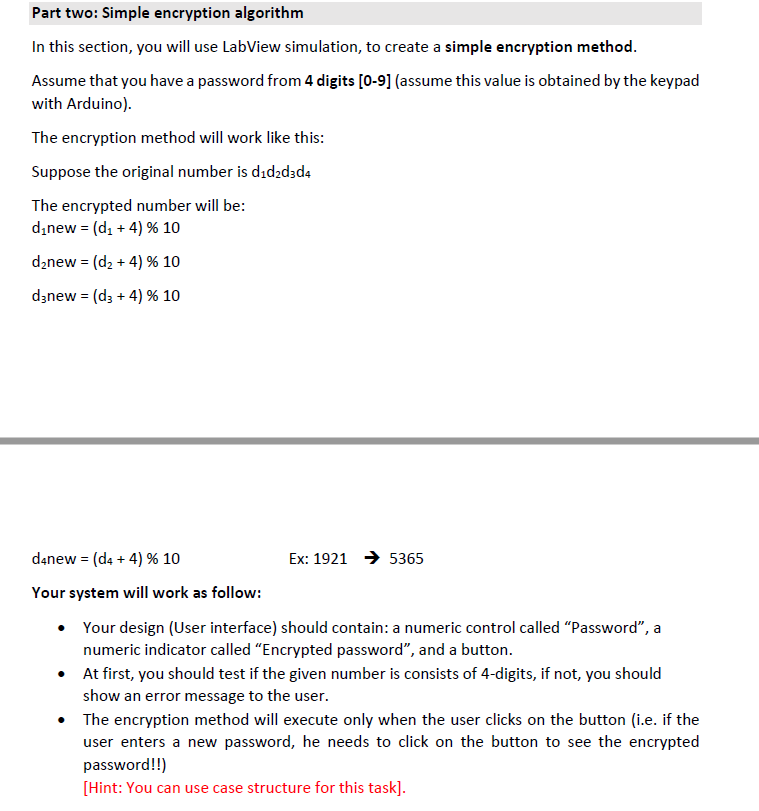
Part two: Simple encryption algorithm In this section, you will use LabView simulation, to create a simple encryption method. Assume that you have a password from 4 digits [0-9] (assume this value is obtained by the keypad with Arduino). The encryption method will work like this: Suppose the original number is dd2d3d4 The encrypted number will be: dinew = (d: +4) % 10 d2new = (d2 + 4) % 10 d3new = (d3 + 4) % 10 d4new = (d4 + 4) % 10 Ex: 1921 5365 Your system will work as follow: Your design (User interface) should contain: a numeric control called Password, a numeric indicator called Encrypted password, and a button. At first, you should test if the given number is consists of 4-digits, if not, you should show an error message to the user. The encryption method will execute only when the user clicks on the button (i.e. if the user enters a new password, he needs to click on the button to see the encrypted password!!) [Hint: You can use case structure for this task]. Part two: Simple encryption algorithm In this section, you will use LabView simulation, to create a simple encryption method. Assume that you have a password from 4 digits [0-9] (assume this value is obtained by the keypad with Arduino). The encryption method will work like this: Suppose the original number is dd2d3d4 The encrypted number will be: dinew = (d: +4) % 10 d2new = (d2 + 4) % 10 d3new = (d3 + 4) % 10 d4new = (d4 + 4) % 10 Ex: 1921 5365 Your system will work as follow: Your design (User interface) should contain: a numeric control called Password, a numeric indicator called Encrypted password, and a button. At first, you should test if the given number is consists of 4-digits, if not, you should show an error message to the user. The encryption method will execute only when the user clicks on the button (i.e. if the user enters a new password, he needs to click on the button to see the encrypted password!!) [Hint: You can use case structure for this task]
Step by Step Solution
There are 3 Steps involved in it

Get step-by-step solutions from verified subject matter experts
 Study Help