







Question: In Linux Log into NDG , using the Workstation machine to answer the following questions. Use the commands learned from the chapter to satisfy the
In Linux Log into NDG using the Workstation machine to answer the following questions. Use the commands
learned from the chapter to satisfy the configurations, using the provided arguments where required.
To include your screenshot, click within the yellow box and use Ctrlv or rightclick and paste.
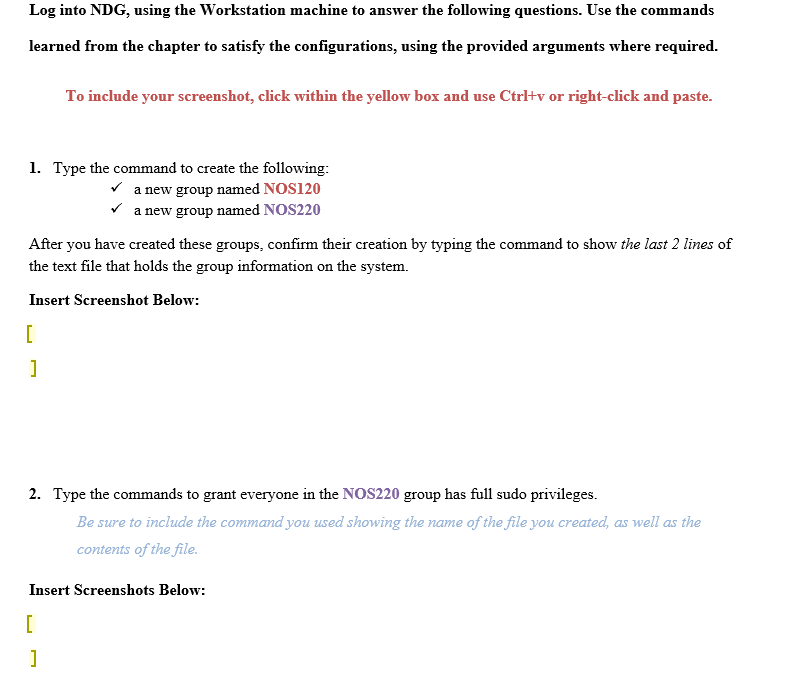
Type the command to create the following:
a new group named NOS
a new group named NOS
After you have created these groups, confirm their creation by typing the command to show the last lines of
the text file that holds the group information on the system.
Insert Screenshot Below:
Type the commands to grant everyone in the NOS group has full sudo privileges.
Be sure to include the command you used showing the name of the file you created, as well as the
contents of the file.
Insert Screenshots Below: Type the command to configure the following:
A user named Serena exists.
The user Serena has the group NOS added as one of her supplementary groups.
After you have created this user, type the command that will print real and effective user and group IDs for the
user, Serena.
Insert Screenshot Below:
Type the command with the appropriate option to set the following for Serena's account:
She must wait days before changing her password.
The maximum days her password is valid is days.
She will be warned days before her password expires.
Her account will expire on May
When finished, issue the command to display Serena's password policy information.
Insert Screenshot Below:
Type the command to create the following:
a new group named NOS
a new group named NOS
After you have created these groups, confirm their creation by typing the command to show the last lines of the text file that holds the group information on the system.
Type the commands to grant everyone in the NOS group has full sudo privileges.
Be sure to include the command you used showing the name of the file you created, as well as the contents of the file.
Type the command to configure the following:
A user named Serena exists.
The user Serena has the group NOS added as one of her supplementary groups.
After you have created this user, type the command that will print real and effective user and group IDs for the user, Serena.
Type the command with the appropriate option to set the following for Serenas account:
She must wait days before changing her password.
The maximum days her password is valid is days.
She will be warned days before her password expires.
Her account will expire on May
When finished, issue the command to display Serenas password policy information.
Step by Step Solution
There are 3 Steps involved in it
1 Expert Approved Answer
Step: 1 Unlock

Question Has Been Solved by an Expert!
Get step-by-step solutions from verified subject matter experts
Step: 2 Unlock
Step: 3 Unlock
 Study Help