







Question: IN MATLAB FORMAT PLEASE 18.3 Cell Arrays Write a function named cellParse that takes in a cell array with each element being either a string
IN MATLAB FORMAT PLEASE
18.3 Cell Arrays
Write a function named cellParse that takes in a cell array with each element being either a string (character array), or a vector (containing numbers), or a Boolean value (true or false). Use varargin
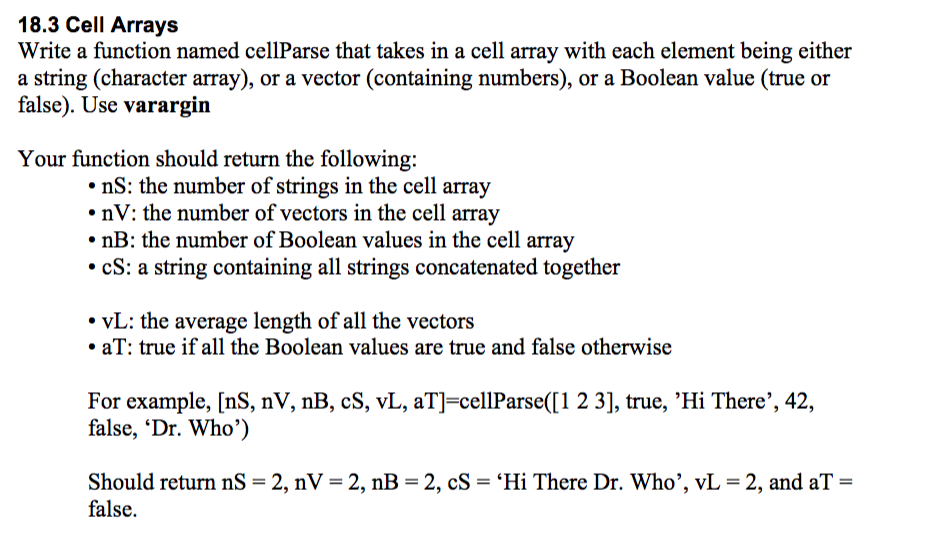
18.3 Cell Arrays Write a function named cellParse that takes in a cell array with each element being either a string (character array), or a vector (containing numbers), or a Boolean value (true or false). Use varargin Your function should return the following: nS: the number of strings in the cell array nV: the number of vectors in the cell array . nB: the number of Boolean values in the cell array cS: a string containing all strings concatenated together vL: the average length of all the vectors aT: true if all the Boolean values are true and false otherwise For example, [nS, nV, nB, cS, vL, aT]-cellParse(I1 2 3], true, 'Hi There',42, false, 'Dr. Who') Should return nS = 2, nV = 2, nB = 2, CS = Hi There Dr. Who", vL = 2, and aT = false. 18.3 Cell Arrays Write a function named cellParse that takes in a cell array with each element being either a string (character array), or a vector (containing numbers), or a Boolean value (true or false). Use varargin Your function should return the following: nS: the number of strings in the cell array nV: the number of vectors in the cell array . nB: the number of Boolean values in the cell array cS: a string containing all strings concatenated together vL: the average length of all the vectors aT: true if all the Boolean values are true and false otherwise For example, [nS, nV, nB, cS, vL, aT]-cellParse(I1 2 3], true, 'Hi There',42, false, 'Dr. Who') Should return nS = 2, nV = 2, nB = 2, CS = Hi There Dr. Who", vL = 2, and aT = false
Step by Step Solution
There are 3 Steps involved in it

Get step-by-step solutions from verified subject matter experts
 Study Help