







Question: in matlab l. Write a program that takes 5 inputs, in the following order 1. A string that is the file location of an image,
in matlab
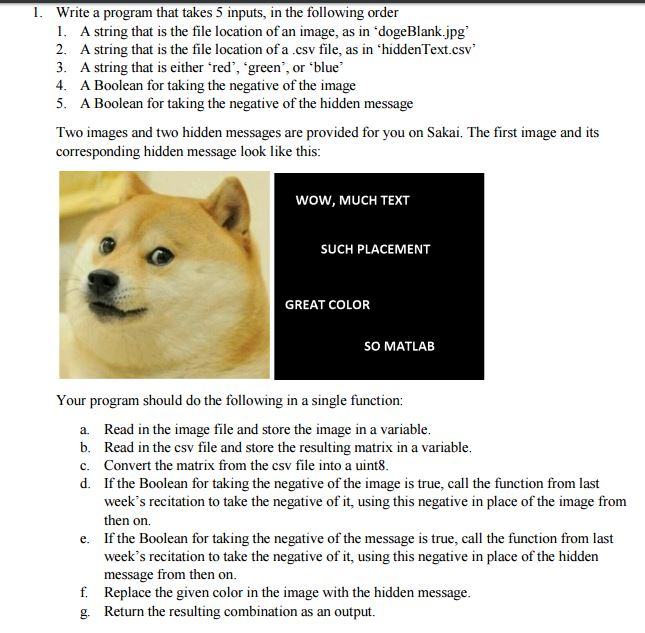
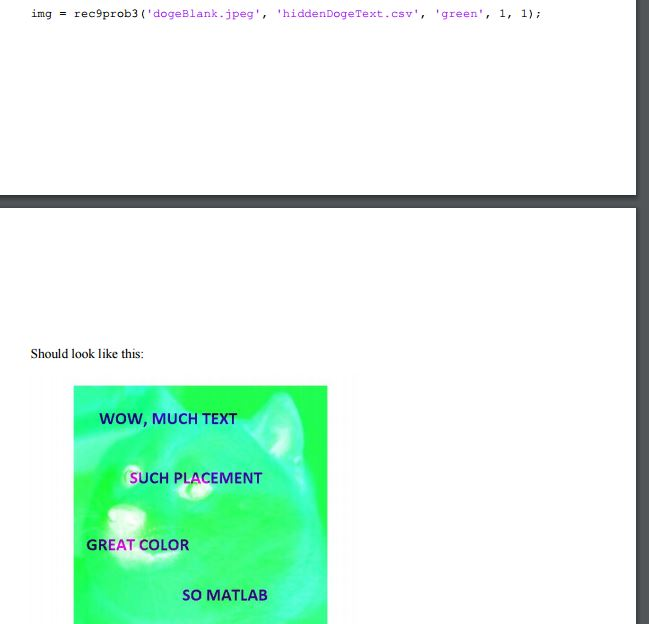
l. Write a program that takes 5 inputs, in the following order 1. A string that is the file location of an image, as in dogeBlankjpg' 2. A string that is the file location of a .csv file, as in "hiddenText.csv' 3. A string that is either red', 'green', or blue 4. A Boolean for taking the negative of the image 5. A Boolean for taking the negative of the hidden message Two images and two hidden messages are provided for you on Sakai. The first image and its corresponding hidden message look like this: Wow, MUCH TEXT SUCH PLACEMENT GREAT COLOR SO MATLAB Your program should do the following in a single function: a. Read in the image file and store the image in a variable. b. Read in the csv file and store the resulting matrix in a variable c. Convert the matrix from the csv file into a uint8. d. If the Boolean for taking the negative of the image is true, call the function from last week's recitation to take the negative of it, using this negative in place of the image from then on. e. If the Boolean for taking the negative of the message is true, call the function from last week's recitation to take the negative of it, using this negative in place of the hidden message from then on f Replace the given color in the image with the hidden message g. Return the resulting combination as an output. l. Write a program that takes 5 inputs, in the following order 1. A string that is the file location of an image, as in dogeBlankjpg' 2. A string that is the file location of a .csv file, as in "hiddenText.csv' 3. A string that is either red', 'green', or blue 4. A Boolean for taking the negative of the image 5. A Boolean for taking the negative of the hidden message Two images and two hidden messages are provided for you on Sakai. The first image and its corresponding hidden message look like this: Wow, MUCH TEXT SUCH PLACEMENT GREAT COLOR SO MATLAB Your program should do the following in a single function: a. Read in the image file and store the image in a variable. b. Read in the csv file and store the resulting matrix in a variable c. Convert the matrix from the csv file into a uint8. d. If the Boolean for taking the negative of the image is true, call the function from last week's recitation to take the negative of it, using this negative in place of the image from then on. e. If the Boolean for taking the negative of the message is true, call the function from last week's recitation to take the negative of it, using this negative in place of the hidden message from then on f Replace the given color in the image with the hidden message g. Return the resulting combination as an output
Step by Step Solution
There are 3 Steps involved in it

Get step-by-step solutions from verified subject matter experts
 Study Help